COOPERATION MODEL
ARTIFICIAL INTELLIGENCE
PRODUCT ENGINEERING
DevOps & Cloud
LOW-CODE/NO-CODE DEVELOPMENT
INDUSTRY
FRONTEND DEVELOPMENT
CLOUD DEVELOPMENT
MOBILE APP DEVELOPMENT
LOW CODE/ NO CODE DEVELOPMENT
EMERGING TECHNOLOGIES



 6 mins read
 Last updated March 9, 2026
Software teams that adopt generative AI for software development are shipping faster, catching bugs earlier, and spending less time on repetitive tasks. That's not hype, it's what we see firsthand at Brilworks, where we integrate AI into the development lifecycle for startups and enterprises building complex, production-grade applications.
The productivity gains are real, but they vary depending on how you apply the technology. Generating boilerplate code is one thing. Using generative AI to accelerate testing, refactor legacy systems, or draft technical documentation is another, and that's where most development teams leave value on the table. Understanding the specific use cases helps you move beyond experimentation and into measurable output improvements.
This article breaks down six practical use cases where generative AI makes a tangible difference across the software development lifecycle. Whether you're a CTO evaluating AI-assisted workflows or a founder looking to build and launch an MVP faster, you'll walk away with a clear picture of where this technology fits, and where it doesn't. We've organized each use case around real development scenarios, not theoretical possibilities.
Rapid prototyping sits at the intersection of speed and risk. Generative AI for software development compresses the time from idea to working prototype, but only when you know exactly which parts of the process to hand off to AI and which to keep under direct control.
Prototyping and MVP delivery live at the earliest phase of the SDLC, before requirements are fully locked and before the architecture is finalized. This is where generative AI provides the highest leverage because the cost of change is still low and iteration speed determines how quickly you validate your core assumptions with real users.
You can safely automate boilerplate scaffolding, UI component generation, and basic CRUD logic. Keep manual control over system architecture decisions, database schema design, and any business-critical logic that carries compliance or security implications. The rule is simple: automate what is repeatable, review what is consequential.
Handing architecture decisions to an AI model without review is the fastest way to inherit technical debt before your product launches.
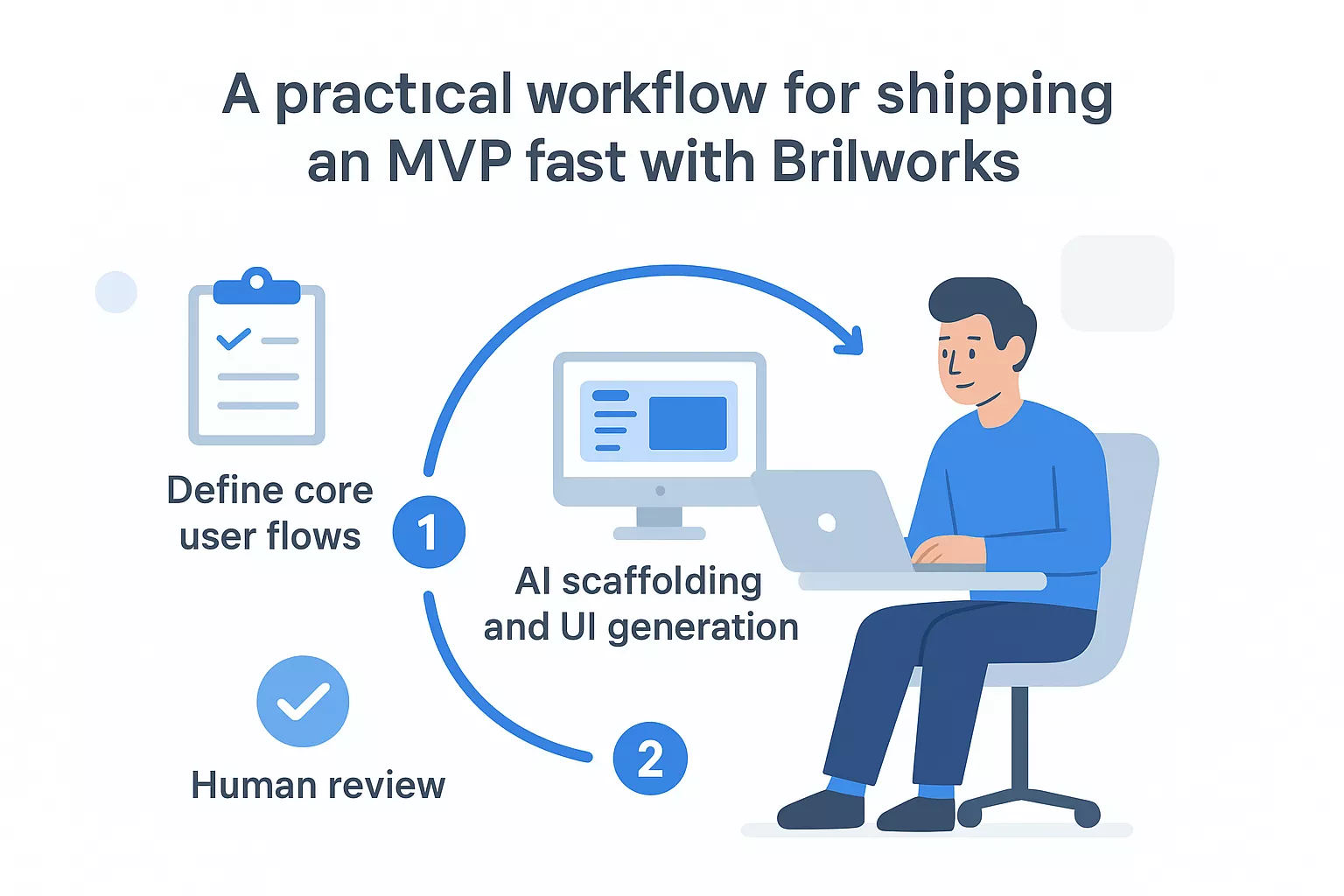
Brilworks uses a structured three-stage approach: define core user flows first, then use AI to scaffold the codebase and generate initial UI components, then apply human review before any module connects to real data or external services. This keeps velocity high without compromising the reliability of what ships.
GitHub Copilot and AWS CodeWhisperer both generate functional code from natural language prompts and integrate directly into your IDE. For frontend work, AI-assisted scaffolding paired with React or FlutterFlow cuts setup time from days to hours when you start with a clear component spec.
The primary risk is treating generated code as production-ready without review. Before any prototype moves toward staging, run it through a checklist that covers input validation, error handling, and dependency versions. Your team should understand and own every line that ships.
Track these two numbers to measure real gains:
Defining requirements clearly is one of the most time-consuming parts of any project. Generative AI for software development helps your team move from vague business goals to structured, actionable user stories and acceptance criteria faster than any manual process allows.
This use case belongs in the planning and discovery phase, right after you collect initial stakeholder input. AI works best here when you feed it raw interview notes, business goals, or product briefs and ask it to produce structured output.
The quality of what AI generates depends entirely on what you put in. Specific context, defined personas, and clear constraints produce far better user stories than vague prompts. Give the model a role, a format, and a real example to anchor the output.
Garbage in, garbage out applies harder with AI than with any other tool in your stack.
A reliable template looks like: "As a [persona], I want to [action] so that [outcome]. Acceptance criteria: [given/when/then]." Structured prompts cut revision cycles and give developers clear, testable requirements from day one.
Share AI-generated drafts with stakeholders before engineering starts. Rapid drafting lets you run more review cycles in less time, catching misalignments before they consume sprint capacity.
AI often generates generic acceptance criteria that sound complete but miss edge cases. Validate every output against your actual user research and have a domain expert review before stories enter the sprint.
Two numbers give you a reliable signal on whether AI-assisted requirements are actually improving your process:
Generative AI for software development cuts the time your team spends on setup code that follows predictable patterns. The goal isn't to replace developers but to eliminate the repetitive scaffolding work that consumes sprint capacity before any real problem-solving begins.
GenAI handles CRUD operations, API endpoint stubs, and standard data transformation logic reliably. It struggles with novel business logic and complex state management that requires deep domain context your prompt can't fully capture.
Generate well-defined, isolated modules where the inputs and outputs are explicit. Avoid asking AI to produce logic that crosses multiple system boundaries in a single pass, since the output becomes harder to verify quickly.
The smaller and more specific your generation scope, the faster your review cycle becomes.
GitHub Copilot integrates directly into VS Code and JetBrains IDEs, providing inline suggestions as you type. You keep full control by accepting, modifying, or rejecting each suggestion before it enters your codebase.
Never feed proprietary business logic or personal data into a public AI model. Check generated code for open-source license conflicts before it ships, particularly in commercial products where licensing exposure carries real legal risk.
Two numbers tell you whether code generation is actually moving the needle:
Generative AI for software development gives your team a faster path through review and refactoring cycles that typically consume a large share of engineering time. The value isn't in replacing human judgment but in handling the mechanical parts so reviewers focus on what genuinely requires their expertise.
This use case belongs in the testing and maintenance phases, after code is written but before it merges to your main branch. Running AI-assisted review at this stage catches surface-level issues and known anti-patterns before they reach a human reviewer, reducing the back-and-forth that slows down delivery.
AI-generated review comments land better when they reference specific lines and explain the reasoning behind each suggestion. Developers act on feedback that provides clear context, not a generic flag with no explanation attached.
Use GenAI to identify redundant logic and propose cleaner alternatives, then run your existing test suite to confirm behavior holds before accepting any change.
A refactoring that introduces a subtle regression is harder to catch than the original problem it was meant to fix.
AI tools surface common vulnerability patterns like SQL injection or insecure deserialization faster than a manual pass. Pair this with a dedicated security scanner for any code that moves toward production.
Always treat AI output as a first draft, not a verified answer. Cross-reference suggestions against your language's official documentation and your team's established code standards before merging.
Two metrics tell you whether AI-assisted review is actually improving your codebase over time:
Writing tests is where generative AI for software development delivers one of its most consistent returns. Your team spends less time on repetitive test scaffolding and more time on the logic that requires genuine engineering judgment.
Test generation spans the development and QA phases, running in parallel with feature work rather than waiting until the end of a sprint. Catching gaps in coverage early costs far less than chasing escaped bugs after a release.
Point your AI tool at a specific function or module and ask it to generate tests for the documented inputs and expected outputs. For integration and end-to-end tests, provide clear flow descriptions so the model produces tests that reflect how your system actually behaves rather than how it might behave in theory.
Ask your AI tool to enumerate boundary conditions for each function before generating tests. This surfaces edge cases your team might skip under sprint pressure and builds a stronger regression baseline for every future release.
A test suite that only covers happy paths is not a test suite, it is false confidence.
Feed flaky test logs directly into your AI tool and ask it to identify non-deterministic patterns. It surfaces timing dependencies and shared state issues faster than a manual code read.
Never use real customer data in generated test fixtures. Synthetic data keeps your tests isolated and repeatable without creating compliance exposure in your test environment.
Two numbers tell you whether test generation is actually improving quality:
Documentation is the part of generative AI for software development that most teams underinvest in until onboarding a new engineer costs two weeks of senior developer time. That's where this use case pays for itself quickly.
Documentation work spans every phase of the SDLC, from inline code comments during development to architecture overviews during handoff. Treating it as a final-step obligation is what produces docs no one reads and onboarding experiences that slow your team down.
Point your AI tool at a specific module or function and ask it to generate a plain-language explanation with usage examples. Docs built directly from code stay closer to what the system actually does rather than what someone intended it to do.
Feed your AI tool legacy code with minimal comments and ask it to produce a summary of what each component does and how it connects to adjacent systems. New engineers reach productivity faster when they can query the codebase rather than interrupt senior teammates.
The fastest way to reduce senior developer interruptions is to make the codebase self-explaining.
Tie doc generation to your pull request workflow so every merged change triggers an updated explanation. Stale documentation is often worse than no documentation because it actively misleads the people who trust it.
Always link generated documentation back to the source file and line number it describes. If the code changes and the link breaks, your team knows the doc needs a review before anyone acts on it.
Two numbers tell you whether documentation improvements are translating into real team efficiency:
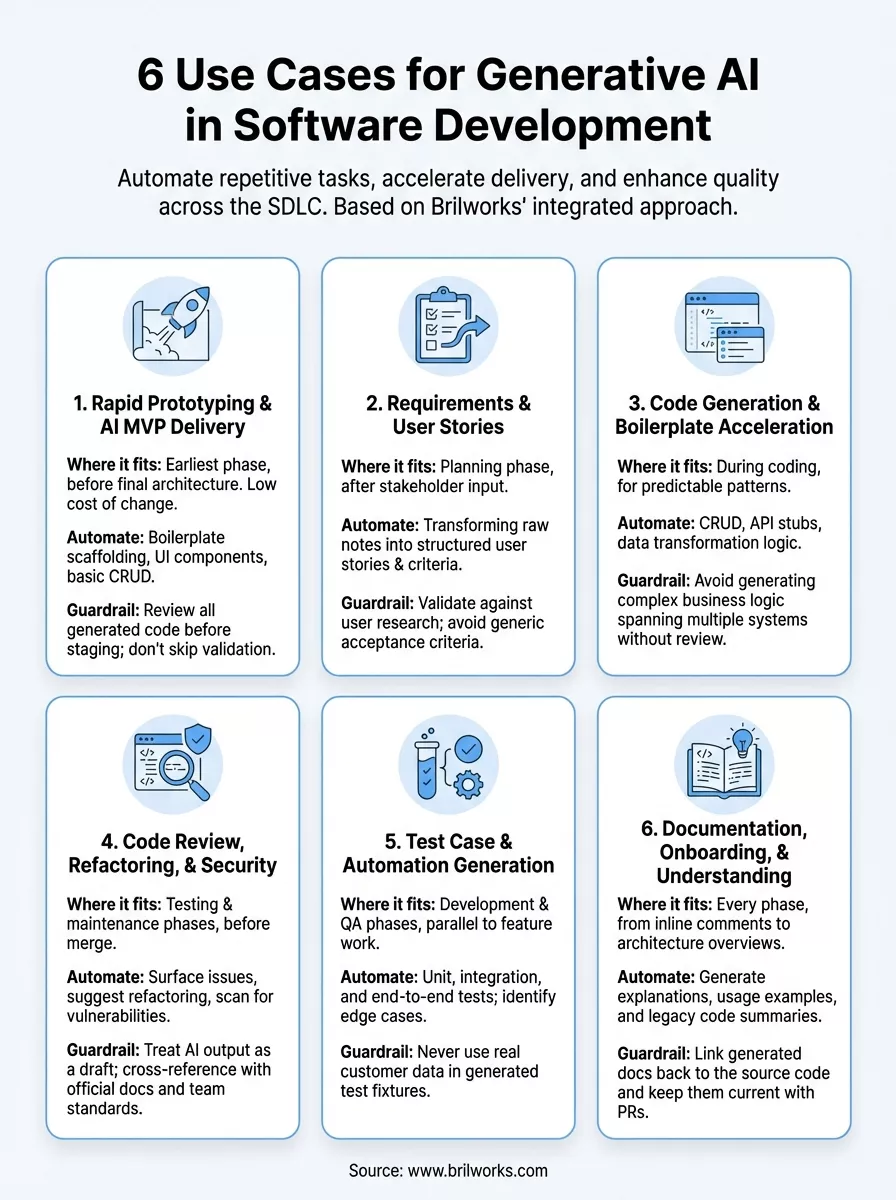
Generative AI for software development delivers real gains when you apply it to the right problems. Across the six use cases covered here, the pattern is consistent: AI handles the repetitive, predictable work so your team focuses on the decisions that actually require engineering judgment.
The teams that see the biggest returns treat AI as a structured part of their workflow, not a shortcut they reach for randomly. They define clear inputs, review outputs before they ship, and track metrics that tell them whether the change is actually improving speed and quality. The teams that struggle skip the guardrails and discover the cost of that later.
Your biggest opportunity right now is picking one use case, running it through a real sprint, and measuring the result before expanding further. If you want a technical partner who builds with these workflows by default, talk to the Brilworks team and let's scope what that looks like for your product.
Generative AI for Software Development refers to AI-powered tools and systems that assist in creating, reviewing, testing, and maintaining code through natural language processing and machine learning. Generative AI for Software Development includes tools like GitHub Copilot, ChatGPT, and Claude that generate code, write documentation, create tests, debug issues, and automate repetitive development tasks.
Generative AI for Software Development improves productivity by automating code generation, reducing boilerplate writing time by 30-50%, accelerating debugging through intelligent error analysis, generating unit tests automatically, providing instant code explanations, and suggesting optimizations. Teams using Generative AI for Software Development report significant time savings on routine tasks, allowing developers to focus on complex problem-solving.
The primary use cases for Generative AI for Software Development include automated code generation, intelligent code completion, automated testing and test case generation, code review and quality analysis, documentation generation, bug detection and debugging assistance, code refactoring suggestions, API integration code creation, database query generation, and legacy code modernization.
No, Generative AI for Software Development augments rather than replaces human developers. While Generative AI for Software Development excels at generating boilerplate code, writing tests, and automating repetitive tasks, it cannot understand complex business requirements, make architectural decisions, ensure security in context, or provide the creative problem-solving and strategic thinking that experienced developers bring.
Popular tools for Generative AI for Software Development include GitHub Copilot for code suggestions, ChatGPT and Claude for code generation and debugging, Amazon CodeWhisperer for AWS-optimized code, Tabnine for AI code completion, Replit Ghostwriter for collaborative coding, and Codeium for free AI assistance. Each Generative AI for Software Development tool offers unique strengths for different development workflows.
Get In Touch
Contact us for your software development requirements
Get In Touch
Contact us for your software development requirements

Hello, we are BRILLIAN’S. Trying to make an effort to put the right people for you to get the best results. Just insight !

 503, Fortune Business Hub, Science City Road, Sola, Ahmedabad, Gujarat, India Pincode- 380060
 + 91 9313644148
 sales@brilworks.com


