COOPERATION MODEL
ARTIFICIAL INTELLIGENCE
PRODUCT ENGINEERING
DevOps & Cloud
LOW-CODE/NO-CODE DEVELOPMENT
INDUSTRY
FRONTEND DEVELOPMENT
CLOUD DEVELOPMENT
MOBILE APP DEVELOPMENT
LOW CODE/ NO CODE DEVELOPMENT
EMERGING TECHNOLOGIES



 7 mins read
 Last updated February 25, 2026
Building a product users actually want to use takes more than intuition. Usability testing methods give you direct insight into how real people interact with your interface, where they get stuck, what confuses them, and what clicks naturally. Without this feedback, you're essentially designing blind.
At Brilworks, our UI/UX design work centers on evidence-based decisions rather than guesswork. We've seen firsthand how the right testing approach can turn a frustrating user flow into something intuitive. But choosing the right method depends on your goals, timeline, and budget, and there are more options than most teams realize.
This guide covers 17 usability testing methods, from moderated sessions to A/B testing and card sorting. You'll learn when each technique fits and how to match it to your product's current stage. By the end, you'll have a clear framework for picking the approach that works for your specific situation.
You can't fix what you don't know is broken. Most product teams assume their interface makes sense because they designed it. They understand the logic behind every button, every menu, and every flow. But your users don't share that context. They arrive with different mental models, different expectations, and different tolerance levels for friction. Usability testing methods reveal the gap between what you think users will do and what they actually do when no one is guiding them.
Testing doesn't just improve user experience. It directly affects conversion rates, support ticket volume, and customer retention. When Airbnb tested their checkout flow, they discovered a single confusing step was costing them millions in abandoned bookings. One adjustment increased conversions by 10 percent. That's the difference between shipping features based on hunches and shipping based on evidence. Every hour users spend frustrated with your interface is an hour they could spend recommending your product or becoming power users who upgrade.
Testing turns assumptions into data, and data into revenue opportunities you can actually quantify.
Financial services companies we work with have cut onboarding time by 40 percent after observing where new users got stuck during sign-up. E-commerce clients have reduced cart abandonment by identifying the exact moment when buyers lose confidence. These aren't minor tweaks. They're the difference between hitting growth targets and wondering why your metrics stayed flat despite launching new features.
Shipping without testing creates technical debt that compounds over time. You build features on top of confusing flows. You write documentation to explain interfaces that should be self-explanatory. Your support team spends hours answering questions that better design would eliminate. Eventually, you face a complete redesign because patching individual problems becomes impossible.
Companies that skip testing also waste developer resources on features users don't want or can't find. Your team might spend two months building a sophisticated filtering system only to discover users never scroll far enough to see it. That's not a feature problem. It's a testing problem. You could have validated the concept with a prototype in days instead of coding for months.
Testing accelerates product decisions by replacing debate with evidence. When your team argues about whether to move a navigation element, you can test both options instead of relying on the loudest voice in the room. This isn't about slowing down development. It's about eliminating the cycles you waste building the wrong thing, then rebuilding it after launch when users complain.
Startups often think they can't afford testing, but they can't afford not to test. Limited runway means every sprint counts. You need to know which features move the needle and which ones just feel important. Testing gives you that clarity before you commit engineering time. Established companies benefit differently because they're protecting existing user bases from disruptive changes. Either way, the method you choose depends on what question you need answered right now.
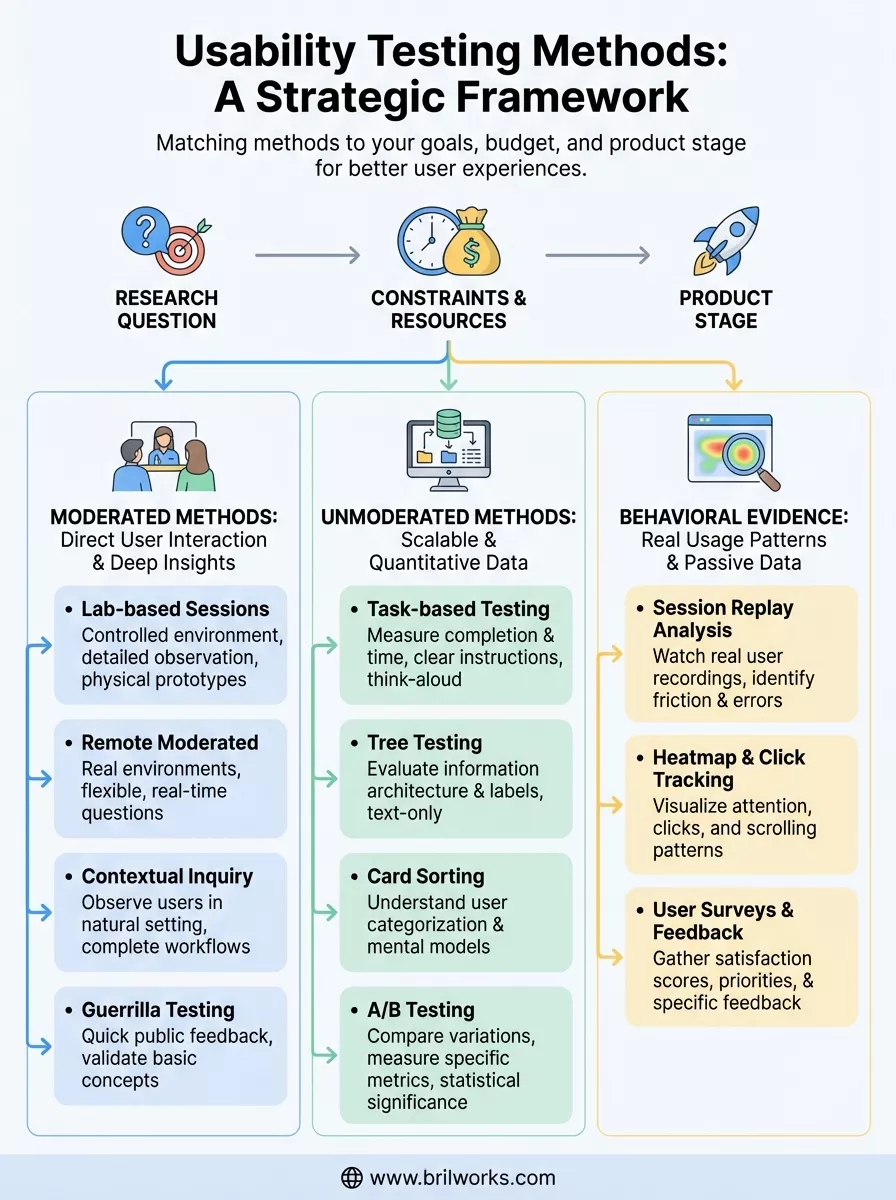
Your choice of usability testing method should answer a specific question about your product, not just check a box on your development roadmap. If you need to know whether users can complete a checkout flow, you run different tests than if you're trying to understand why they abandon their carts halfway through. The method follows the question, never the other way around. Budget and timeline matter, but they should constrain how you execute the test, not whether you test at all.
Start by defining what you need to learn. Asking "can users find this feature" requires different evidence than asking "why do users prefer competitor X." Task-based tests measure completion rates and time-on-task when you need quantitative proof of improvement. Contextual observation reveals the environment and interruptions that affect usage when you're designing for real-world conditions rather than ideal scenarios. You can't choose the right usability testing method until you write down the exact question you're trying to answer.
Pick the method that directly addresses your research question, not the one that sounds impressive in status meetings.
Your question also determines your sample size and participant criteria. Testing whether a button is visible needs five users. Understanding purchasing behavior across demographics might need fifty. If you're validating basic navigation, recruit anyone who matches your target audience. If you're optimizing a specialized workflow, recruit people who actually perform that job daily.
Remote unmoderated testing costs less than flying users to your office for lab sessions. Surveys scale to thousands of participants while contextual interviews cap out at dozens. These aren't quality differences. They're practical tradeoffs based on what you can execute right now. A startup with two designers picks different methods than an enterprise team with a dedicated research department.
Time pressure affects method selection too. You can run A/B tests for weeks to reach statistical significance, or you can watch five users struggle with a prototype tomorrow and fix the obvious problems immediately. Neither approach is wrong. They serve different needs at different stages. The worst choice is delaying all testing because you can't afford the perfect method.
Early concepts need qualitative feedback on whether you're solving the right problem. You're validating direction, not optimizing pixels. Prototype testing and guerrilla methods work because you need broad reactions, not precise metrics. Established products benefit from quantitative methods that measure small improvements across large user bases. Your choice shifts as your product matures from "does this make sense" to "which version converts 2 percent better."
Moderated usability testing methods put you in direct conversation with users as they interact with your product. A facilitator guides the session, asks questions, and probes deeper when something interesting happens. This real-time dialogue reveals not just what users do, but why they make specific choices. You catch the moment of confusion, the hesitation before clicking, and the assumptions that lead them down the wrong path. The trade-off is resource intensity. You need a skilled moderator, scheduled sessions, and more time per participant than automated approaches.
You bring participants into a controlled environment where distractions disappear and you can record everything from screen interactions to facial expressions. This method works when you need detailed observations of complex tasks or want to test multiple variations in succession. Financial institutions use lab testing for secure applications that can't leave their network. Medical device companies need it for regulatory compliance documentation. The setup costs more and limits your geographic reach, but you gain precision and the ability to test physical prototypes alongside digital interfaces.
Video conferencing tools let you watch users interact with your product from their own environment while still asking questions in real time. You recruit participants across time zones and see how your interface performs on their actual devices and internet connections. This approach costs less than lab sessions and reveals context-specific problems like slow loading on rural connections or conflicts with common browser extensions. Schedule flexibility improves too since neither you nor the participant travels anywhere.
Remote moderated testing combines the insight of direct observation with the convenience and authenticity of users' natural environments.
You visit users where they actually work or use your product and observe their complete workflow. This ethnographic approach uncovers needs users can't articulate because they've adapted to workarounds they no longer notice. Enterprise software teams learn how your tool fits into a 30-application ecosystem. Healthcare designers discover that nurses use products while standing, wearing gloves, and managing three tasks simultaneously. You can't replicate these insights in a conference room.
You approach strangers in public spaces like coffee shops or libraries and ask for five minutes of their time to test a quick concept. This method trades rigor for speed when you need fast validation of basic questions. Does this button label make sense? Can people guess what this icon means? You won't gather deep insights, but you'll catch obvious problems before investing in formal research. Startups use it when they need feedback today, not next week.
Unmoderated usability testing methods run without a facilitator present, letting users complete activities on their own schedule. You set up the test parameters, recruit participants, and collect data automatically through specialized platforms. This approach scales to hundreds of users simultaneously and costs less per participant since you eliminate scheduling overhead and moderator time. The downside is you can't ask follow-up questions or clarify confusion when it happens, so you need clear instructions and well-defined tasks upfront.
You give participants specific goals to accomplish in your interface and measure completion rates, time, and paths taken. The system records their actions without anyone watching, and users narrate their thoughts if you enable think-aloud protocols. This method works when you need quantitative proof that your navigation structure functions across diverse user groups. E-commerce teams test whether shoppers can find products in specific categories. SaaS companies verify that new users can complete onboarding without help documentation.
Your participants navigate through a text-only menu structure to find where they'd expect specific content to live. This strips away visual design to test your information architecture before you build anything. You discover whether your category labels make sense and if users follow the paths you intended. Enterprises use tree testing before restructuring large websites to avoid expensive redesigns later.
Unmoderated methods let you test with larger sample sizes and gather statistically significant data without proportionally increasing your budget.
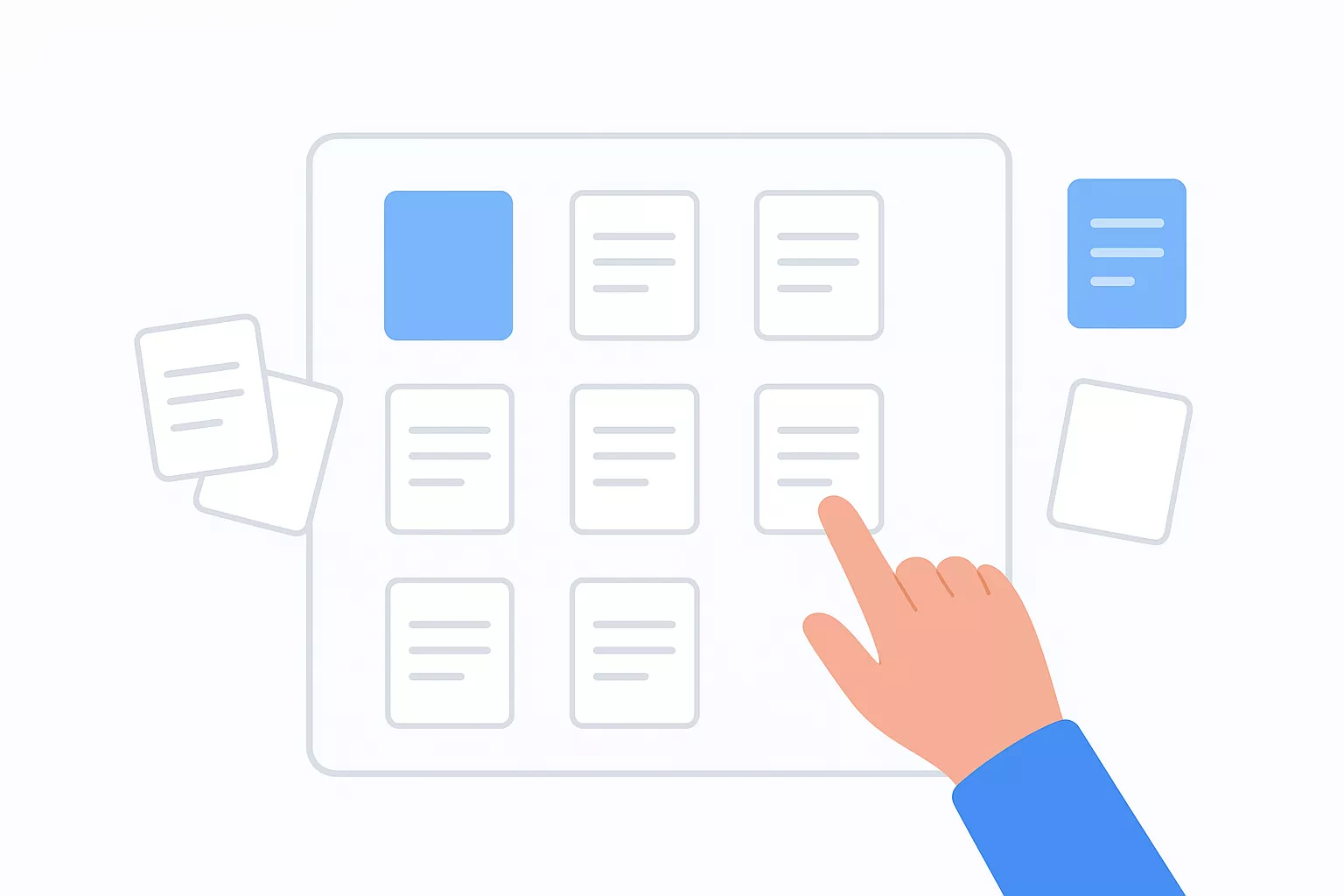
Users organize labeled cards into groups that make sense to them, revealing how they mentally categorize your content or features. Open sorting lets them create their own category names. Closed sorting asks them to place items into predefined groups. This technique works best in early design stages when you're structuring navigation or deciding how to organize product catalogs. You learn the vocabulary users expect and which items they naturally group together.
You show different versions of a page or feature to separate user groups and measure which performs better against specific metrics like conversion rate or click-through rate. Unlike other usability testing methods, A/B tests don't ask users what they think. They measure what users actually do when presented with variations. You need sufficient traffic for statistical significance, making this method more suitable for established products than early prototypes.
Behavioral usability testing methods capture what users actually do rather than what they say they do. These approaches collect data passively as people interact with your live product, eliminating the observer effect that moderated sessions sometimes create. You don't need to recruit participants or schedule sessions because you're analyzing real usage patterns from existing traffic. This category bridges the gap between traditional usability testing and analytics by showing you the qualitative context behind your quantitative metrics.
You watch recordings of actual user sessions to see exactly where people click, scroll, and pause during their journey through your interface. These replays reveal friction points you'd never catch in summary statistics, like users repeatedly clicking non-interactive elements or rapidly switching between tabs because they can't find information. Unlike lab testing, you observe authentic behavior when users think no one is watching and they navigate at their natural pace without feeling rushed or observed.
Privacy considerations matter here since you're recording real user activity. Most platforms automatically mask sensitive data like credit card numbers and passwords, but you still need clear consent mechanisms and compliance with regulations. The data volume can overwhelm you if you try watching every session, so filter for specific user segments or behaviors that matter to your current optimization goals.
Heatmaps aggregate thousands of sessions into visual representations showing where users focus attention, how far they scroll, and which elements attract the most clicks. Scroll maps tell you whether important content sits below where most visitors abandon the page. Click maps expose whether users try interacting with non-clickable elements that look like buttons or links. This method works best for identifying patterns across large user populations rather than understanding individual experiences.
Behavioral evidence shows you what users do when they think no one is watching, revealing authentic interaction patterns that interviews and surveys often miss.
You combine heatmap data with other usability testing methods to form complete pictures. A heatmap might show that users ignore your primary call-to-action button, but session replays explain why by revealing the distracting element positioned right above it.
Surveys let you ask specific questions to large audiences and quantify responses in ways qualitative methods can't match. You measure satisfaction scores, identify feature priorities, and discover pain points users experience between testing sessions. Embedded feedback widgets capture reactions at the exact moment users encounter problems, providing context-rich insights that retrospective interviews lose. Financial services teams use surveys to track trust metrics over time while e-commerce sites measure how shipping policies affect purchase confidence.
You now have a framework for selecting usability testing methods that match your product stage, budget, and research questions. Start by picking one method that addresses your most urgent problem rather than trying to implement everything at once. If you're unsure where navigation breaks down, run task-based tests this week. If you need to understand why users abandon workflows, schedule contextual sessions with five participants.
The real challenge isn't learning these techniques. It's building a testing habit that compounds over time. Teams that test regularly catch problems when they're cheap to fix instead of discovering them after launch when fixes require engineering sprints and damage control.
Need help implementing these usability testing methods into your product development process? Our team at Brilworks specializes in UI/UX design that combines user research with rapid prototyping. We've helped startups and enterprises turn user feedback into interfaces that actually work the first time users encounter them.
Usability Testing Methods are systematic approaches to evaluating how easily users can interact with a product, website, or application. Different Usability Testing Methods help teams identify user experience issues, validate design decisions, and improve product usability through direct observation and feedback from real users.
There are 17+ distinct Usability Testing Methods, each suited for different stages of product development and research goals. These Usability Testing Methods range from moderated in-person sessions to remote unmoderated tests, from early-stage card sorting to advanced eye-tracking studies.
Moderated Usability Testing Methods involve a facilitator guiding participants through tasks and asking questions in real-time, while unmoderated Usability Testing Methods allow users to complete tasks independently without supervision. Moderated methods provide deeper insights, while unmoderated Usability Testing Methods offer faster results and scalability.
For early-stage products, the best Usability Testing Methods include paper prototyping, wireframe testing, first-click testing, and card sorting. These Usability Testing Methods are cost-effective, require minimal development, and help validate concepts and information architecture before investing in full development.
Remote Usability Testing Methods are ideal when you need geographical diversity, faster recruitment, or lower costs, while in-person Usability Testing Methods work better for complex products, hardware testing, or when you need to observe body language and environmental context closely.
Get In Touch
Contact us for your software development requirements
Get In Touch
Contact us for your software development requirements

Hello, we are BRILLIAN’S. Trying to make an effort to put the right people for you to get the best results. Just insight !

 503, Fortune Business Hub, Science City Road, Sola, Ahmedabad, Gujarat, India Pincode- 380060
 + 91 9313644148
 sales@brilworks.com


