COOPERATION MODEL
ARTIFICIAL INTELLIGENCE
PRODUCT ENGINEERING
DevOps & Cloud
LOW-CODE/NO-CODE DEVELOPMENT
INDUSTRY
FRONTEND DEVELOPMENT
CLOUD DEVELOPMENT
MOBILE APP DEVELOPMENT
LOW CODE/ NO CODE DEVELOPMENT
EMERGING TECHNOLOGIES



 5 mins read
 Last updated February 23, 2026
You tap an app, find what you need in seconds, and complete your task without friction. That seamless experience? It's the result of intentional UI UX design, two disciplines that shape how people interact with digital products. But what is UI UX design exactly, and why do these terms always appear together?
At Brilworks, UI/UX design is a core part of how we approach product engineering. We've seen firsthand how strategic design decisions directly impact user adoption, retention, and overall product success. Whether we're building fintech platforms or healthcare applications, aligning digital interactions with business goals starts with solid design foundations.
This guide covers the fundamentals: what UI and UX design mean, how they differ, and what the design process involves from research to prototype. We'll also explore career paths and key responsibilities for anyone hiring designers or considering this field themselves.
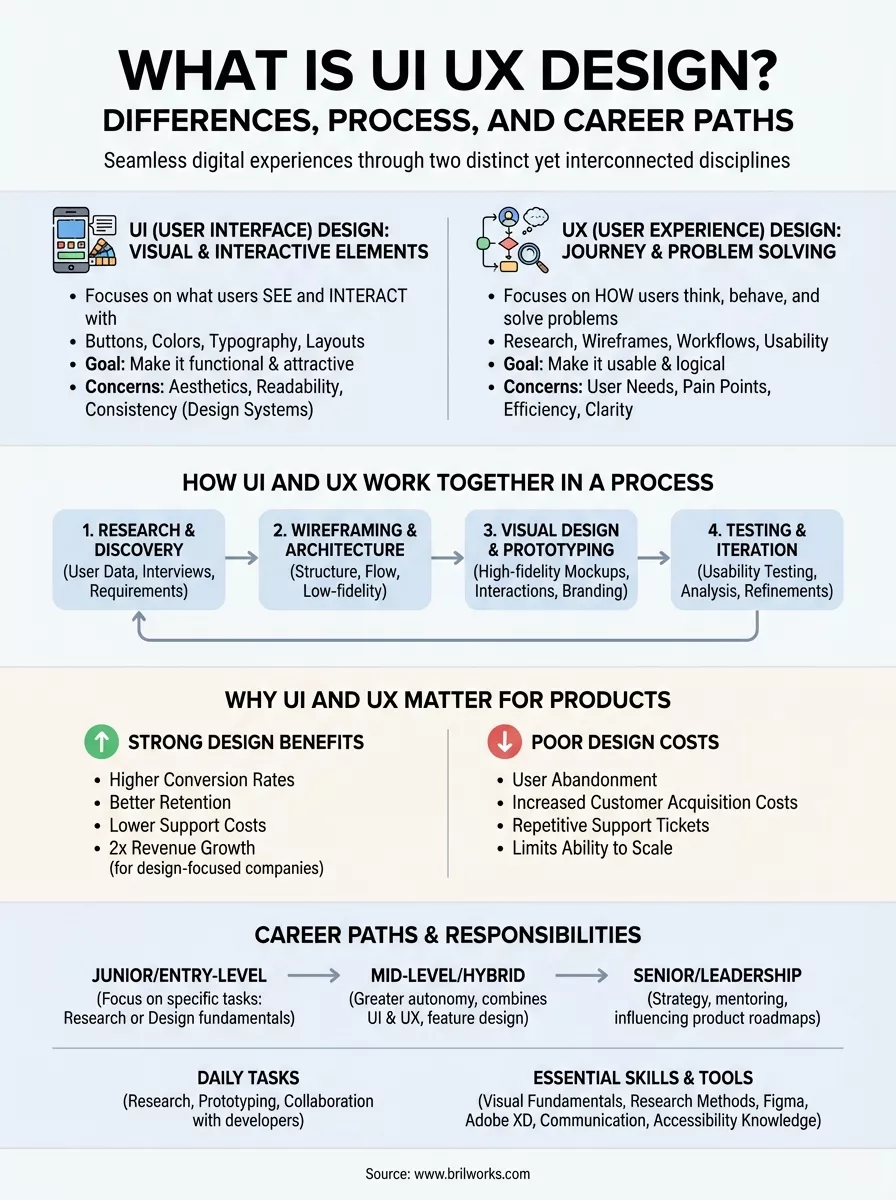
Understanding what is UI UX design starts with recognizing that these are two distinct disciplines that address different aspects of product development. UI (User Interface) design handles everything users see and interact with on their screens: buttons, colors, typography, spacing, and visual elements. UX (User Experience) design focuses on the entire journey a user takes through your product, from their first click to task completion and beyond.
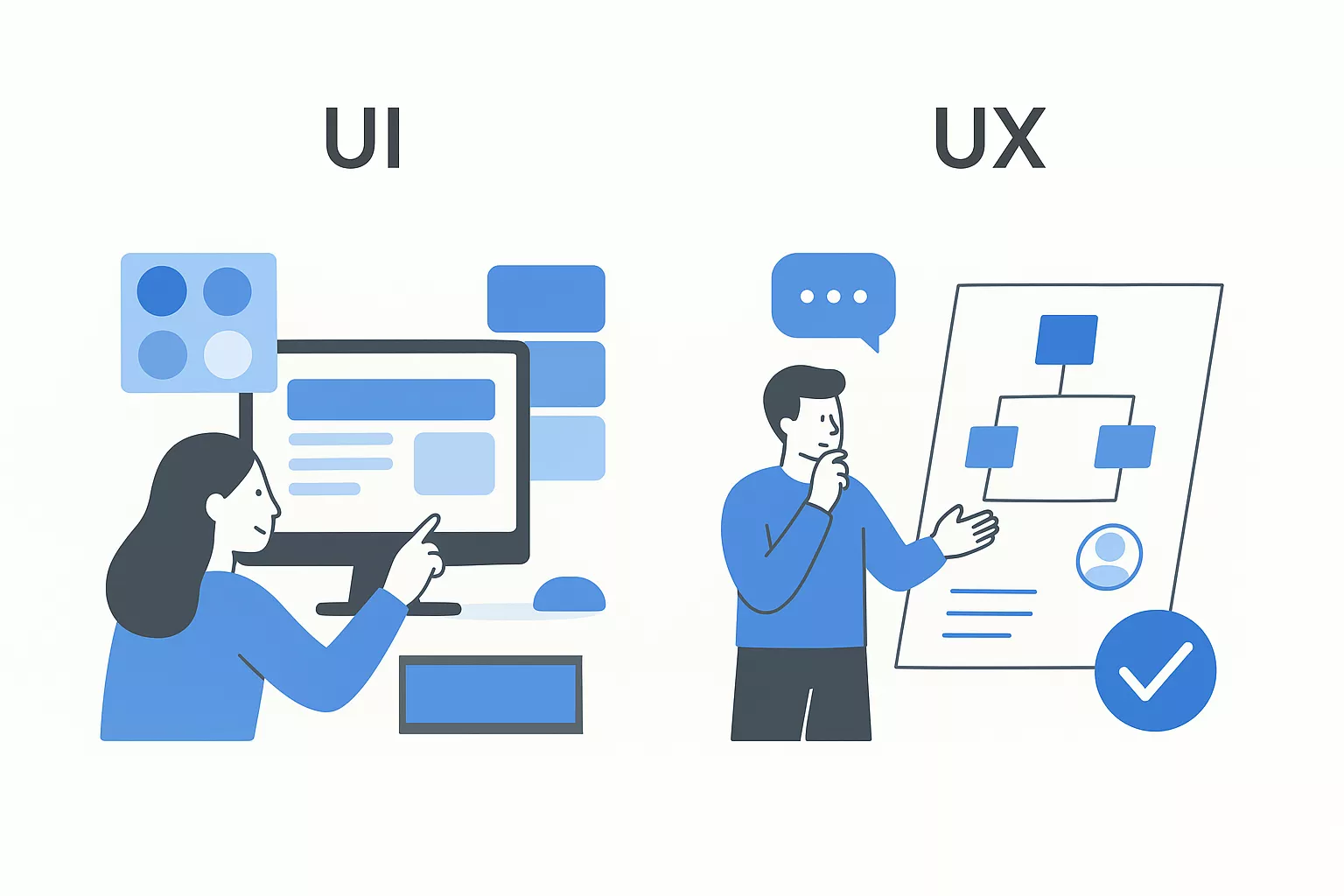
UI designers build the visual and interactive elements that make digital products functional and attractive. They select color palettes that align with brand identity, design button states that provide clear feedback, and create layouts that guide users through information hierarchies. Every pixel, icon, and animation serves a purpose in the interface.
Your UI designer makes decisions about font sizes for readability, contrast ratios for accessibility, and spacing that prevents accidental taps on mobile devices. They work with design systems and style guides to maintain consistency across every screen. Think of UI design as the layer users directly touch, swipe, and click when they interact with your product.
UX designers research how users think, behave, and solve problems within your product. They conduct user interviews, analyze behavior patterns, and map out workflows before any visual design begins. Research and testing form the foundation of UX work, not aesthetic preferences.
Your UX designer identifies pain points in current processes, defines user personas based on actual data, and creates wireframes that outline functionality without visual polish. They ask questions like: What motivates users to complete this action? Where do they abandon the flow? How can we reduce steps while maintaining clarity?
UX design shapes the logic and structure behind your product, while UI design brings that structure to life visually.
These disciplines intersect when prototypes become interactive and when design decisions impact both form and function. A UX designer might identify that users need a quick way to save items, while the UI designer determines whether that happens through a heart icon, a bookmark symbol, or a floating action button. Collaboration between both roles produces the most effective solutions.
Many companies hire hybrid UI/UX designers who handle both responsibilities, particularly in early-stage startups. However, as products scale and user bases grow, separating these roles allows for deeper specialization and more refined outcomes in each area.
Your product's design directly determines whether users stay or leave within seconds of their first interaction. Understanding what is UI UX design helps you recognize why design quality impacts revenue, not just aesthetics. Products with strong UI and UX see higher conversion rates, better retention, and lower support costs because users accomplish their goals without confusion or frustration.
Poor design costs you money in measurable ways. Users abandon checkout flows when forms feel complicated or payment buttons fail to provide clear feedback. They uninstall apps after one session when navigation patterns confuse rather than guide. Your customer acquisition costs multiply when new users need support tickets to complete basic tasks.
Companies that prioritize design see 2x higher revenue growth compared to competitors who treat it as an afterthought.
Strong UI and UX design improves conversion rates by reducing friction at critical decision points. When your signup flow requires fewer steps, when your product dashboard presents information in logical hierarchies, and when your mobile interface responds instantly to touch inputs, users complete more transactions. Retention increases when people can build habits around your product because the interface feels predictable and reliable.
Fixing design problems after launch costs significantly more than building thoughtfully from the start. Your development team wastes time rebuilding features that users reject. Support teams field repetitive questions about basic functionality that should be self-explanatory. Marketing budgets balloon trying to overcome negative reviews that cite usability issues.
Products with weak design also limit your ability to scale. New features become harder to integrate when your foundation lacks consistent patterns. Users resist updates because they've learned workarounds for existing problems. Strategic UI and UX work prevents these compounding costs by establishing systems that grow with your business needs.
Understanding what is ui ux design means seeing how these disciplines integrate throughout product development rather than operating in isolation. Your design process moves through distinct phases where UX research informs UI decisions, and visual design constraints shape UX strategy. Collaboration between both roles prevents misalignment that wastes development time and produces disconnected user experiences.
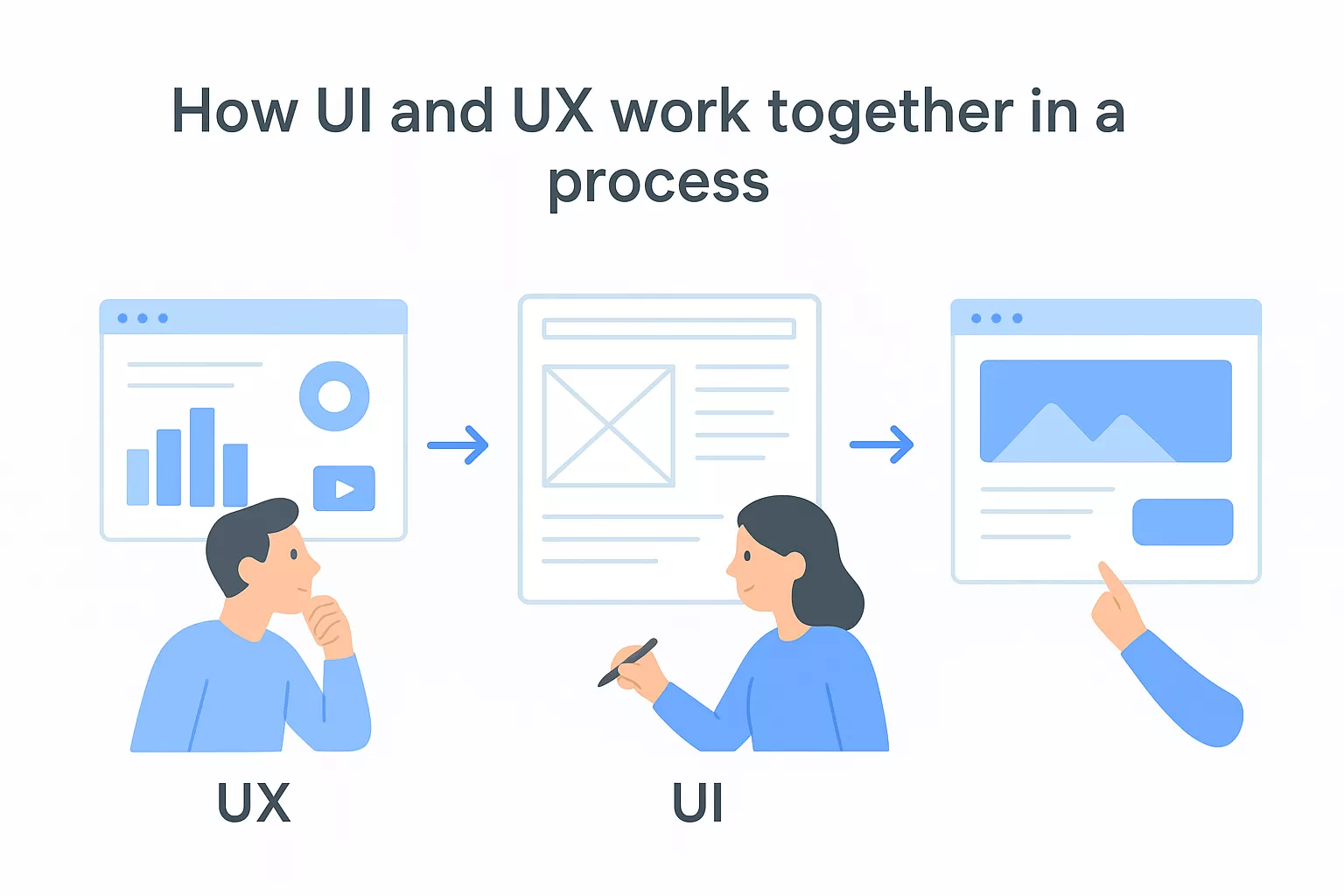
Your UX designer starts by gathering user data through interviews, surveys, and behavior analysis before any screens take shape. They identify who your users are, what problems they need solved, and where existing solutions fail them. This research defines requirements that guide every subsequent design decision.
UI designers participate during discovery by auditing existing visual systems and identifying design patterns that users already understand from other products. They assess technical constraints that will impact visual possibilities. Both roles align on success metrics that bridge user goals with business objectives.
UX designers create low-fidelity wireframes that map workflows and information architecture without visual polish. These wireframes focus on placement, hierarchy, and functionality. Your UI designer then translates these structures into high-fidelity mockups with actual colors, typography, and interactive elements that match your brand identity.
The handoff between wireframes and visual design requires constant communication to ensure functionality remains clear even as aesthetics evolve.
Changes during this phase flow both directions. Your UI designer might discover that a wireframe layout creates visual clutter, prompting your UX designer to restructure the information hierarchy. Iteration between both disciplines produces stronger outcomes than rigid sequential handoffs.
Both roles participate when prototypes go through usability testing with real users. Your UX designer analyzes behavioral data to identify confusion points, while your UI designer observes whether visual cues guide users effectively. Testing reveals gaps that neither research nor design reviews can predict, driving refinements that improve the final product.
Your designer's typical workday varies based on project phase, but understanding what is ui ux design in practice means recognizing the mix of research, creation, and collaboration that fills their schedule. They split time between independent creative work and cross-functional meetings with developers, product managers, and stakeholders. Expect them to move fluidly between strategic thinking and detailed execution throughout any given week.
Designers conduct user interviews to validate assumptions about how people interact with existing products or might respond to new features. They analyze session recordings, review analytics dashboards, and identify patterns in user behavior that reveal friction points. Testing sessions might involve watching users attempt specific tasks while thinking aloud, then documenting where confusion or frustration emerges.
Your designer also competes user research synthesis by creating personas, journey maps, and workflow diagrams that translate raw data into actionable insights. They present findings to teams, advocating for design changes based on evidence rather than subjective preferences. Research work often happens in sprints before major feature development or continuously through smaller validation tests.
Most design hours go toward creating wireframes, mockups, and interactive prototypes using tools like Figma or Adobe XD. Your designer iterates on layouts, tests different visual approaches, and refines details like spacing, color contrast, and button states. Prototypes range from low-fidelity clickable wireframes to pixel-perfect representations that developers can reference during implementation.
Designers spend significant time in design systems, building reusable components that maintain consistency across your entire product while speeding up future work.
Collaboration with developers happens daily through design reviews, handoff sessions, and quality assurance checks. Your designer answers questions about intended interactions, adjusts designs based on technical constraints, and verifies that implemented features match specifications before release.
Breaking into UI UX design requires developing both technical abilities and soft skills that allow you to solve user problems while collaborating across teams. Your career trajectory can range from entry-level designer roles to senior leadership positions that shape entire product strategies. Understanding what is ui ux design from a practical standpoint means knowing which competencies matter most and how professionals typically advance in this field.
Designers combine visual design fundamentals like typography, color theory, and layout with research methodologies including user interviews, usability testing, and data analysis. You need proficiency in creating wireframes, prototypes, and design systems that developers can implement accurately. Communication skills matter just as much as design talent because you'll present ideas to stakeholders, justify decisions with research, and incorporate feedback from multiple sources.
Strong UI UX designers balance creativity with analytical thinking, using data to validate their design choices rather than relying on personal preferences.
Accessibility knowledge has become essential as products must serve users with diverse abilities. Your understanding of WCAG guidelines and inclusive design practices directly impacts whether your product reaches its full potential audience.
Most professionals work primarily in Figma for interface design and prototyping, though Adobe XD and Sketch remain common in some organizations. You'll use tools like Miro or FigJam for collaborative workshops, Maze or UserTesting for research validation, and various analytics platforms to track user behavior after launch.
Entry-level designers typically start as junior UI designers or UX researchers focusing on specific aspects of the design process. Mid-level roles combine both disciplines with greater autonomy over feature design and user research initiatives. Senior positions include Lead Designer, Design Manager, or Head of Design, where you guide design strategy, mentor teams, and influence product roadmaps across entire organizations.
You now understand what is ui ux design, how both disciplines differ, and why they matter for product success. This knowledge helps you evaluate design quality in your own products, communicate more effectively with designers, and recognize when user experience issues require strategic attention rather than surface-level fixes.
Applying these principles starts with auditing your current product experience. Identify where users struggle to complete tasks, where visual elements fail to guide attention, and where your interface creates unnecessary friction. Your next hire might need strong UX research skills if you lack user data, or UI expertise if you have solid workflows but weak visual execution.
Building products that users love requires balancing business goals with user needs through thoughtful design decisions. Whether you're launching a new platform or improving an existing one, strong UI and UX work directly impacts your bottom line. Explore how Brilworks combines design expertise with technical execution to create products that drive measurable business results.
UI UX Design refers to the combined discipline of creating digital product interfaces (UI - User Interface) and optimizing user experiences (UX - User Experience). When people ask "what is UI UX Design," they're asking about the process of designing how products look, feel, and function to ensure they're both visually appealing and user-friendly across websites, apps, and digital platforms.
Understanding what is UI UX Design requires knowing the distinction: UI (User Interface) focuses on visual elements like colors, typography, buttons, and layouts, while UX (User Experience) encompasses the entire user journey including research, information architecture, wireframing, and usability. UI makes products beautiful; UX makes them functional and intuitive.
A UI UX Designer conducts user research, creates wireframes and prototypes, designs visual interfaces, conducts usability testing, and collaborates with developers and stakeholders. When exploring what is UI UX Design as a career, you'll find designers split their time between understanding user needs, solving problems, and crafting aesthetically pleasing, functional digital experiences.
Essential skills for understanding what is UI UX Design include user research methods, wireframing and prototyping, visual design principles, interaction design, usability testing, design tools (Figma, Sketch, Adobe XD), information architecture, basic HTML/CSS knowledge, communication skills, and empathy for users. Both creative and analytical abilities are crucial in UI UX Design.
Common tools in UI UX Design include Figma, Sketch, and Adobe XD for interface design, InVision and Framer for prototyping, Miro and FigJam for collaboration, Maze and UserTesting for usability research, and Principle or After Effects for animation. Understanding what is UI UX Design means mastering these industry-standard design tools.
Get In Touch
Contact us for your software development requirements
Get In Touch
Contact us for your software development requirements

Hello, we are BRILLIAN’S. Trying to make an effort to put the right people for you to get the best results. Just insight !

 503, Fortune Business Hub, Science City Road, Sola, Ahmedabad, Gujarat, India Pincode- 380060
 + 91 9313644148
 sales@brilworks.com


