COOPERATION MODEL
ARTIFICIAL INTELLIGENCE
PRODUCT ENGINEERING
DevOps & Cloud
LOW-CODE/NO-CODE DEVELOPMENT
INDUSTRY
FRONTEND DEVELOPMENT
CLOUD DEVELOPMENT
MOBILE APP DEVELOPMENT
LOW CODE/ NO CODE DEVELOPMENT
EMERGING TECHNOLOGIES



 12 mins read
 Last updated February 24, 2026
Moving your infrastructure to AWS isn't just a technical project, it's a strategic decision that affects your operations, budget, and competitive position. Whether you're running legacy systems that need modernization or scaling a growing application, understanding AWS cloud migration services gives you the foundation to plan effectively and avoid costly missteps.
The challenge? AWS offers dozens of migration tools, each designed for specific use cases. Add in the decisions around strategy, security, downtime management, and cost optimization, and the path forward can feel overwhelming. Many organizations underestimate the complexity, leading to budget overruns and extended timelines that strain both resources and patience.
At Brilworks, we've helped companies navigate these exact challenges through our specialized AWS development and infrastructure services. Our team works with CTOs and engineering leaders to architect migrations that minimize disruption while maximizing the performance gains cloud infrastructure can deliver. This article breaks down the official AWS migration tools at your disposal, walks through proven migration strategies, and provides transparent guidance on what these services actually cost. By the end, you'll have a clear framework for evaluating your options and moving forward with confidence.
AWS cloud migration services encompass a complete ecosystem of native tools, partner programs, and professional support designed to move workloads from on-premises infrastructure or other cloud platforms into AWS. These services address every phase of migration, from initial discovery and assessment through execution and optimization. You'll find automation for server replication, database conversion tools, network configuration services, and orchestration platforms that coordinate complex multi-application moves. The breadth can feel overwhelming, but each component serves a specific purpose in reducing manual effort and technical risk during your transition.
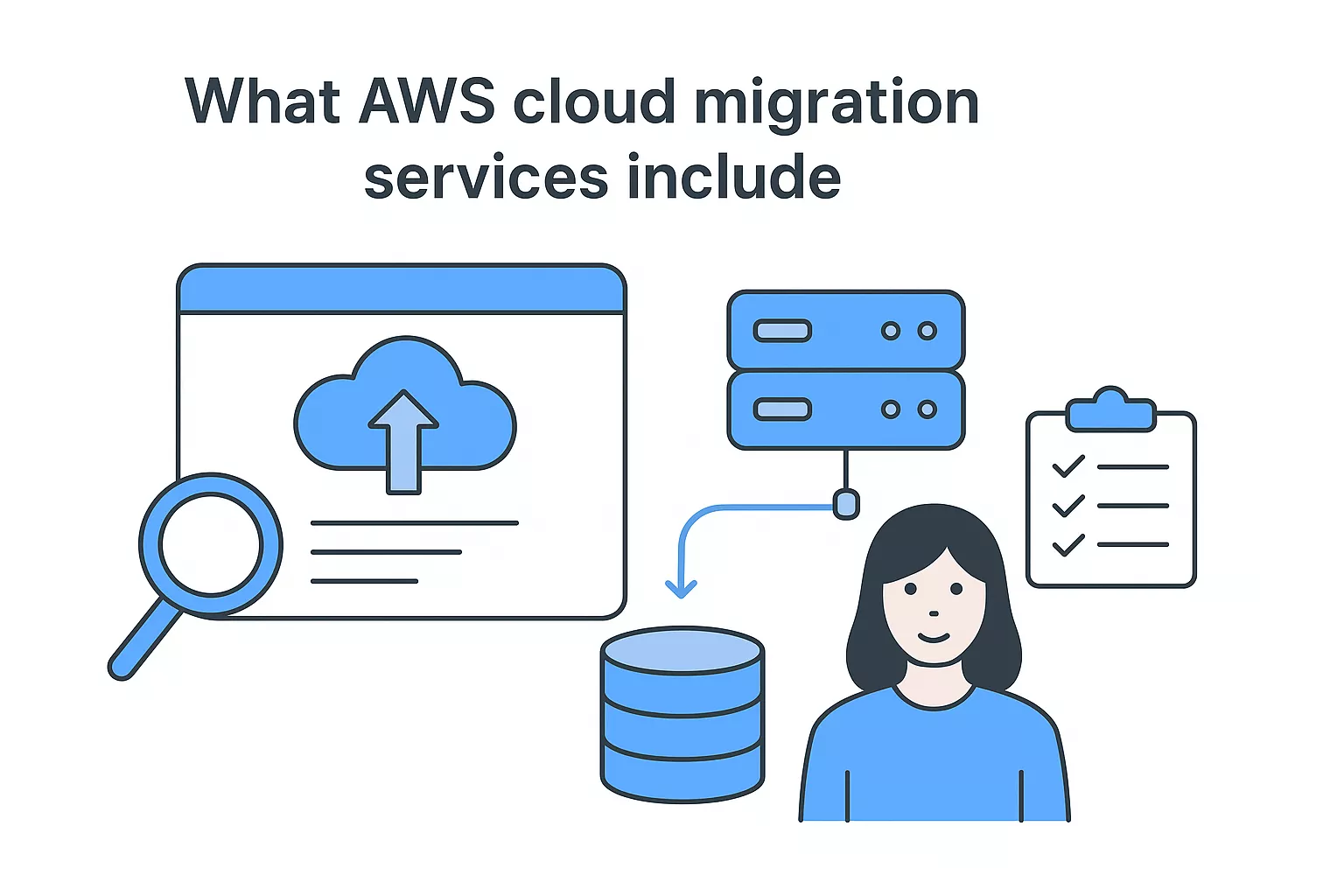
AWS provides several built-in tools that handle the technical mechanics of moving infrastructure and applications. AWS Migration Hub acts as your central dashboard, tracking progress across multiple migrations and integrating data from various AWS services and partner tools. This single pane of glass helps you monitor server migrations, database transfers, and application modernization projects without juggling separate interfaces or spreadsheets.
AWS Application Discovery Service scans your existing environment to map dependencies, performance characteristics, and utilization patterns. You install agents on your servers or use agentless discovery to collect configuration and usage data that informs your migration planning. This inventory becomes the foundation for deciding which workloads move first and which migration strategy fits each application. AWS Database Migration Service handles the complexities of moving databases with minimal downtime, supporting homogeneous migrations like Oracle to Oracle and heterogeneous conversions such as SQL Server to Aurora. The service replicates data continuously while you test the target environment, then lets you cut over when ready.
For server workloads, AWS Application Migration Service replicates entire machines to AWS as running instances, converting physical, virtual, or cloud-based servers into EC2 instances without lengthy manual rebuild processes. These tools integrate with each other, feeding discovery data into Migration Hub and coordinating replication schedules across your environment.
Beyond the tools AWS builds directly, you gain access to a network of certified partners who specialize in migration execution. The AWS Partner Network includes system integrators, managed service providers, and specialized consulting firms that bring industry-specific expertise and proven methodologies to your project. These partners often combine AWS tools with their own automation frameworks and project management approaches to accelerate complex migrations.
Choosing the right partner depends on your internal technical capacity and the complexity of your existing environment.
Some organizations need full end-to-end migration management, while others require targeted expertise in specific areas like mainframe modernization or SAP migration. Partners typically offer fixed-price migration packages for standardized workloads and time-and-materials engagements for custom architectures. The AWS Migration Competency program validates partners who demonstrate technical proficiency and successful customer outcomes, giving you a qualified shortlist when evaluating potential partners.
AWS Professional Services operates as an internal consulting arm that works directly with customers on large-scale migrations and modernization initiatives. This team brings deep AWS platform knowledge and access to internal resources that external partners can't match. They design custom migration solutions, provide architectural guidance, and train your team on AWS best practices throughout the process.
You also have access to AWS Support plans that range from basic developer assistance to enterprise-level support with dedicated technical account managers. Higher-tier plans include proactive reviews, operational guidance, and priority response times that prove valuable during the high-stakes periods of cutover and stabilization. AWS Training and Certification programs round out the support ecosystem, offering courses and hands-on labs that prepare your team to manage AWS infrastructure post-migration. Many organizations combine AWS Professional Services for initial architecture and planning with partner execution teams and ongoing AWS Support for operational stability.
AWS cloud migration services deliver measurable improvements in infrastructure flexibility and operational efficiency, but they also introduce new complexities around cost management and team capabilities. Understanding both sides helps you set realistic expectations and allocate resources appropriately. The decision to migrate hinges on whether the performance gains and scalability benefits justify the investment in time, training, and architectural changes your organization will need to make.
You gain access to infrastructure that scales both vertically and horizontally without the procurement delays and capital expenses associated with physical hardware. AWS regions and availability zones let you deploy applications closer to your users, reducing latency and improving response times for global operations. The platform's auto-scaling capabilities adjust compute resources based on actual demand, handling traffic spikes without manual intervention or overprovisioning.
AWS services eliminate many performance bottlenecks common in traditional data centers. You can provision high-performance storage options like NVMe-based instance storage, configure multi-region database replication for disaster recovery, and leverage content delivery networks without building your own infrastructure. The ability to test new configurations and experiment with different instance types gives your team flexibility to optimize performance without long-term hardware commitments. Managed services like Aurora and ElastiCache offload database administration tasks while delivering better performance than self-managed alternatives in many scenarios.
The pay-as-you-go pricing model reduces upfront capital expenditure and lets you align infrastructure costs with actual usage. You stop paying for idle servers and unused capacity that plague traditional data center operations. AWS offers reserved instances and savings plans that provide significant discounts when you commit to consistent usage levels, making costs more predictable for steady-state workloads.
Moving to AWS doesn't automatically reduce your total infrastructure spending, especially in the first 12 to 24 months.
Migration costs include professional services, potential application refactoring, team training, and dual operations during the transition period. You'll also face data transfer fees for moving data between regions or out of AWS, charges that catch many organizations off guard. AWS pricing complexity requires dedicated cost management attention, and without proper resource tagging and budget controls, cloud spending can spiral quickly. Your team needs new skills in cloud financial management, and you may need to hire specialists or invest in third-party cost optimization tools to maintain efficiency post-migration.
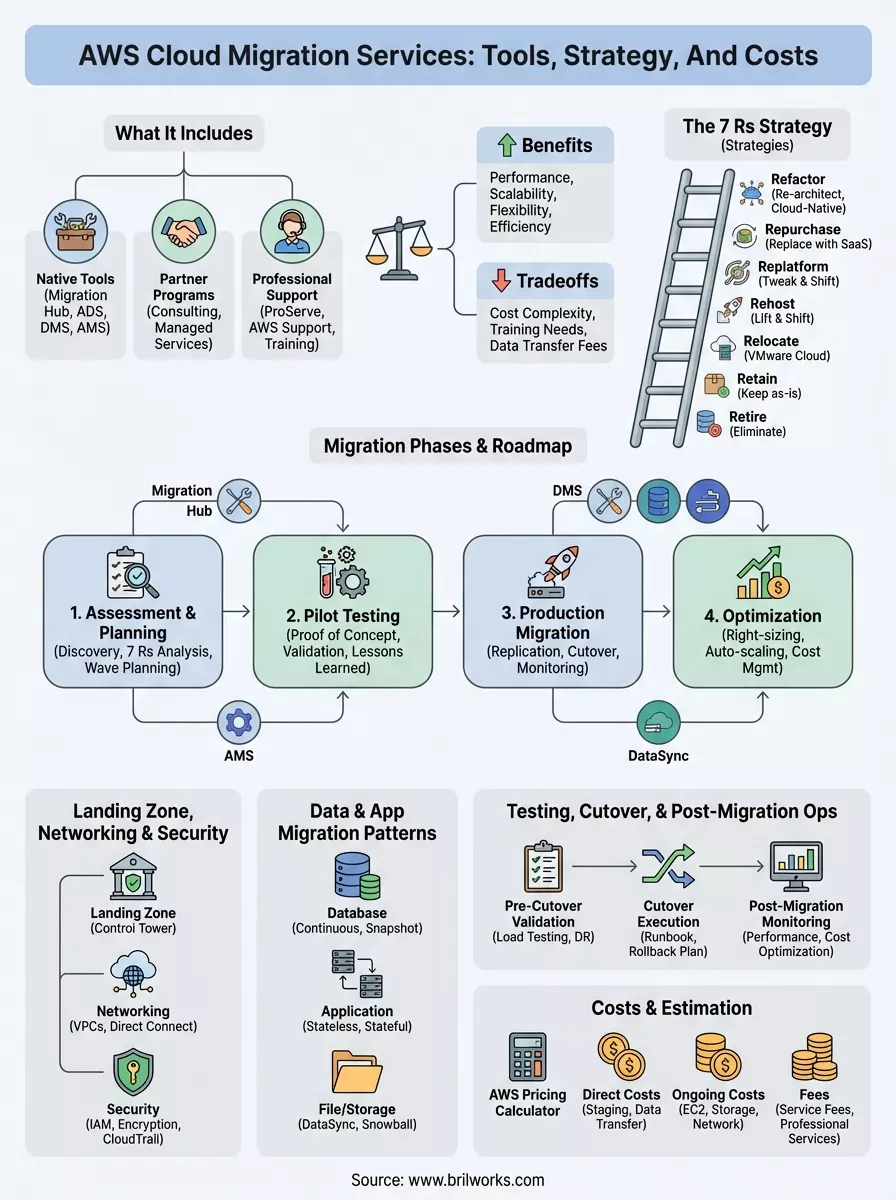
AWS cloud migration services operate around seven distinct strategies, often called the 7 Rs, that define how you move each application or workload to the cloud. Your choice depends on the application's complexity, business criticality, and technical debt you're willing to carry forward. Most organizations use multiple strategies across their portfolio rather than applying a single approach to everything. Understanding these patterns helps you make informed decisions about where to invest engineering resources and which workloads deliver quick wins versus long-term transformation.
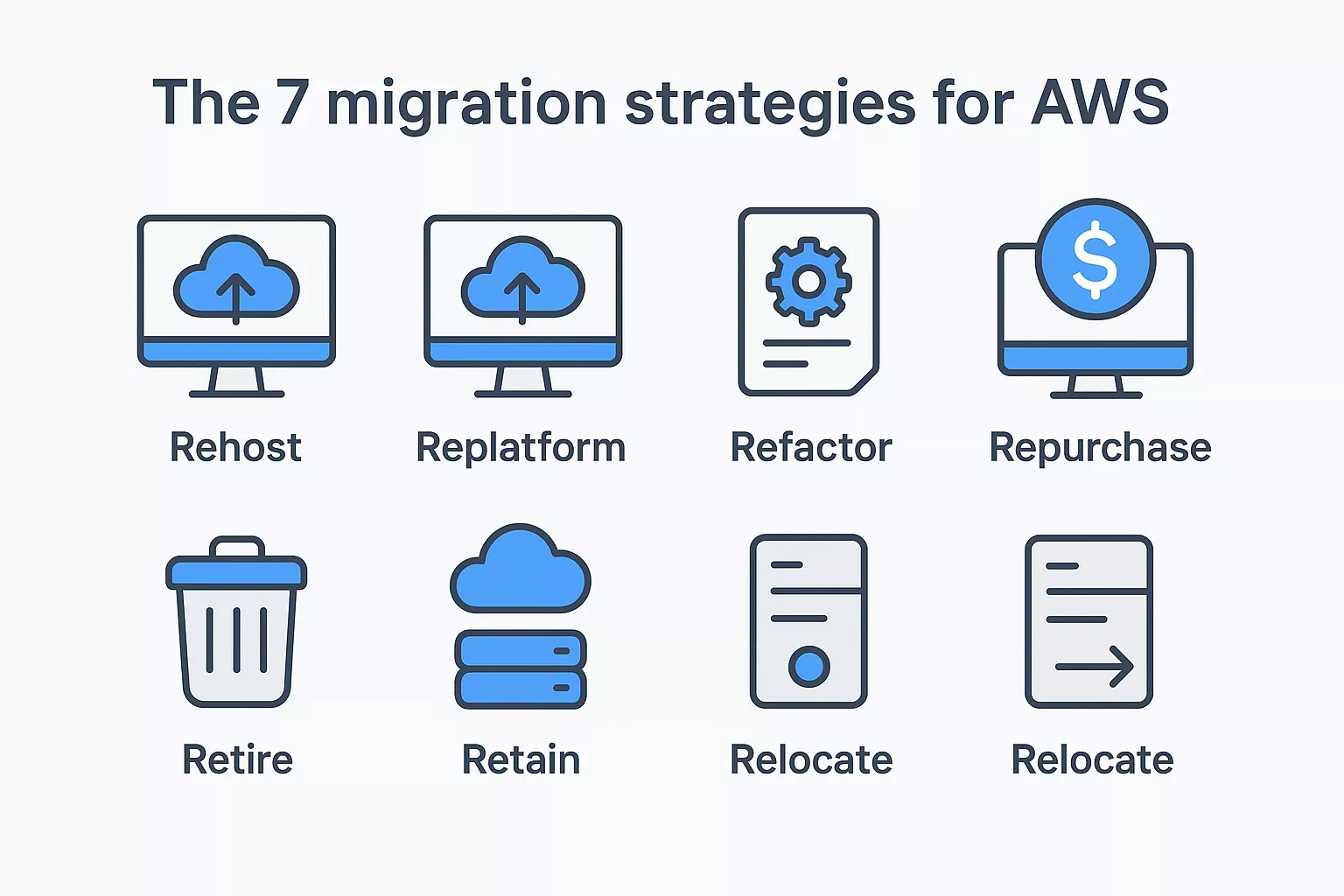
Rehosting, commonly known as lift and shift, moves applications to AWS with minimal changes to the underlying architecture. You replicate virtual machines or physical servers directly into EC2 instances, maintaining the same operating system, application stack, and configuration. This strategy delivers the fastest time to migrate and requires the least initial investment in code changes, making it ideal for reducing data center footprint quickly or meeting urgent deadlines. The tradeoff is that you don't immediately capture cloud-native benefits like auto-scaling or managed services.
Replatforming takes a middle path by making targeted optimizations during migration without full redesign. You might move a database from self-managed MySQL on EC2 to Amazon RDS, gaining automated backups and patching while keeping application code largely unchanged. This approach captures some cloud efficiency benefits without the risk and cost of complete refactoring. Organizations often replatform applications that have straightforward optimization opportunities, such as moving to managed services or right-sizing instance types based on actual usage patterns.
Refactoring involves redesigning applications to take full advantage of cloud-native features like serverless computing, containers, or microservices architectures. You rewrite significant portions of code to improve scalability, reduce operational overhead, or enable new capabilities that weren't possible in the legacy environment. This strategy requires the highest upfront investment but delivers the greatest long-term benefits in performance, cost efficiency, and developer agility. You typically refactor applications that are business-critical and need to scale or evolve rapidly.
Retiring outdated applications eliminates maintenance burden and reduces migration scope.
Repurchasing means replacing your existing application with a commercial or SaaS alternative. You might swap a custom-built CRM system for Salesforce or move from self-hosted email to Microsoft 365. This strategy works well when commercial solutions now offer features that match or exceed your custom application's capabilities. Retiring applications that no longer serve business needs removes technical debt entirely. Many organizations discover during migration discovery that 10 to 20 percent of their application portfolio can be retired without impacting operations.
Retaining applications means keeping them in their current environment, at least temporarily. Some workloads aren't ready for migration due to compliance requirements, licensing restrictions, or technical dependencies that make cloud deployment impractical. You maintain these systems on-premises or in existing hosting environments while migrating everything else. This strategy acknowledges that not every application belongs in the cloud immediately.
Relocating applies specifically to moving large numbers of servers or entire VMware environments to AWS using VMware Cloud on AWS. You transfer infrastructure in bulk while maintaining the same management tools and operational processes your team already knows. This strategy accelerates migration for organizations heavily invested in VMware and provides a bridge to gradual cloud-native adoption over time.
AWS cloud migration services provide a comprehensive toolkit that addresses different technical challenges across your migration journey. These platforms handle everything from initial environment discovery to ongoing replication and cutover orchestration. You access most tools through the AWS Management Console, though many offer command-line interfaces and API access for automation. Understanding which tools solve specific problems helps you build an efficient migration architecture without duplicating functionality or introducing unnecessary complexity.
AWS Migration Hub serves as your central coordination platform, aggregating migration status from multiple AWS services and partner tools into a single dashboard. You track progress across server migrations, database transfers, and application modernization projects without switching between separate interfaces. The hub integrates with Application Discovery Service, Database Migration Service, and partner solutions to provide real-time visibility into your entire migration portfolio.
AWS Application Discovery Service maps your existing infrastructure by collecting configuration, usage, and dependency data from your servers. You choose between agentless discovery that collects basic information through VMware vCenter or agent-based discovery that captures detailed performance metrics and network connections. This data feeds into Migration Hub and helps you identify server dependencies before moving workloads. The service exports data that you can analyze in spreadsheets or visualization tools to plan migration waves and identify applications that move together.
AWS Application Migration Service replicates your source servers to AWS continuously, converting physical, virtual, or cloud-based machines into EC2 instances. You install a lightweight agent on each source server that captures disk changes and transfers them to a staging area in your AWS account. The service maintains an up-to-date copy of each server, letting you test the migrated environment while your production systems continue running. When you're ready to cut over, you launch the replicated servers and redirect traffic with minimal downtime.
Application Migration Service replaced the older Server Migration Service and now handles the majority of server lift-and-shift scenarios.
AWS DataSync accelerates data transfer between on-premises storage and AWS services like S3, EFS, and FSx. You deploy a DataSync agent in your environment that handles network optimization, encryption, and integrity validation automatically. The service moves data up to 10 times faster than standard tools by using purpose-built network protocols and parallel transfer mechanisms.
AWS Database Migration Service handles both homogeneous and heterogeneous database migrations with continuous replication. You create a replication instance that connects to your source and target databases, copying existing data and capturing ongoing changes until you're ready to switch over. The service supports major database engines including Oracle, SQL Server, PostgreSQL, MySQL, and MongoDB. For heterogeneous migrations, AWS Schema Conversion Tool analyzes your source database schema and generates conversion scripts that adapt code to the target platform.
AWS cloud migration services follow a structured approach that breaks your migration into distinct phases, each with specific objectives and deliverables. You move through assessment, pilot testing, production migration, and optimization in sequence, building confidence and refining your processes before scaling to larger workloads. This phased approach reduces risk by validating your strategy on smaller applications before committing critical systems. Your timeline varies based on portfolio size and complexity, but most organizations complete initial migrations within six to twelve months for mid-sized environments.
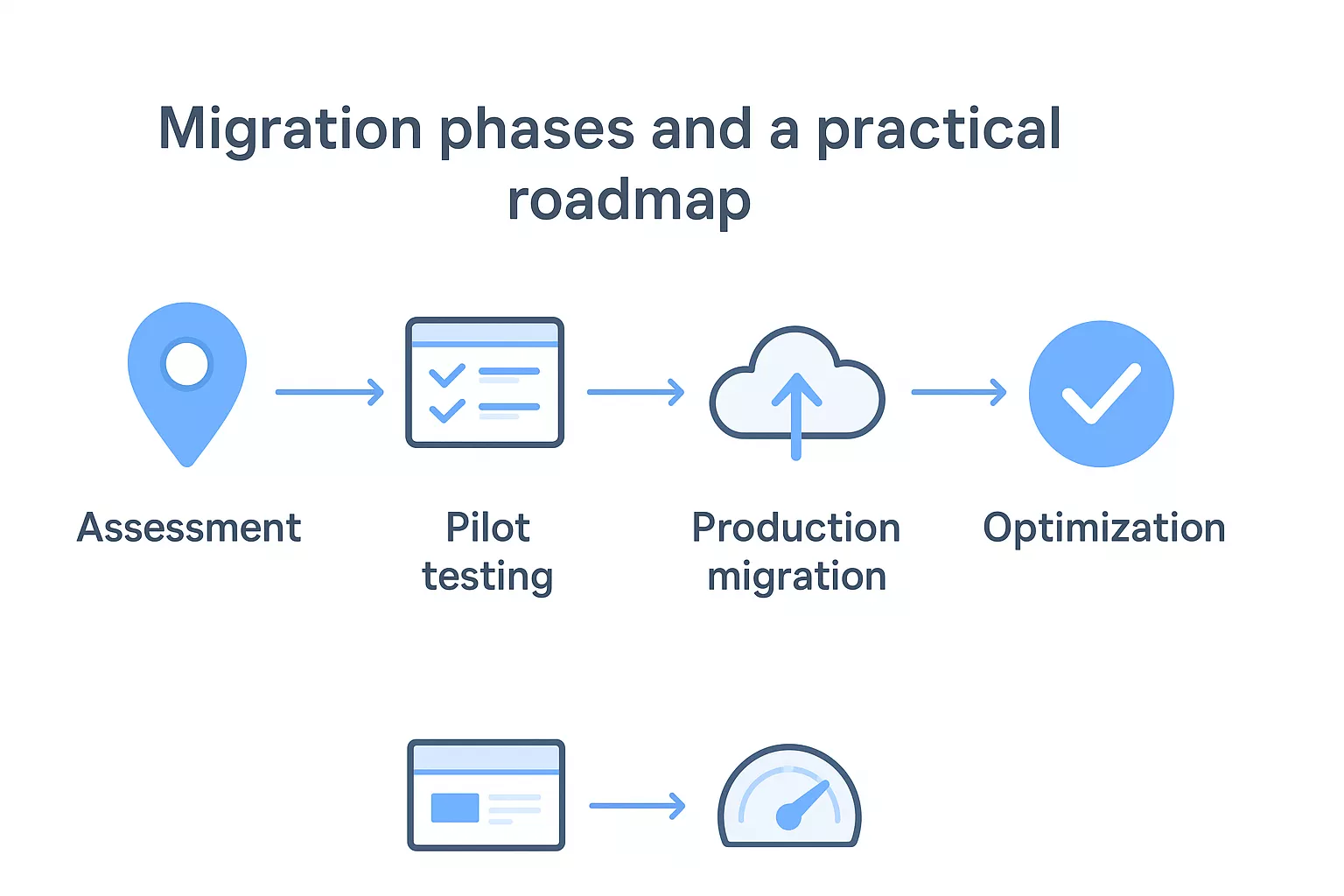
You start by cataloging your existing infrastructure and applications using AWS Application Discovery Service or third-party tools. This inventory captures server configurations, application dependencies, and performance baselines that inform your migration strategy. Your team evaluates each application against the 7 Rs framework to determine whether you rehost, replatform, refactor, or pursue another strategy. The assessment phase typically takes four to eight weeks for environments with hundreds of servers.
During planning, you establish migration waves that group applications with similar characteristics or dependencies. You prioritize applications based on business value, technical complexity, and migration readiness. Early waves focus on lower-risk applications that validate your processes without threatening critical operations. Your roadmap defines success metrics, resource requirements, and timeline commitments for each wave. You also identify training needs and budget allocation across tools, professional services, and internal staffing.
Your first production migration wave serves as a proof of concept that validates your chosen tools and processes. You select applications that represent common patterns in your portfolio but don't carry critical business risk if issues arise. This phase tests your cutover procedures, rollback plans, and monitoring capabilities in a real environment with actual users and data.
Running a pilot migration exposes gaps in documentation, training, and technical assumptions before you scale to business-critical systems.
You document lessons learned and adjust your approach based on performance results, user feedback, and operational challenges encountered. Most organizations complete two to three pilot waves before migrating tier-one applications, each wave increasing in scope and complexity.
You execute remaining migration waves using the refined processes from your pilots. Each wave follows the same pattern: replicate workloads, validate functionality, conduct user acceptance testing, and execute cutover during planned maintenance windows. Your team monitors migrated applications closely during the first 30 days to catch performance issues or configuration problems.
Post-migration optimization focuses on right-sizing instances, implementing auto-scaling, and transitioning from rehosted configurations to cloud-native services where appropriate. You track cost, performance, and availability metrics against the baselines established during assessment. This continuous improvement phase extends beyond initial migration, evolving your AWS environment as you gain operational experience and identify optimization opportunities.
Your AWS foundation determines how secure, scalable, and manageable your migrated environment becomes. Building the right landing zone architecture before moving workloads prevents security gaps and operational headaches that plague rushed migrations. AWS cloud migration services rely on properly configured networking and security controls to function effectively, and you can't retrofit these fundamentals without significant rework. You establish this foundation during the assessment phase, testing it during pilots, and scaling it as production migrations progress.
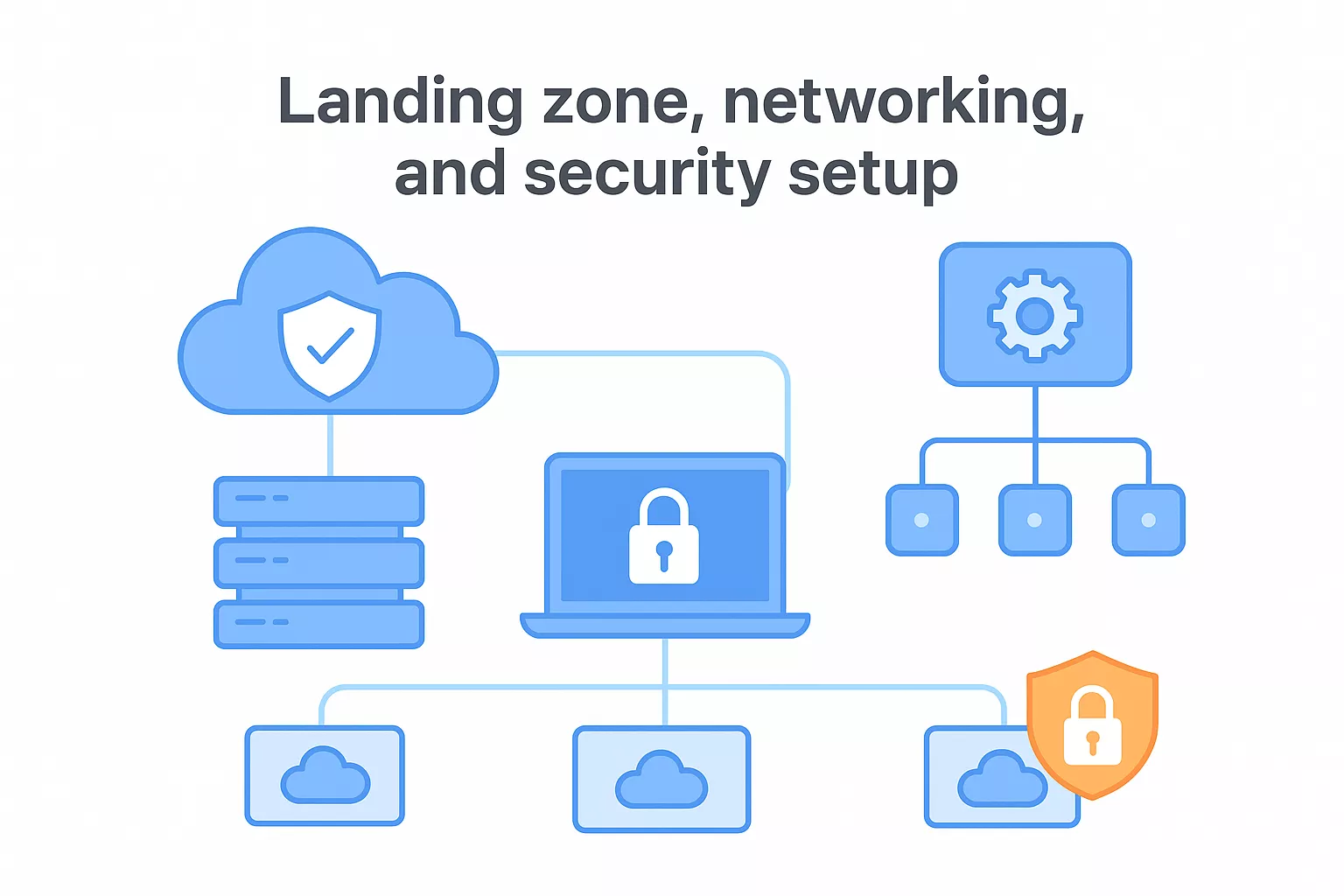
AWS Control Tower automates the setup of a multi-account environment based on AWS best practices for governance and security. You define organizational units that separate workloads by environment type or business unit, then Control Tower provisions accounts with pre-configured guardrails that enforce security policies and compliance controls. This service creates a landing zone that includes centralized logging, identity management, and network configurations without manual infrastructure scripting.
Alternatively, you build a custom landing zone using AWS Organizations combined with infrastructure-as-code tools like CloudFormation or Terraform. This approach gives you complete control over account structure, naming conventions, and policy enforcement but requires more expertise to implement correctly. Your landing zone includes a shared services account for centralized tools, separate accounts for development and production environments, and a security account that centralizes audit logs and compliance monitoring.
You configure Virtual Private Clouds (VPCs) as isolated network environments within your AWS accounts, defining IP address ranges that avoid conflicts with your existing on-premises networks. Each VPC contains multiple subnets spread across availability zones for high availability, with public subnets for internet-facing resources and private subnets for backend systems. Your routing tables direct traffic between subnets and control access to the internet through NAT gateways or internet gateways.
Hybrid connectivity decisions affect migration speed, cost, and ongoing operational expenses for years after initial deployment.
AWS Direct Connect provides dedicated network connections between your data center and AWS, delivering predictable bandwidth and lower latency than internet-based connections. You establish redundant connections for reliability, typically provisioning circuits of 1 Gbps or 10 Gbps based on data transfer requirements. VPN connections offer an alternative for lower-volume connectivity or backup paths, encrypting traffic over the public internet at lower cost but with variable performance.
AWS Identity and Access Management (IAM) controls who accesses your AWS resources and what actions they can perform. You create policies that grant minimum necessary permissions, use roles instead of long-term credentials, and enable multi-factor authentication for privileged accounts. Service control policies at the organization level prevent accounts from violating security requirements even if individual administrators make configuration mistakes.
Encryption protects data both in transit and at rest using AWS Key Management Service to manage encryption keys. You enable CloudTrail logging to capture all API calls across your accounts, feeding these audit logs into centralized storage for compliance reporting and security investigation. AWS Config monitors resource configurations against your defined baselines, automatically detecting drift and triggering remediation workflows when resources violate security policies.
Different workload types require specific technical approaches that balance data consistency, application availability, and migration speed. AWS cloud migration services support multiple patterns that you apply based on your application architecture, data volume, and acceptable downtime windows. You select patterns that match your technical constraints and business requirements rather than forcing every workload through the same process. Most migrations combine several patterns across your portfolio, with database-heavy applications following different approaches than stateless web services or batch processing systems.
Continuous replication works for databases that can't tolerate extended downtime. You set up AWS Database Migration Service to replicate data from your source database to AWS while your production system continues serving requests. The service captures ongoing changes in real time, keeping your target database synchronized until you're ready to cut over. You test the replicated database thoroughly, then switch your application to the new endpoint during a brief maintenance window.
Snapshot-based migration suits databases with flexible downtime windows. You create a final backup of your source database, transfer it to AWS using S3 or Snowball, and restore it to your target environment. This approach eliminates the complexity of continuous replication but requires longer downtime during the transfer and restore process. You use this pattern for development databases, archived systems, or applications with scheduled maintenance windows that accommodate hours of downtime.
Heterogeneous migrations add schema conversion to the process. AWS Schema Conversion Tool analyzes your source database structure and generates scripts that adapt stored procedures, triggers, and data types to your target platform. You review conversion reports that flag manual changes needed for incompatible features, then apply these modifications before migrating data.
Stateless applications migrate easily because you can run instances in both environments simultaneously without complex synchronization. You deploy your application code to AWS, configure load balancers, and gradually shift traffic using DNS weighting or by updating application endpoints. This blue-green deployment pattern lets you validate the AWS environment under production load while maintaining the ability to roll back instantly if issues surface.
Stateful applications require careful coordination between data tier migration and application cutover. You migrate databases first using continuous replication, then switch application servers after verifying data consistency. Session state stored locally on servers needs migration to centralized services like ElastiCache or DynamoDB to maintain user sessions across the transition.
Batch processing and scheduled jobs often require synchronized cutover across multiple components to prevent duplicate processing or data corruption.
AWS DataSync accelerates file server migrations by optimizing network transfer and handling incremental updates automatically. You schedule DataSync tasks to run repeatedly before cutover, transferring changed files while your source storage remains active. This pattern reduces final cutover time to minutes rather than hours by synchronizing most data beforehand.
AWS Snowball devices handle massive datasets that would take weeks to transfer over network connections. You load data onto physical appliances that AWS ships to you, then return them for import into S3. Each Snowball holds up to 80 terabytes of data, making this pattern viable for migrating entire file servers, backup archives, or media libraries without saturating your internet connection.
Your migration succeeds or fails based on how thoroughly you test before cutover and how effectively you monitor afterward. AWS cloud migration services provide the technical foundation, but your validation procedures and operational readiness determine whether applications perform as expected in production. You can't rely on basic connectivity checks or assume everything will work because it ran in your test environment. Real validation requires load testing, failover drills, and user acceptance sign-off under conditions that mirror actual production usage.
You start validation by verifying that your migrated infrastructure matches source configurations and meets functional requirements. Your testing checklist includes database schema validation, application connectivity to all dependent services, authentication integration with Active Directory or identity providers, and backup restoration procedures. Performance benchmarks establish baseline metrics for response time, throughput, and resource utilization that you compare against pre-migration measurements.
Load testing reveals how your AWS environment handles peak traffic volumes and sustained load patterns. You simulate realistic user counts and transaction rates using tools like JMeter or commercial load testing platforms, watching for bottlenecks in compute capacity, database connections, or network bandwidth. Disaster recovery testing confirms that your failover procedures work as designed, including automated health checks, traffic redirection, and data replication validation across availability zones.
Testing should replicate production conditions as closely as possible, including network latency, concurrent user sessions, and batch processing schedules that run during your actual cutover window.
User acceptance testing brings business stakeholders into the validation process to confirm that applications deliver expected functionality. You create test scripts that cover critical business processes and edge cases that might not appear in automated testing. This phase catches issues with custom integrations, third-party API connections, or business logic that behaves differently in the cloud environment.
Your cutover runbook documents every step required to switch from source to target systems, including timing dependencies, responsible parties, and verification checkpoints between tasks. You schedule cutover during maintenance windows that minimize business impact, accounting for time zone differences if you operate globally. The runbook includes DNS updates, load balancer configuration changes, database synchronization stops, and application server restarts in the proper sequence.
Rollback procedures receive equal planning attention because you need a clear path to restore service if critical issues emerge during cutover. You document exactly what constitutes rollback criteria, who makes the decision to abort, and the specific commands or configuration changes needed to redirect traffic back to source systems. Database rollback requires particular care because you can't simply reverse changes if applications wrote data to the new environment during cutover.
You implement intensive monitoring for the first 72 hours after cutover, tracking application performance, error rates, and user-reported issues through centralized dashboards. CloudWatch provides infrastructure metrics like CPU utilization and network throughput, while application performance monitoring tools capture request latency and failure patterns. Your operations team maintains increased staffing during this critical period to respond quickly to any degradation.
Optimization begins after you stabilize operations and verify that applications meet performance baselines. You analyze actual resource consumption to right-size instances, identify opportunities to implement auto-scaling, and transition from generic configurations to purpose-built services like Aurora or ElastiCache. Cost optimization reviews examine unused resources, inefficient architectures, and opportunities to apply reserved instance pricing where usage patterns justify commitments.
AWS pricing for migration combines service-specific charges during the move with ongoing infrastructure costs after you complete the transition. You face costs across multiple dimensions including data transfer, temporary infrastructure for testing, professional services, and the target AWS resources themselves. Understanding these components helps you budget accurately and avoid the sticker shock that catches many organizations when their first monthly bills arrive significantly higher than projected.
Most AWS migration tools themselves carry no additional licensing fees beyond the standard AWS service charges. AWS Application Migration Service doesn't bill separately for the replication agents or orchestration features, but you pay for the staging area resources it creates in your account, including EC2 instances, EBS volumes, and data transfer. Database Migration Service charges based on the replication instance size you select and the amount of data you move, with pricing starting around $0.15 per hour for smaller instances and scaling to several dollars per hour for high-performance configurations.
Data transfer costs become significant when you move large volumes from on-premises infrastructure to AWS. Inbound data transfer into AWS remains free, but you pay for data moving between AWS regions and for traffic leaving AWS to the internet. DataSync charges $0.0125 per gigabyte transferred, which adds up quickly for terabyte-scale migrations. Direct Connect circuits carry monthly port fees ranging from $0.30 per hour for 1 Gbps connections to $2.25 per hour for 10 Gbps ports, plus data transfer charges.
Your monthly AWS bill after migration reflects compute, storage, and network costs based on actual resource consumption. EC2 instances bill by the hour with prices varying by instance type, region, and operating system. A general-purpose t3.medium instance costs around $0.04 per hour on-demand in US East, while compute-optimized or memory-intensive instances cost significantly more. Storage costs include EBS volumes at roughly $0.10 per GB per month for general-purpose SSD and S3 object storage starting at $0.023 per GB per month.
AWS provides Reserved Instances and Savings Plans that reduce costs by up to 72 percent when you commit to specific usage levels for one or three years.
Network costs include data transfer between availability zones at $0.01 per GB and outbound internet traffic starting at $0.09 per GB for the first 10 TB monthly. Managed services add their own pricing layers on top of underlying infrastructure costs.
The AWS Pricing Calculator lets you model migration scenarios by selecting services, instance types, and usage patterns to generate monthly estimates. You input expected compute hours, storage volumes, and data transfer amounts based on your discovery phase measurements. The calculator provides detailed breakdowns showing exactly where costs accumulate across your architecture.
Common cost surprises include unused resources left running after testing, data transfer fees between services, and NAT gateway charges that can reach hundreds of dollars monthly for high-traffic environments. Professional services for aws cloud migration services typically range from $50,000 for straightforward lifts to several million dollars for complex enterprise transformations depending on application count and customization requirements.
You now have the framework to evaluate aws cloud migration services and make informed decisions about your migration strategy. The tools, costs, and implementation patterns covered here give you the foundation to plan your move to AWS with clarity and confidence. Your next step involves matching these capabilities against your specific workload requirements and organizational constraints to build a migration roadmap that fits your timeline and budget.
Migration complexity varies significantly based on your application portfolio and technical debt. Some organizations execute successful migrations with internal teams and native AWS tools, while others benefit from specialized expertise that accelerates delivery and prevents costly mistakes. If you're facing tight deadlines, complex legacy systems, or limited cloud experience internally, partnering with a team that understands both AWS infrastructure and practical migration execution makes the difference between smooth transitions and extended struggles.
Brilworks specializes in AWS development and migration services that help CTOs and engineering leaders move infrastructure to AWS without the typical pitfalls. We combine technical depth with transparent communication to deliver migrations that meet your business objectives.
AWS Cloud Migration Services are a comprehensive suite of tools, programs, and professional services offered by Amazon Web Services to help organizations move applications, data, and infrastructure from on-premises environments or other clouds to AWS. AWS Cloud Migration Services include native tools like AWS Migration Hub, Database Migration Service, and Server Migration Service, plus partner and consulting services.
AWS Cloud Migration Services include AWS Migration Hub for tracking migrations, AWS Application Migration Service for lift-and-shift, AWS Database Migration Service (DMS) for database transfers, AWS DataSync for data migration, AWS Snow Family for offline data transfer, and AWS Schema Conversion Tool. These AWS Cloud Migration Services tools cover virtually every migration scenario from simple to complex.
The cost of AWS Cloud Migration Services varies by approach: many AWS native migration tools are free or low-cost (you pay only for AWS resources used), while professional AWS Cloud Migration Services from partners range from $50,000-$500,000+ depending on migration complexity. Total costs include assessment, migration execution, AWS infrastructure, and post-migration optimization.
WS Cloud Migration Services support the 7 R's migration strategies: Rehost (lift-and-shift), Replatform (lift-tinker-and-shift), Refactor/Re-architect, Repurchase (move to SaaS), Relocate (VMware), Retain (keep on-premises), and Retire (decommission). Professional AWS Cloud Migration Services help determine the optimal strategy for each workload.
Migration timelines using AWS Cloud Migration Services vary widely: small applications may migrate in weeks, medium workloads take 2-4 months, and enterprise-wide transformations require 6-18+ months. The duration of AWS Cloud Migration Services depends on application complexity, data volume, dependencies, testing requirements, and chosen migration strategy.
Get In Touch
Contact us for your software development requirements
Get In Touch
Contact us for your software development requirements

Hello, we are BRILLIAN’S. Trying to make an effort to put the right people for you to get the best results. Just insight !

 503, Fortune Business Hub, Science City Road, Sola, Ahmedabad, Gujarat, India Pincode- 380060
 + 91 9313644148
 sales@brilworks.com


