Ten years ago, your infrastructure team was ordering servers. Today, you spin one up in four minutes and pay for what you actually use. But as cloud became the default, a new problem replaced the old one. Instead of choosing hardware, you're now choosing platforms.
Because of these different foundations, the two platforms behave differently once real projects start running on them. Understanding those differences for cloud developers makes it easier to see where each one fits, and that’s what this comparison aims to lay out, what AWS is good at, what Azure is good at, and how each handles the kind of work people actually host on the cloud.
1. Market
AWS got there first, and that head start compounded. Startups built on it, SaaS companies scaled on it, and by the time Azure had a serious offering, AWS already had 29% of the global cloud market and an ecosystem that was hard to leave. Working with a team that carries AWS partner expertise makes a measurable difference when that ecosystem complexity is what your project is walking into.
Azure followed a different path. It expanded through companies already depending on Microsoft products, and its market share now has 20%. Even though this number is smaller than AWS, Azure continues to grow steadily because it fits naturally into environments where Windows, Office, SQL Server, and Active Directory are already in place.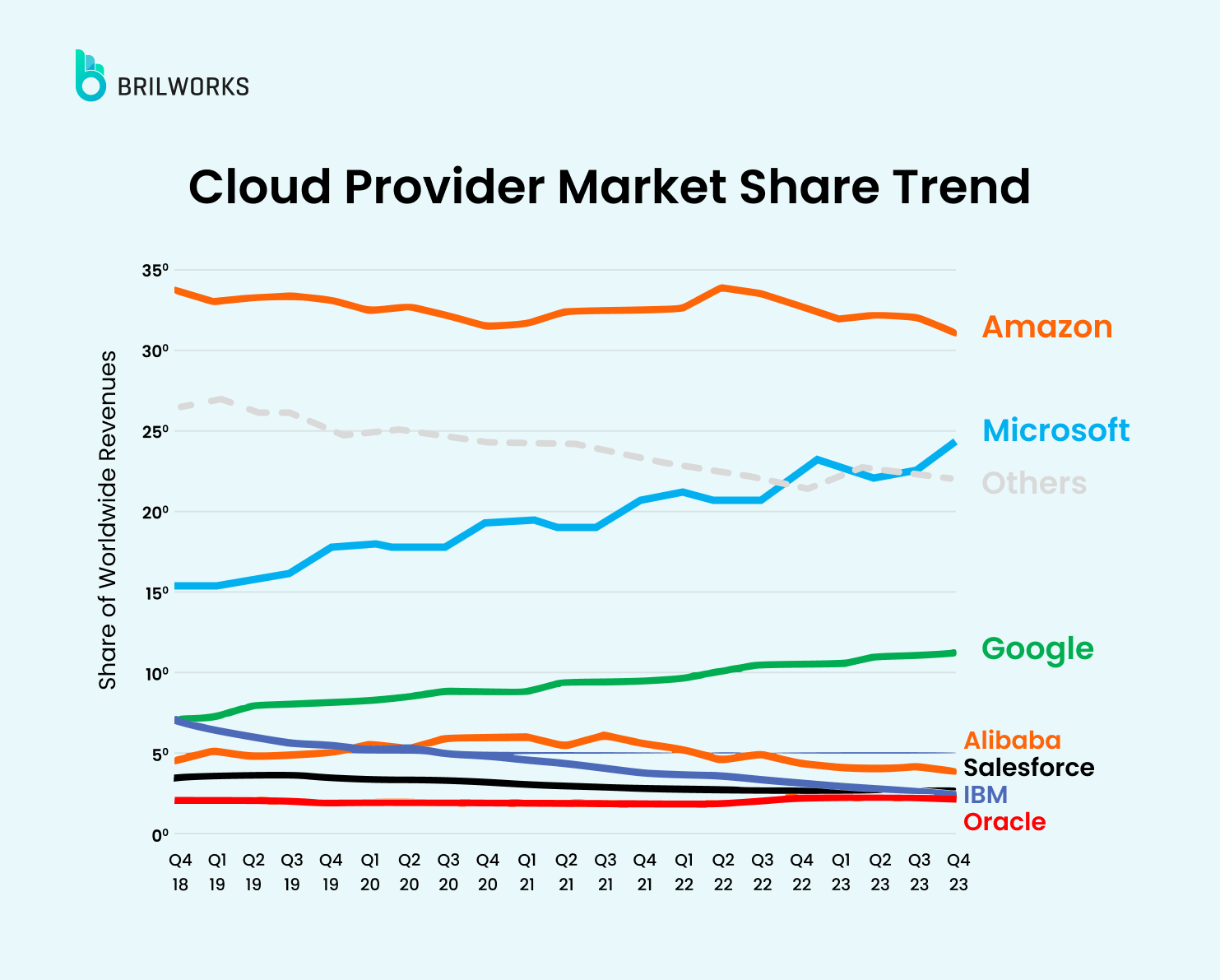
When you look at these trends together, you can see a clear pattern. AWS grew by supporting modern, cloud-first development, while Azure grew by supporting large companies that needed cloud to connect smoothly with existing systems.
To understand why this pattern exists, it helps to look at how these platforms are designed.
2. Service
Both platforms offer many services, but they do not follow the same strategy.
AWS has more than 200 services across many categories. This wide range gives teams the ability to customize almost every layer of their system. Because of this variety, AWS often appeals to teams that want close control over how applications run.
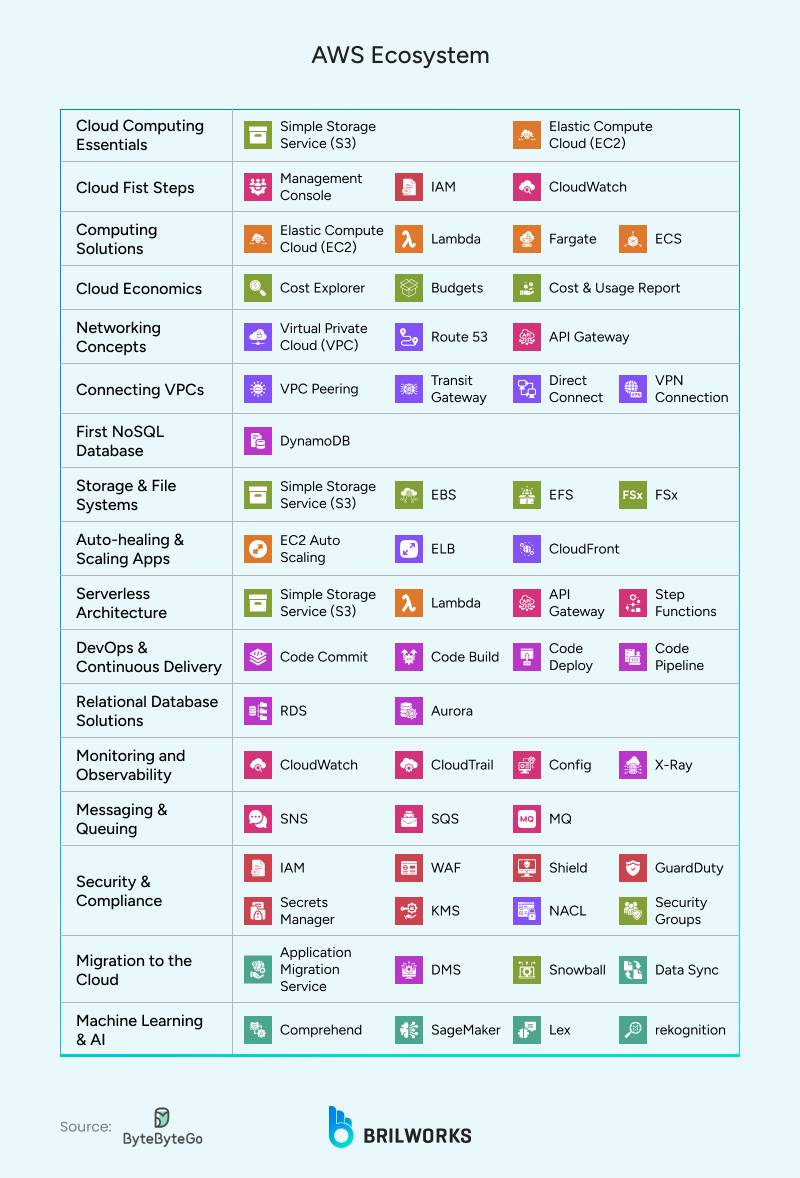
Azure also provides over 200 services. However, these services are closely connected with Microsoft’s identity, security, and management tools. As a result, Azure tends to feel more unified and easier to adopt if a company already uses Microsoft products.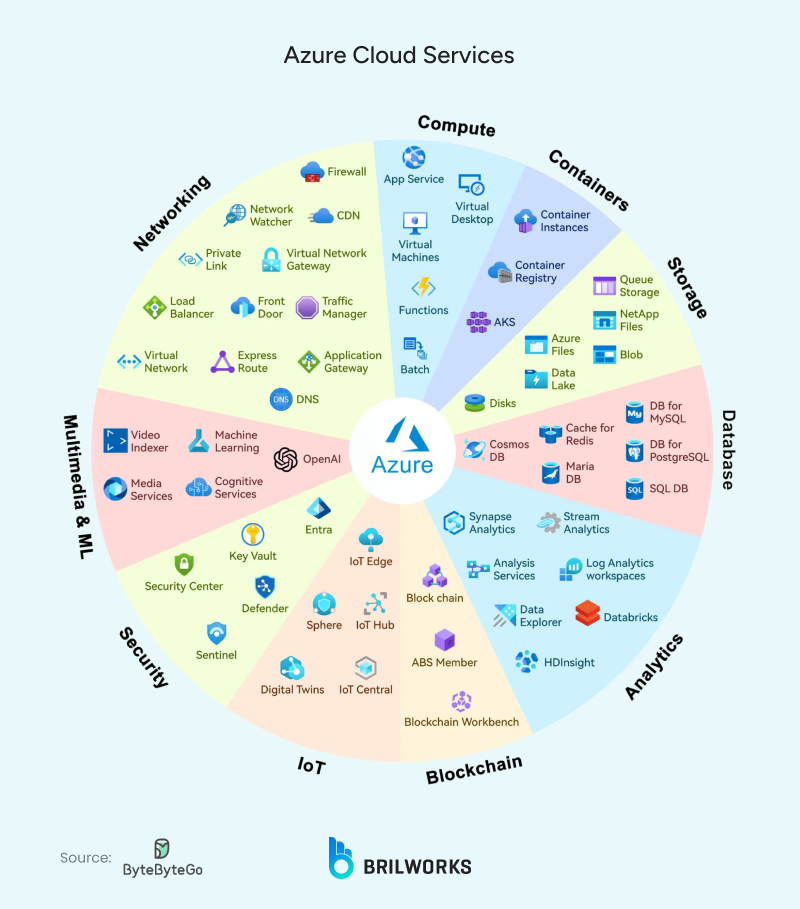
These differences matter because they affect how teams plan their work. AWS offers more options, while Azure offers more familiar paths for companies with existing Microsoft setups.
3. Design Approach
Another important difference lies in how the platforms are built. AWS works like a collection of building blocks. Each service stands on its own, and you combine them based on your needs. This approach allows a lot of flexibility, and it works well for cloud-native applications that need to grow or change often.
Azure works more like a connected system. Many of its tools are linked through Microsoft identity and security frameworks. This design helps companies move older systems into the cloud with less friction, especially if they rely on Windows or on-premise servers.
Because these design patterns are so different, the experience of using AWS and Azure can feel very different even when you are working on similar tasks.
4. Cost
Both platforms can be cost-effective when used correctly, but they behave differently.
AWS provides many pricing options. This helps teams who monitor their usage closely and adjust resources as needed.
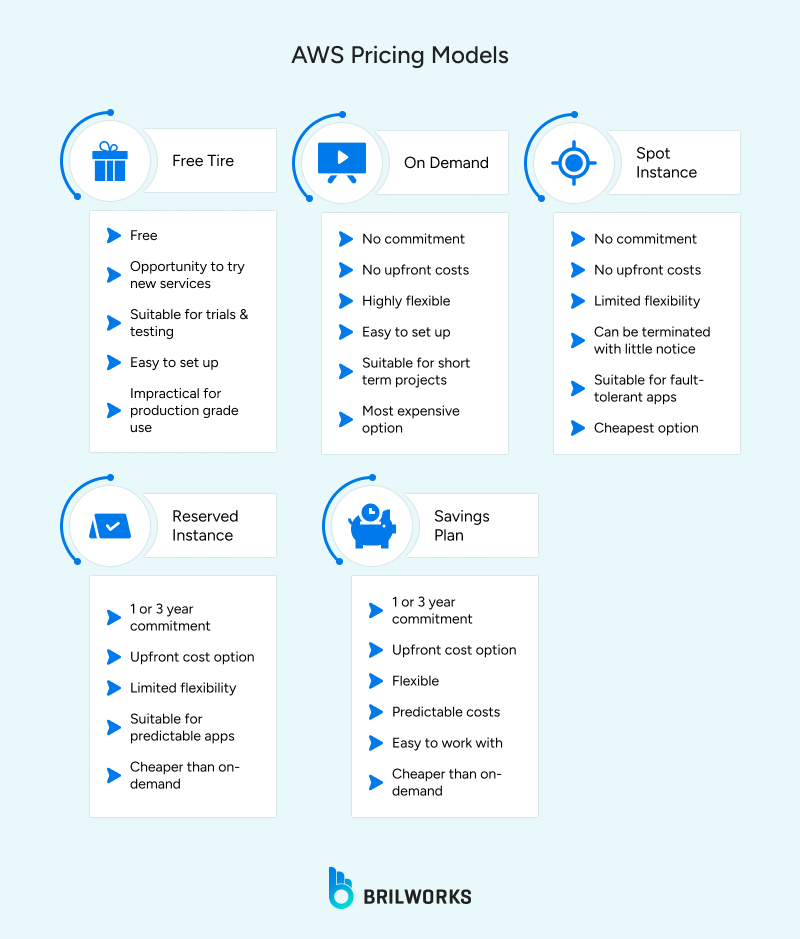
That flexibility cuts both ways. Leave a service running overnight that you forgot about, or misconfigure an auto-scaling rule, and the bill at the end of the month will tell you about it.
Azure pricing is less exciting but more predictable. Companies already paying for Microsoft licenses, Office 365, Windows Server, SQL Server, typically carry those discounts into their Azure spend. For finance teams doing annual cloud budgets, that predictability matters more than the optimization ceiling.
If your organization already has a Microsoft agreement in place, Azure's pricing structure will feel familiar from day one. AWS will give you more levers to pull. Whether that's an advantage depends entirely on whether your team has the discipline to pull the right ones.
5. Operational Complexity
AWS and Azure both give you the tools to run everything from small apps to large global systems. Getting there, though, depends heavily on what your team walks in knowing.
AWS becomes harder when you need to make many choices. Most services come in several versions, and each version has multiple configuration options. For example, picking a compute instance often means going through dozens of families and sizes.
That works in your favour when you have a senior engineer who has made these decisions before. When you don't, the same freedom turns into weeks of research before a single service is configured correctly. And because AWS bills you for what runs, not what you intended, a misconfigured setting does not just slow you down. It shows up on your invoice.
Azure becomes harder for another reason. Many core settings connect back to identity, policy, or the wider Microsoft environment. This creates a consistent structure across the platform, but it also limits how far you can move away from Microsoft’s way of managing systems.
If your organization already uses tools like Active Directory, Azure feels familiar and predictable. If you do not, some features may feel tied to earlier decisions your team never made.
Because the challenges come from different places, the platform you choose affects how your team works.
AWS requires more decision-making. Azure requires more alignment with its structure.
6. Hybrid and On-Prem Compatibility
Hybrid cloud is now common. Many organizations move part of their systems to the cloud while keeping older tools or sensitive data on-prem. This is one of the clearest areas where AWS and Azure take different paths.
Azure works closely with on-prem setups because it grew from Microsoft’s enterprise background. Identity, access control, device management, and server administration often carry over with very little change.
So a team running Active Directory on-prem can extend that into Azure without rebuilding their identity layer from scratch. Azure Arc and Azure AD handle the bridge, one place to manage cloud and on-prem together, without a full migration project to get there.
AWS supports hybrid systems too, but the experience is more cloud-first. Services like Outposts, Direct Connect, and Site-to-Site VPN cover most needs, but they do not plug into traditional on-prem environments with the same level of built-in familiarity.
AWS expects you to standardize more parts of your setup around cloud patterns rather than extending older setups directly.
In simple terms, Azure fits hybrid systems without much adjustment. AWS fits hybrid systems when most of the design leans toward cloud practices.
Migration Cost Considerations
Moving to the cloud is not a one-time project cost. The bill starts when you migrate and keeps running long after the migration team has moved on.
AWS migrations tend to carry higher upfront engineering costs. The service depth that makes AWS flexible also makes the migration more involved — more decisions to make, more configurations to validate, more specialists to bring in. A team moving a mid-size application to AWS should budget for the architecture work, not just the data transfer.
Azure migrations look cheaper on paper when a Microsoft agreement is already in place. The licensing discounts carry over, the identity layer is familiar, and the tooling for moving Windows-based workloads is mature. Where organizations get surprised is the hidden cost of retraining teams on Azure-specific tooling and governance structures that sit outside the Microsoft stack they already know.
The cost neither platform advertises is the ongoing one. Compute, storage, egress fees, and support tiers compound over months. We have seen clients underestimate their 12-month cloud spend by 40% because the migration estimate only covered the move, not what it costs to run once you are there. Get a 12-month projection before you sign anything, not just a migration quote. If you are evaluating an AWS migration specifically, the AWS cloud adoption framework is the right place to start before those conversations happen.
When to Migrate from One to the Other
Most teams do not migrate platforms because the technology failed them. They migrate because the business changed around it.
Signals that AWS to Azure makes sense:
A company gets acquired by or merges with a Microsoft-heavy enterprise. The new parent organization runs Active Directory, has an existing Azure agreement, and the cost of maintaining a separate AWS environment starts showing up in every budget conversation. The migration is not about AWS being wrong — it is about the organization no longer being the same organization that chose AWS.
The other signal is compliance. Regulated industries with strict identity and access requirements sometimes find Azure's native integration with Microsoft's security and governance tooling easier to satisfy than building equivalent controls on AWS from scratch.
Signals that Azure to AWS makes sense:
A company scales past its Microsoft roots. The product becomes cloud-native, the engineering team grows and starts hiring developers who have built on AWS, and Azure starts feeling like it was designed for a version of the company that no longer exists.
The second signal is cost at scale. Azure's predictable pricing works well at steady state. Teams running highly variable workloads with aggressive optimization requirements sometimes find AWS gives them more room to reduce spend as they grow.
The signal that applies to both directions:
Your team spends more time managing the platform than building on it. That is when the migration conversation is worth having regardless of which direction it goes.
Brilworks' Take on AWS vs Azure
The data points in one direction. AWS is the right call for teams building from scratch, cloud-native apps, fast-growing products, startups that want full control over how their infrastructure is shaped and scaled.
Azure is the right call when the organization already runs on Microsoft. Active Directory, SQL Server, Windows Server, on-prem systems with strict identity requirements, Azure handles that existing environment without forcing a rebuild. The setup time is shorter because most of the groundwork is already done.
Both platforms are mature, well-supported, and capable of running production systems at any scale. But "both are good" is not a useful answer when you have a deployment deadline. The real question is which one your team can operate without spending the first three months figuring out why something isn't behaving the way the documentation said it would.