Two teams can buy the same tools, wire up the same warehouse, and still end up in different places. One runs for years. The other is rebuilding within eighteen months. The difference is usually the data pipeline architecture underneath.
Data pipeline architecture is the design that decides how data flows, where it gets processed, how the parts connect, and what happens when a source fails at 2am. Skip those decisions and start wiring components together, and it works until volume triples or a source changes its schema. Then the shortcuts surface at once, and the fix is rarely a patch. It's a rebuild. This guide breaks down the core components, the main patterns and when each fits, a reference data pipeline architecture diagram, and the challenges that tend to break pipelines in production.
What Is Data Pipeline Architecture?
Data pipeline architecture is the blueprint for how data moves through your system, from the sources it starts in to the tools and people that use it at the end. It defines the stages data passes through, how they connect, and how the system holds up when load spikes or something fails.
The pipeline is the working system that moves data. The architecture is the design decisions behind it, made before any code gets written. Batch or streaming. One processing engine or several. Where transformation happens, what breaks when a source doubles its volume overnight. Two teams can build pipelines that look identical on paper and end up with completely different systems, because they answered those questions differently. That's also what decides whether a pipeline runs for years or gets rebuilt in eighteen months.
Core Components of a Data Pipeline
Every data pipeline architecture, simple or complex, is built from the same seven parts. Knowing them is how you spot where a pipeline is likely to break, because failures almost always trace back to one specific layer.
1. Data Sources
Where the data starts. Databases, APIs, event streams, flat files, IoT sensors, SaaS platforms like a CRM or billing tool. Most real pipelines pull from several at once, and each source brings its own format, schedule, and reliability to deal with. A source that changes its schema without telling you is one of the most common reasons a pipeline breaks, so the architecture has to assume sources will misbehave.
2. Ingestion Layer
The layer that pulls or receives data from those sources. This is where you decide whether data arrives in scheduled batches or streams in continuously as events happen. That single choice shapes almost everything downstream, from cost to complexity to which tools you can use. Build ingestion to survive a source going down, sending duplicates, or changing shape, because eventually it will do all three.
3. Processing Layer
Where raw data becomes usable. Cleaning, deduplicating, standardizing formats, joining sources, applying business logic. A manufacturer reconciling machine data from three vendors in three different formats does most of its real work here. This is also where data quality is won or lost, so validation belongs inside this layer rather than bolted on afterward.
4. Storage Layer
Where processed data lands. Usually a data warehouse for structured analytics or a data lake for raw and semi-structured data, and plenty of teams run both. The choice here depends on what the data feeds and how it gets queried, which is why warehouse-versus-lake is an architecture decision, not just a storage one.
5. Orchestration
The coordinator that decides what runs, in what order, and what happens when a step fails. Without it, a pipeline is a pile of scripts hoping to fire in sequence. Orchestration is what turns those scripts into a system that retries, recovers, and picks up where it left off instead of collapsing when one job errors out.
6. Monitoring
The layer that tells you the pipeline is healthy, or that it isn't. Data quality checks, failure alerts, latency tracking, volume anomalies. This is the component teams skip first and regret most, because a pipeline that fails silently keeps feeding bad numbers into reports until someone downstream notices. By then the damage is already in a decision someone made.
7. Data Consumers
Where the data actually gets used. Dashboards, BI tools, machine learning models, reverse-ETL pushing data back into operational apps. This is the layer the whole architecture exists to serve, and it sets the requirements for everything upstream. How fresh the data needs to be, how it's shaped, how often it updates, all of it works backward from what the consumer needs.
Common Data Pipeline Architecture Patterns
The seven components can be arranged in more than one way, and the arrangement is the pattern. Five come up again and again. Most real systems are one of these or a blend of two, so the job is matching the pattern to what your data and your business actually need.
1. Batch Processing
Data gets collected over a window, an hour, a day, a night, then processed all at once. It's the oldest pattern and still the most common, because most business questions don't need up-to-the-second answers. Yesterday's sales, last month's churn, a nightly inventory sync. Batch is cheaper to run, simpler to build, and far easier to debug, since you're working with a fixed dataset instead of a moving one. The trade-off is latency. If a number needs to be current, batch can't give you that, and no amount of running it more often truly closes the gap.
2. Streaming
Data gets processed as it arrives, event by event, within seconds or less. Fraud detection, live dashboards, sensor alerts on a factory line, anything where a delay makes the data worthless. Streaming buys you immediacy, and it charges for it. The infrastructure runs continuously, failures are harder to reason about, and reprocessing history is a real engineering problem rather than a rerun. You pay this cost only when the freshness genuinely earns it.
3. Lambda
Lambda runs two paths at once. A batch layer processes the full history accurately, and a streaming layer handles live data for speed, and results merge at the end. You get real-time answers now and correct answers once the batch catches up. The catch is that you're maintaining the same business logic in two places, which doubles the code and the ways it can drift out of sync. Powerful when you truly need both speed and accuracy. Overkill when you don't.
4. Kappa
Kappa is Lambda with the batch layer removed. Everything, live data and historical reprocessing alike, runs through a single streaming path. One codebase instead of two, which kills the sync problem Lambda creates. When you need to reprocess history, you replay the event stream through the same pipeline. It's leaner, but it demands a streaming setup solid enough to carry the entire load, so it fits teams already committed to streaming rather than those easing into it.
5. Lakehouse
The lakehouse pattern puts one storage layer under everything. It combines the cheap, flexible storage of a data lake with the structure and query performance of a warehouse, so raw data and analytics-ready data live in the same place instead of being copied between systems. This is where the Databricks and Snowflake decision usually gets made, since both are built around this model. Fewer copies of the data, less movement, one source of truth. The trade-off is that the tooling is younger than the warehouse world, and getting governance right on a lakehouse takes deliberate work.
Data Pipeline Architecture Diagram
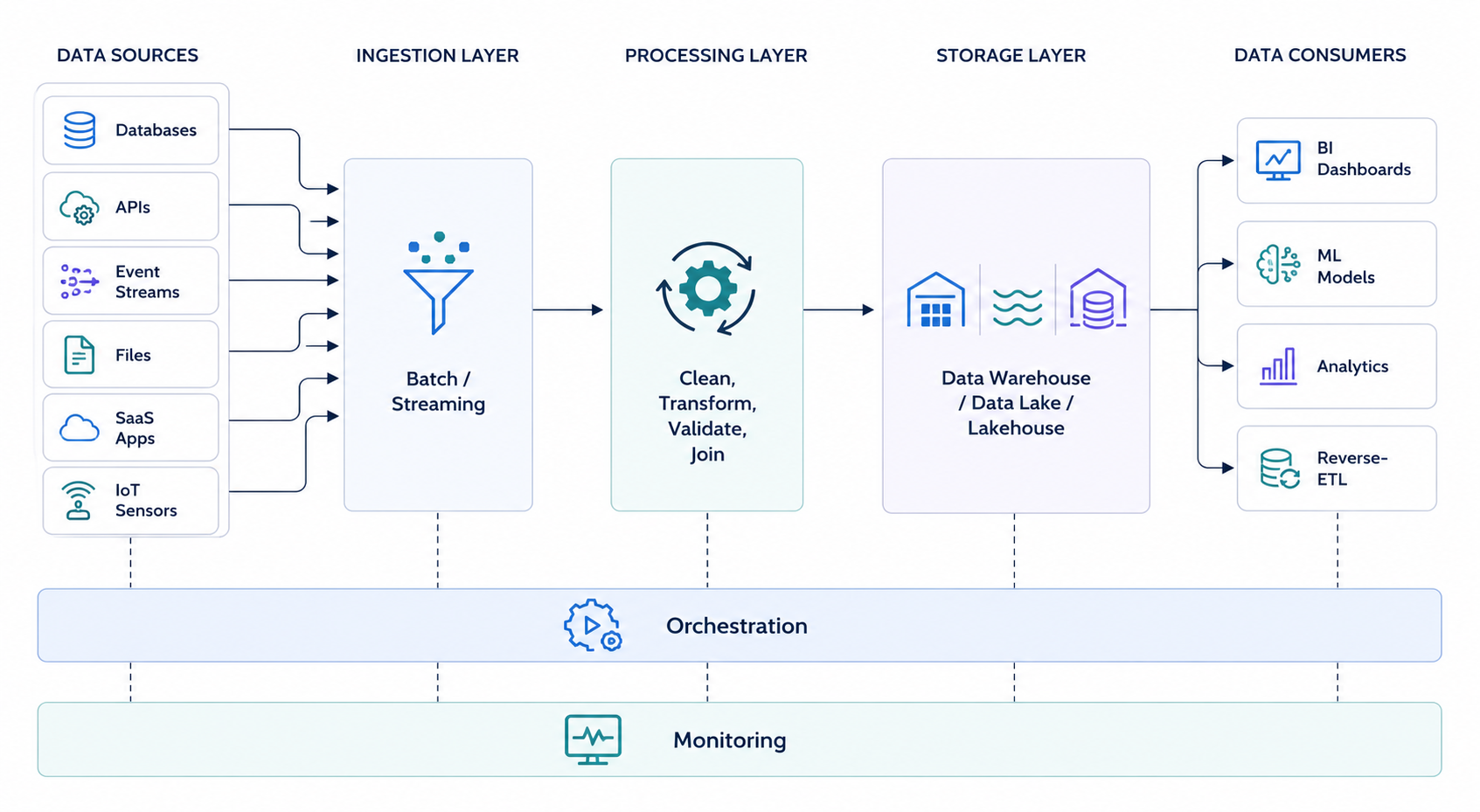
A diagram is the fastest way to see how the seven components fit together, because architecture is about how the parts connect, not just what they are. The layout below shows data moving left to right, from raw sources on one end to the people and tools using it on the other, with the coordinating layers sitting across the whole flow.
Common Challenges in Data Pipeline Architecture
Most pipeline failures aren't exotic. The same handful of problems break systems across every industry, and nearly all of them come from architecture decisions made early and paid for later.
1. Schema changes that break everything downstream
A source adds a column, renames a field, or changes a data type, and the pipeline that assumed the old shape falls over. This is the single most common failure in production. The fix is architectural, not reactive: validate schemas at ingestion and design the pipeline to flag or quarantine unexpected changes instead of passing them straight through to break something further down.
2. Silent failures
A pipeline that crashes loudly is easy. A pipeline that keeps running while quietly dropping records or duplicating rows is the dangerous one, because bad data reaches a dashboard and someone makes a decision on it before anyone notices. This traces straight back to a weak monitoring layer. If the architecture can't tell you the data is wrong, you'll find out from the person who acted on it.
3. Scaling past what the design assumed
A pipeline built for a million rows a day starts choking at ten million. Batch jobs that finished in an hour now run past the next scheduled start. Almost always the bottleneck is a single stage that can't process in parallel, and retrofitting parallelism into a design that never planned for it is expensive. Cheaper to assume growth up front than to rebuild under load.
4. No recovery path
A job fails at 3am. Does the pipeline retry, pick up where it stopped, or does the whole run need restarting by hand in the morning? Without orchestration built for failure, every error becomes manual cleanup, and the same job reprocessing the same data creates duplicates on top of the original problem. Idempotency and retry logic belong in the design, not in a patch after the first bad night.
5. Data quality treated as an afterthought
When validation gets bolted on at the end instead of built into the processing layer, bad data has already traveled through the whole system before anyone checks it. Quality is cheapest to enforce at the point of entry and most expensive to fix once it's spread across every downstream table. A data quality framework that lives inside the pipeline catches problems while they're still small.
6. Governance added late
Once a pipeline is moving real data across sources and teams, questions arrive that the architecture never planned for. Who can access this data, where did it come from, is it compliant. Retrofitting a data governance strategy onto a running pipeline is far harder than designing for it from the start, especially in regulated fields like fintech or healthcare where lineage and access control aren't optional.
Conclusion
Architecture is the part of a pipeline you can't easily change later. Tools you can swap and code you can refactor, but the shape of how data moves gets locked in early and is expensive to undo. That's why the decisions here, batch versus streaming, where processing happens, how failure gets handled, come before you pick a single tool.
The pipelines that run for years weren't lucky. They matched the pattern to the need, built monitoring and orchestration in from the start, and designed for the schema change before it arrived. If you're building one from scratch or trying to work out why yours keeps breaking, that's the day-to-day work behind our data engineering services.
FAQ
The pipeline is the working system that moves data from source to destination. The architecture is the set of design decisions behind it, made before any code is written, covering how data flows, where it gets processed, and how failures are handled. Two pipelines can do the same job and still have very different architectures.
ETL is one approach to moving and transforming data within a pipeline, not the architecture itself. Architecture is the broader design of how all the components connect, and ETL sits inside the processing layer as one way to handle transformation. A pipeline can use ETL, ELT, or streaming transformation depending on what the architecture calls for.
It depends on how fresh your data needs to be and how much complexity your team can maintain. Batch fits reports and scheduled analytics, streaming fits fraud detection and live dashboards, and lambda or kappa fit systems that need both speed and accurate history. Most teams start with batch and add streaming only where the freshness genuinely earns the extra cost.
Different tools handle different layers of the architecture. Ingestion uses tools like Kafka, Fivetran, or Airbyte, processing uses Spark or dbt, storage uses Snowflake, Databricks, or a cloud data lake, and orchestration usually runs on Airflow or a managed equivalent. The right combination depends on your pattern and scale rather than any single best-in-class list.
Design for growth before you hit it, not after. That means building stages that can process in parallel, choosing storage that scales independently of compute, and adding orchestration that retries and recovers instead of failing the whole run. Retrofitting scale into a design that never planned for it is far more expensive than assuming growth from the start.
Vikas, the visionary CTO at Brilworks, is passionate about sharing tech insights, trends, and innovations. He helps businesses—big and small—improve with smart, data-driven ideas.