Last updated August 26, 2026
The Ultimate Guide to Legacy Data Migration Process Strategies and Best Practices

7 mins read
Summarize with AI:


Data
AI
The Stack Underneath
Most legacy data migrations don't break when the data moves. They break weeks later, when finance can't close the month.
You extract the data, the rows land, the counts match, everyone signs off. Then a report comes out wrong, because a status code that meant "on hold" in the old system maps to nothing in the new one. Three years of orders, silently miscategorized. The migration was tested for whether the data arrived, not whether it still meant the same thing.
That gap is where most legacy data migration projects fail, and it has little to do with the tool copying the records. It's the undocumented logic inside old systems that gets you.
This guide covers how the process actually runs, where it breaks, the strategies teams use to cut over safely, and the tooling that keeps it in check. It's part of a broader data modernization effort.
Legacy data migration is the process of moving data out of an old system and into a modern one, when the old system has become too costly, too risky, or too limited to keep running.
The word doing the work there is old. A legacy system isn't just software that's been around a while. It's software you can no longer safely change, either because the people who built it are gone, the platform is unsupported, or the business logic is tangled so deep that touching one part breaks three others. The data inside it is usually fine. The container is what's failing.
This is what separates legacy system data migration from an ordinary transfer. A routine migration moves data between two systems that both make sense today. A legacy migration moves data whose original rules, formats, and meaning have to be reverse-engineered before they can be trusted anywhere else. You're not just moving records. You're recovering intent.
That recovery is the hard part, and it's why these projects take longer than the extract-and-load timeline suggests.
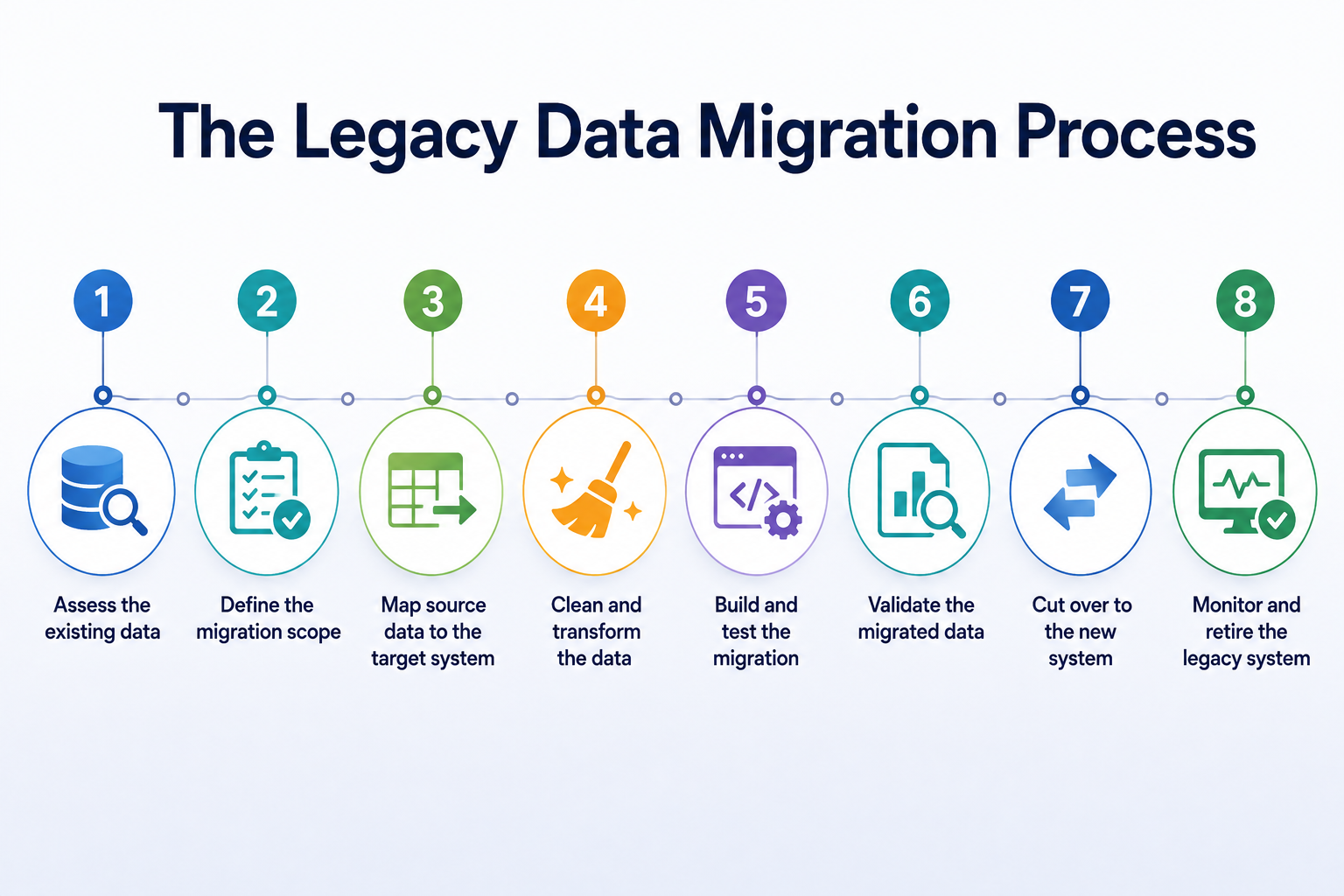
The legacy data migration process runs in eight stages, from understanding what you're holding to shutting the old system down for good. Most teams rush the front half and pay for it in the back half. The order below is deliberate, because skipping ahead is how the expensive mistakes happen.
Start by finding out what's actually in the old system, because it's almost never what the documentation claims. Run a profile of the source data to see the real formats, the null rates, the duplicate keys, and the fields that have quietly been repurposed over the years. This is where you discover that the "phone number" column contains email addresses for every record created before 2015. Better to know now than during cutover.
Decide what moves, what gets archived, and what gets left behind. Not all legacy data is worth migrating, and dragging twenty years of dead records into a new platform just raises your storage bill and slows every query that follows. Agree on a cutoff, agree on which tables are in, and get the business to sign off on what's being dropped. Get that agreement in writing.
Map every source field to where it lands in the new system, and document what has to change on the way. This is the stage that decides whether the project succeeds. A field that was a free-text string in the old system might need to become a constrained enum in the new one, which means someone has to define the rules for that conversion. Where a clean map isn't possible, flag it now rather than letting the migration script make the decision silently.
Fix the data before it moves, not after. Old systems accumulate values that were never valid and rules that were enforced by habit rather than the schema, and all of it surfaces the moment you apply real constraints. Deduplicate, standardize formats, resolve the records that violate the target rules, and decide what happens to the ones that can't be salvaged. Building this on a proper data quality framework keeps the cleanup consistent instead of a pile of one-off fixes nobody can reproduce later.
Build the migration as repeatable scripts, then run them against a copy of the real data until the results stop surprising you. A migration you can only run once is a migration you can't trust, because you'll need to run it several times before the real cutover. Test on production-scale volumes too, since a script that works on a thousand sample rows can fall over on ten million. Timing matters here, and if you're scoping budget around it, a data migration cost calculator gives you a defensible number to work from before the first script runs.
Check that the data in the new system still means what it meant in the old one, not just that the row counts match. Row-count validation is the trap, because the numbers can line up perfectly while the values behind them are wrong. Reconcile totals, spot-check records against the source, and have someone from the business confirm that the reports built on the new data return the same answers as before. This is the step that catches the miscategorized-orders problem before your users do.
Cutover is the moment the business starts running on the new system, and the risk here is operational, not technical. The data can be perfect and you can still break the company if an integration nobody documented was reading from the old database every night. Map the downstream dependencies before you switch, pick a cutover window that survives a rollback if something goes wrong, and decide in advance what "we're rolling back" actually looks like. Run the old and new systems in parallel for a short period if the business can't afford a hard switch.
Watch the new system under real load before you turn anything off. The first days after cutover surface the edge cases that testing missed, usually the rare transaction types nobody thought to check. Keep the old system readable but frozen until you're confident, then decommission it properly so you're not paying to maintain the thing you just spent months escaping. Leaving it running "just in case" is how a finished migration quietly becomes a second legacy system.
Most legacy data migration challenges trace back to three failures. Data gets lost, a business process breaks, or the new system quietly becomes the old mess on a pricier platform. The rest are smaller and manageable once these three are handled.
The most dangerous data loss is the kind that throws no error. The rows are all there and the counts match, but a field got truncated, a date flipped day and month, or a code that encoded three states got flattened into one. You find out months later when someone needs the history and it's gone. Undocumented logic is what kills you here, because you can't preserve a rule you never knew existed. Row-count checks alone are close to useless against this.
Cutover breaks the business when something nobody documented was reading from the old database. Over the years, other tools, scripts, and reports wire themselves into that system, and half of them live in no diagram anywhere. You switch over, and a nightly job feeding the finance dashboard silently stops returning data because its source table no longer exists. The migration was clean. The business still broke. Dependency mapping is the only defense, and it's the step teams skip most because the payoff stays invisible until the day it isn't.
The slowest failure is lifting the old structure across untouched. A team under deadline keeps the bad field names, carries the dead columns, and reproduces the exact tangle they were escaping, now on a system that costs more to run. Nothing breaks on day one, which is why it passes review. Two years later someone opens the new schema and finds the same undocumented mess, just relocated. Fixing this is a discipline problem more than a technical one, and it usually needs a clear enterprise data strategy defining the target shape before anyone writes a migration script.
A few challenges sink less often but still hurt: downtime windows that turn out too short, source volumes that blow past what the pipeline was tested on, and stakeholders who disagree on what "done" means after cutover. None of these are project-enders on their own. They become dangerous when they stack on top of one of the three above.
Choosing a legacy data migration strategy comes down to one question. How much downtime can the business tolerate, and how much risk are you willing to carry to avoid it? The three common approaches answer that differently, and the wrong pick for your situation is how a technically sound migration still ends badly.
Big bang moves everything in a single planned window, usually over a weekend, and switches the business to the new system on Monday. It's the simplest to plan and the cheapest to run, because you're not maintaining two systems or syncing data between them. The risk is that everything rides on one window. If validation fails at hour six of an eight-hour cutover, you're rolling back with the clock against you. This works when the dataset is small enough to move and verify inside the window, and when the business can genuinely afford to be down while you do it.
Phased migration moves the data in stages, one module or business unit at a time, over weeks or months. You lower the blast radius, because a problem in one phase affects one slice of the business instead of all of it. The cost is complexity, since you're running old and new systems side by side and keeping them in sync while the migration is only partway done. That sync layer is where phased projects get hard. This is the right call for large datasets or systems too critical to take down all at once, as long as you can build and maintain the bridge between old and new.
Parallel migration runs both systems live at the same time, with data flowing into both, until you're confident enough in the new one to retire the old. It's the safest option for continuity, because the old system stays available as a fallback the entire time. It's also the most expensive and the most operationally demanding, since staff may be double-entering data and you're paying to run two systems at once. Reserve this for cases where downtime is genuinely unacceptable, like systems where an hour offline has regulatory or revenue consequences.
Here's how the three compare on the factors that actually decide the choice.
|
Factor |
Big bang |
Phased |
Parallel |
|
Downtime |
High, one window |
Low, per phase |
Near zero |
|
Risk profile |
Highest, all at once |
Moderate, contained per phase |
Lowest, old system stays live |
|
Cost |
Lowest |
Moderate |
Highest |
|
Complexity |
Low |
High, sync layer needed |
High, double-running |
|
Best for |
Small datasets, tolerant business |
Large or critical systems |
Zero-downtime requirements |
|
Main danger |
Rollback under time pressure |
Keeping two systems in sync |
Cost and staff load |
Most of these come from watching migrations go wrong, not from a methodology deck. Each one exists because skipping it has a predictable cost.
Never scope a migration on what the old system is supposed to contain. Profile the actual data first, because the gap between the documented schema and the real one is where every timeline slips. A field that's supposed to be a clean date and turns out to hold six different formats can add a week of transformation work that nobody budgeted for. The profile is what makes your estimate defensible instead of a guess.
Matching row counts prove the data moved, not that it survived intact. Build validation that reconciles totals, spot-checks records against the source, and confirms the business reports still return the same answers. This is the single check that catches the silent-corruption failures before users do. If you only automate one thing, automate this.
Write the migration as scripts you can run start to finish, again and again, not as manual steps someone performs once. You will run it more than once. Test runs, dry runs, and the real cutover all use the same code, and a repeatable pipeline is also the difference between a rollback that takes an hour and one that takes a lost weekend. Manual migrations can't be trusted because they can't be reproduced.
Find everything reading from the old system before you switch anything off. Downstream jobs, reports, and integrations are what break at cutover, and the dangerous ones are the undocumented ones nobody remembers building. Trace the connections, list them, and confirm each one has a home in the new setup. The same rigor applies whenever you handle a cloud data migration, where the dependency web often stretches across services you don't directly control.
Run the whole process in a staging environment that mirrors production before you touch production. Migrations expose problems you can only find by running them at real scale on real data, and you want to find those in a place where a failed run costs nothing. Broader cloud migration best practices apply here too, since the discipline of testing against a production-like copy is the same whether you're moving data or entire workloads.
Set a hard date to shut the old system down, and treat leaving it running as its own failure. A legacy system kept alive "just in case" past cutover is money spent maintaining the exact thing the migration was meant to retire. Freeze it, keep it readable for a defined window, then turn it off. A migration isn't finished until the old system is gone.
If you take one thing from this, make it this. The hard part of legacy data migration was never moving the data. It's preserving what the data meant once it lands somewhere new.
That's why the front half of the process carries more weight than the cutover everyone worries about. A migration that's profiled, mapped, and validated properly is boring at cutover, and boring is exactly what you want. The projects that turn into disasters are the ones that treated assessment as paperwork and found out during go-live what the old system was really holding.
Pick the strategy that matches your tolerance for downtime, not the one that's cheapest to run. Validate meaning instead of counting rows. And set a date to kill the old system, because a migration that leaves it running hasn't finished, it's just started your next one.
Most teams don't lose these projects on the technology. They lose them on the planning, which is where experienced cloud data engineering support earns its cost, by finding the buried logic before it becomes a live incident. Get the groundwork right and the migration itself is almost dull. That's the goal.
It depends on data volume and how messy the source is, but most mid-sized migrations run from a few weeks to several months. The transfer itself is fast. What consumes the timeline is profiling, mapping, cleaning, and validation, and a source system with heavy undocumented logic can easily double an estimate built on data volume alone.
Ordinary data migration moves data between two systems that both make sense today. Legacy data migration moves data out of an old system whose original rules, formats, and meaning have to be reverse-engineered before the data can be trusted anywhere else. The difference is the recovery work, not the transfer.
Prevent it by validating meaning rather than matching row counts. Most silent loss passes a row-count check while values behind those rows are truncated, reformatted, or flattened. Profile the source before you move, reconcile totals afterward, and have someone from the business confirm the reports still return the same answers as before.
Parallel migration is the safest for business continuity because the old system stays live as a fallback the entire time. It's also the most expensive and operationally demanding, since you're running two systems at once. Big bang carries the most risk but the least cost, and phased sits in between, which is why most real projects blend them.
You can, but keeping it running past a defined cutoff is usually a mistake. A legacy system kept alive "just in case" costs money to maintain and quietly becomes a second legacy problem. Freeze it, keep it readable for a set window, then decommission it on purpose.
You might also like

Hello, we are BRILLIAN’S. Trying to make an effort to put the right people for you to get the best results. Just insight !