Last updated May 20, 2026
React Server Components Explained: The Complete Guide

9 mins read
Summarize with AI:


Data
AI
The Stack Underneath

Have you ever considered how much the web has transformed in just a decade? Since its introduction ten years ago, React has continuously evolved. The latest such transformation is React Server Components (RSCs). This new paradigm has, admittedly, generated a great amount of confusion and attention online.
Many developers, even expert ones, find themselves asking: "What exactly React server components are? How do they fit with everything else?". For those who've explored it, they have found it quite impressive. So, let's get a clearer understanding of what React Server Components are.
To fully understand, we need to revisit web rendering first. In the early days of React, applications often used a "client-side" rendering technique. Users would receive an empty HTML file. And only after the JavaScript bundle was downloaded and parsed, React would "conjure" the entire application's UI.
It had a major drawback. Users were left staring at a blank white screen while all this work happened. This problem would even worsen as JavaScript bundles grew with new features.
Then came Server Side Rendering (SSR). The server would generate the initial HTML, providing users with a "fully-formed HTML document," thus reducing the blank screen time. While this was a step forward, a shell is better than nothing, the application often still needed to fetch content data from the server with a second network request after initial hydration.
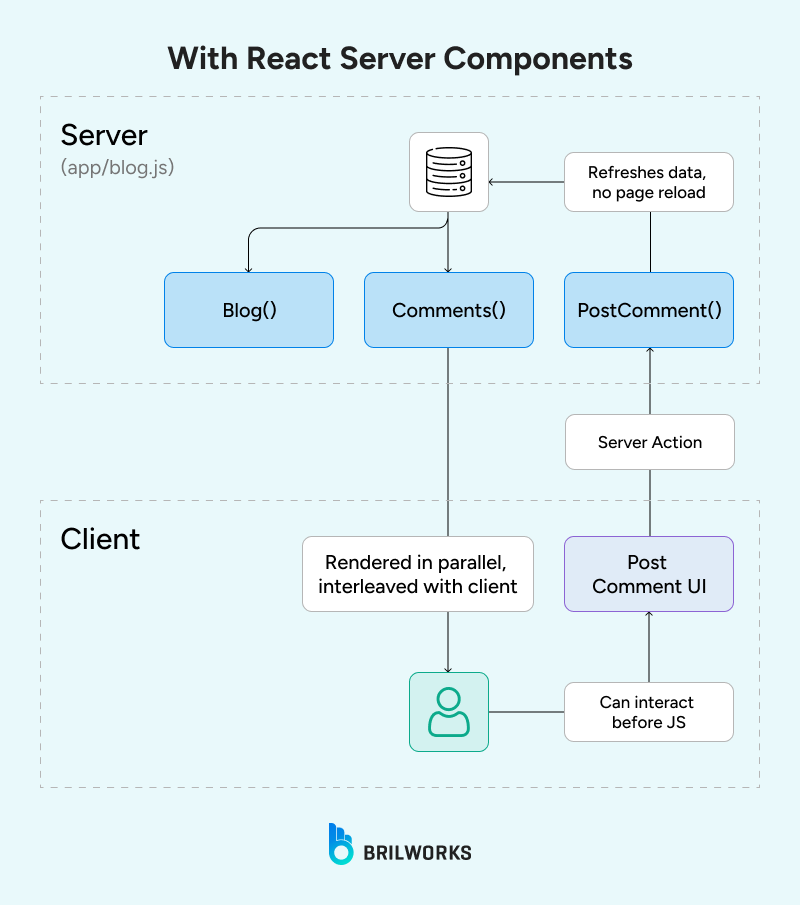
This would result in a visible loading state for the actual content. This led to a question: why not perform the database work during the initial server request rather than bouncing back and forth?
Historically, this has been a challenge, as all React components, even with SSR, would render on both the server and the client. While React frameworks like Next js provided their own solutions to run server-exclusive code, these were often limited to the route level.
At its core, React Server Components (RSCs) introduce a new paradigm where components can run exclusively on the server. This capability allows developers to perform actions like writing database queries directly inside their React components, which, to many long-time React users, might initially seem "absolutely wild."
The good thing about server Components is that they never re-render. They execute once on the server to produce the UI. The rendered output is then sent to the client and considered immutable.
This means a significant portion of React's client-side API, such as `useState` (for managing state that changes) and `useEffect` (for side effects that run after render on the client), are incompatible with Server Components.
However, this makes things simpler, as developers no longer need to worry about issues like stale closures or memoization for these components.
In this new RSC paradigm, the "traditional" React components we've known and loved are now referred to as Client Components. This name can be a bit misleading, as Client Components actually render on both the server and the client. Conversely, Server Components only render on the server without being included in the generated JavaScript bundle, and they don't hydrate (or re-render) on the client.
It is important to recognize that React Server Components are not a substitute for Server Side Rendering (SSR). Rather, they work alongside each other. As always, we depend on SSR to render the initial HTML document. What RSCs add is the ability to omit specific components from the client-side JavaScript bundle. It's still early days for this technology.
|
Feature |
Client-Side Rendering (CSR) |
Server-Side Rendering (SSR) |
React Server Components (RSC) |
|
Where Code Runs |
Client-side only (browser). |
Initial render on server, then runs on client. |
Server Components: Exclusively on the server. Client Components: On both the server and the client. |
|
JS Bundle Inclusion |
Includes everything (React, dependencies, app code). |
Still includes JavaScript bundle for interactivity. |
Server Components: Code is NOT included in the JS bundle. Client Components: Code IS included in the JS bundle. |
|
Client Hydration / Re-render |
React "conjures" all DOM nodes from scratch; re-renders. |
React "adopts" existing HTML (hydration); re-renders on client. |
Server Components: Never hydrate or re-render. Output is immutable. Client Components: Hydrate and re-render on the client. |
|
Initial HTML to User |
Largely empty HTML file with a <div id="root">. |
Fully-formed HTML document (initial "shell" rendered). |
Fully-formed HTML document via SSR. |
|
Data Fetching Approach |
Client makes second network request to REST API. |
Server renders shell, then client makes second network request for content. |
Server Components: Database queries directly inside components, as part of initial server request. Client Components: Can fetch data on client or receive props from Server Components. |
|
Performance Impact |
Blank white screen while JS loads. Delayed First Paint, Page Interactive, Content Paint. |
Faster First Paint (shell) than CSR, but Content Paint still delayed. |
Server Components: Potential to improve "Page Interactive" (TTI) by reducing JS bundle size and hydration. Allows features that would be "cost-prohibitive" on client side to run on server "for free". Client Components: Their code adds to JS bundle. |
|
Compatible React APIs |
Full React client API (useState, useEffect). |
Full React client API (useState, useEffect). |
Server Components: Incompatible with useState and useEffect as they don't re-render or hydrate. Client Components: Fully compatible with useState and useEffect. |
|
Typical Use Cases / Benefits |
Simple applications where initial load time is less critical. |
Improves perceived loading speed by providing a visual shell. |
Server Components: Ideal for data fetching, database queries, and server-only logic. Simpler component logic (no dependency arrays, stale closures, memoization). Reducing client-side JavaScript bundle size. Client Components: Essential for interactivity, state management, and client-specific browser APIs. |
|
Limitations |
Users stare at blank screen. JS bundles grow over time. |
Often still requires a second network request for content. Components render on both server and client. |
Server Components: Output is immutable, cannot accept changing props directly. Cannot import Client Components directly. HTML file can become larger due to inlined rendered value. Client Components: Create "client boundaries" meaning imported components are implicitly client components. Can only import other Client Components. |
|
How Specified / Opted In |
N/A (was the default). |
N/A (rendering strategy implemented by frameworks). |
Server Components: Default component type. Client Components: Explicitly marked with the 'use client' directive at the top of the file. |
|
Required Environment / Framework |
Standard React setup. |
Node.js server using ReactDOMServer APIs. Meta-frameworks like Next.js, Gatsby, Remix offered their own solutions. |
Currently only Next.js 13.4+ using the "App Router". Requires tight integration with bundler, server, and router. Can work with static or dynamic rendering. |
If you're looking to add RSC to your React project, Next.js is one of the most mature frameworks that supports it out of the box. So if you're ready to explore it, Next.js could be the ideal place to start. Explore the best React frameworks to find what fits your stack before you commit.
Let's take a quick look at how RSC works in NextJS
To get started with Server Components in Next.js, ensure you are using Next.js 13 or later with the /app directory enabled.
npx create-next-app@latest my-rsc-app

cd my-rsc-app
# Ensure next version >= 13 in package.json
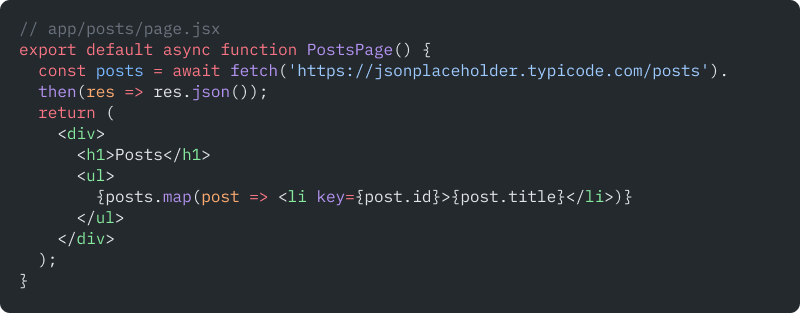
Create a file in the /app directory (e.g., /app/posts/page.jsx). By default, files here are Server Components.
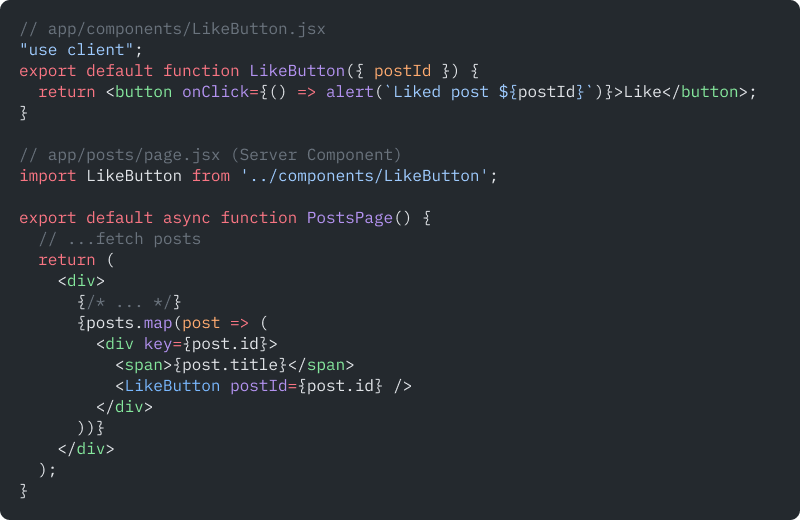
To use a Client Component, add the "use client" directive at the top of the file.
When deploying, ensure your hosting supports Node.js server execution (e.g., Vercel, Netlify with Next.js support). Test both server and client interactions, and use tools like React DevTools and Next.js' built-in analytics to verify RSC behavior.
Now that we've seen how to implement RSC in Next.js, the next question is: how do popular data libraries like React Query fit into this model?
Can they run inside Server Components?
Do we still need hydration?
Let's break it down.
One of the early challenges developers had was around compatibility with third-party libraries built for traditional React apps. However, recent advancements in frameworks like Next.js and updates in React have made it relatively easier for developers.
Browser-based libraries still work, but only inside Client Components. In a server-rendered setup, you need to use the "use client" to mark components that should run on the client side.
Plus, not all libraries work with React Server Components. If a library relies heavily on direct DOM access, it might not behave correctly. This usually means the library expects to run in the browser. In those situations, it's better to use server-side rendering tools like React Query or SWR.
Next.js latest versions also rolled out an improved fetch API that works smoothly with server components. With it, you can avoid using external libraries.

npm install @tanstack/react-query
Configure React Query in your Client Components, as React Query is primarily client-side.
In Server Components, fetch data directly using async/await. For shared logic, you can create utility functions or use libraries like SWR for server-side fetching.
// Server Component data fetching
See also: Best React State Management Libraries
Implement a theme context or use a CSS-in-JS library that supports SSR (e.g., styled-components, emotion). Store theme preference in cookies or headers.
Pass theme information from the server (via props or context) to Client Components. For example, read the theme from cookies in a Server Component and provide it to a Client Component.
Ensure the initial theme matches on both server and client to prevent hydration mismatches. Use consistent sources (cookies, headers) and avoid reading window or localStorage in Server Components.
When using Client Components within Server Components, follow these best practices:
By moving logic and data fetching to Server Components, you can reduce client bundle size by up to 30-50% in real-world apps. Compare bundle analyzer reports before and after migration.
Use <Suspense> boundaries to stream parts of the UI as soon as data is ready, improving perceived performance and user experience.
Keep sensitive operations (e.g., database queries, API keys) within Server Components to prevent exposure to the client.
Most migration guides make this sound straightforward. It isn't, but it's also not as painful as the React 18-era horror stories suggested.
By 2026, the tooling has caught up. Next.js 15, React 19, and the broader ecosystem have ironed out the sharp edges that made early RSC adoption a gamble. That said, migration still requires you to rethink how your component tree is structured, not just how your files are named.
Start with the right mental model
The most common mistake we see teams make: they try to convert components one by one without first drawing the client boundary. Don't. The first thing to do is identify which components actually need interactivity, onClick, useState, form inputs, browser APIs. Everything else is a candidate for the server.
In our experience, most apps have far fewer genuinely interactive components than developers assume. Usually it's 20–30% of the tree. The rest has been running on the client simply because that was the only option before.
A practical sequence that works
Start at the leaves, not the root. Convert the deepest, most isolated components first, data display components, static UI blocks, anything that just receives props and renders HTML. These are zero-risk RSC candidates.
Move up only after the leaf layer is stable. When you hit a component that imports useEffect or useState, that's your client boundary. Mark it 'use client' and stop there.
The part nobody warns you about
Third-party libraries. A significant portion of the npm packages your app depends on were written before RSC existed. They import browser globals, use useEffect internally, or export components that assume client-side rendering. When you hit one, and you will, the fix is to wrap it inside a Client Component, not to abandon the RSC approach.
One pattern we keep reaching for: create a thin *-client.tsx wrapper around any third-party component that needs browser access. The Server Component imports the wrapper; the wrapper handles the 'use client' boundary internally. Clean, contained, and easy to audit later.
What React 19 changes about migration
React 19 introduced improvements to how server and client components share data, particularly around Actions and the new use API for reading context and promises. If you're migrating from a codebase that used Redux or Zustand heavily, React 19's built-in patterns eliminate some of that complexity at the server layer. Worth reviewing before you decide how much of your state management layer to keep.
Migration timeline, honestly? For a mid-sized Next.js app (50–100 components), expect 2–4 weeks to get the boundaries right, not counting the third-party library audit. That audit alone has surprised teams before. Run it first.
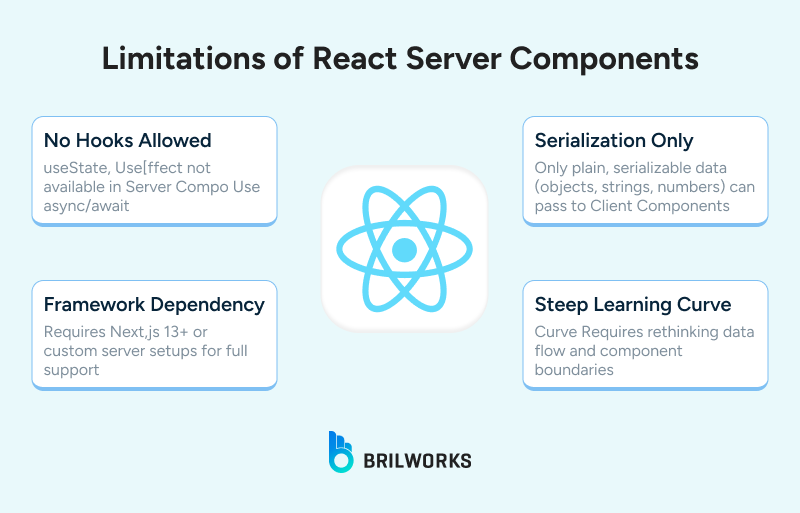
Here's the thing most RSC content won't tell you: server components are the default now, but default doesn't mean always correct.
Highly interactive UIs
If your component re-renders constantly in response to user input — think rich text editors, real-time collaborative tools, drag-and-drop interfaces, complex forms with live validation — RSC adds friction without adding value. These components live and breathe on the client. Trying to push them server-side doesn't reduce your bundle; it just creates awkward prop-passing chains that make the code harder to follow.
Apps with no server infrastructure
RSC requires a server. Not a CDN, not a static host — an actual Node.js runtime. If you're deploying a fully static site, a simple SPA, or shipping to an environment that doesn't support server execution, RSC is simply not available to you. Vercel and Netlify handle this transparently when you use Next.js. But if your deployment target is an S3 bucket or a basic shared host, RSC isn't in the picture.
Small apps where the complexity isn't justified
We'll say this plainly: if your app has 15 components and one data source, the RSC mental model — server components, client boundaries, serialization constraints, payload management, costs more than it returns. This is a pattern built for apps with real scale and real data-fetching complexity. Don't introduce it for a marketing site or an internal dashboard with two pages.
Teams that aren't ready for the boundary mindset
This one is less talked about. RSC requires everyone on the team to think in terms of boundaries, where does this component live, what can it import, what data can it receive? If your team is still onboarding to React or is unfamiliar with the client/server distinction, shipping RSC into production will produce subtle bugs that are genuinely difficult to debug. We've seen teams spend days tracing hydration mismatches that came down to one component importing the wrong thing across a boundary.
The technology is solid. The question is always whether it fits your team and your problem, not whether it's impressive enough to justify the complexity.
The RSC payload is simply a serialized stream of component data and props, delivered from the server to the client. It follows a custom protocol that allows the client to access only the necessary data for the component.

React Server Components are still in an evolving state, but they're already kicking off some paradigm shifts in how we think about rendering, and data flow in React apps. From how we set up an environment, to debugging, working with Server Components is all about adjusting your habits, not only your code.
If your team's exploring RSC in production or building something that needs to balance performance with flexibility, having developers who understand both the old and the new patterns can make all the difference.
Looking for React developers who've already worked with these ideas in the real world? Hire expert React developers today to modernize your React app with less front-end overload.
Yes, and meaningfully so compared to where it was at launch. React 19 and Next.js 15 have both stabilized the RSC model to the point where production adoption is no longer a gamble. The core APIs are settled, the tooling is mature, and the ecosystem has largely caught up on compatibility. That said, "stable" doesn't mean "simple" the client boundary model still requires deliberate thinking, especially in larger codebases.
Depends on what's hurting you. If your app has slow initial load times, a bloated JavaScript bundle, or heavy server-side data fetching happening on the client, RSC will address all three. If your app is small, mostly interactive, or your team is still ramping up on React fundamentals, migration introduces complexity that won't pay back quickly. Start by auditing how many of your components actually need client-side interactivity. If the answer is less than 30%, migration is worth scoping seriously.
Technically yes, but practically it's a significant undertaking. RSC requires tight integration between the bundler, the router, and the server runtime. Next.js 14+ handles all of that out of the box. Building that infrastructure yourself from scratch is possible — but unless you have a very specific reason to avoid Next.js, it's not a trade-off most teams should make in 2026.
Not entirely, but they do reduce the scope of what your state management needs to handle. Data that previously had to be fetched client-side and stored in global state can now live in Server Components entirely — which means libraries like Redux or Zustand become relevant only for genuinely client-side, interactive state. React 19's built-in Actions and the use API chip away at that further. Most apps migrating to RSC find they need significantly less state management overhead than before.
You might also like

Hello, we are BRILLIAN’S. Trying to make an effort to put the right people for you to get the best results. Just insight !