Last updated August 18, 2026
Is AWS for Data Engineering Actually Worth It?

9 mins read
Summarize with AI:


Data
AI
The Stack Underneath
If you are running data engineering on AWS, you already know the feeling of opening the monthly bill and not being able to explain half of it. AWS for a data engineer looks simple at the start, when you have data in S3 and one Glue job moving it somewhere useful. The trouble comes later, once the pipelines multiply and every new service adds another line to a bill nobody fully understands.
This happens because AWS hands you parts, and leaves the building to you. You get storage, compute, a warehouse, an orchestrator, and a dozen ways to connect them. What you do not get is anyone telling you which of those you actually need, or how much running them will cost once traffic grows.
This blog is about that gap. It covers why AWS became the default choice for cloud data engineering, where the platform gets genuinely hard to manage, how it compares to Snowflake and Databricks on cost and control, and whether native AWS still makes sense for a data team in 2026.
AWS became the default because it got there first and never gave teams a reason to leave. It launched S3 in 2006, years before most companies were thinking about cloud data at all, and by the time data engineering became a defined role, AWS already had a service for nearly every part of the job. Teams did not choose AWS on the merits of its data tools. They chose it because their applications already ran there, and keeping the data next to the app was the path of least resistance.
That head start matters less now than three things that keep teams on the platform.
You can build an entire data platform without leaving AWS. Storage sits in S3, transformation runs in Glue or EMR, the warehouse is Redshift, orchestration is Step Functions or managed Airflow, and analytics runs through Athena or QuickSight. Every service is designed to connect to the others through the same permissions system and the same billing account.
For a data engineer, that reduces the number of vendors, contracts, and integration points to manage. One login, one bill, one place to set access controls. When you are moving data between a cloud data warehouse and a data lake, both live inside the same platform, and the connection between them is something AWS already supports rather than something you have to broker between two separate providers.
The trade-off is that this convenience only holds while you stay inside AWS. The moment part of your stack lives elsewhere, the single-ecosystem benefit weakens.
AWS handles growth without forcing a replatform. A pipeline that processes a few gigabytes a day runs on the same core services as one processing terabytes, and most of that scaling happens by changing configuration rather than rebuilding the system. S3 has no practical storage ceiling, Lambda spins up more concurrent executions as load rises, and Redshift lets you resize clusters or move to serverless when query volume grows.
For an early-stage company, this means the data stack built in year one does not have to be thrown away in year three. The same architecture that served a startup can serve it through several rounds of growth, which is a large part of why AWS data engineering appeals to teams that expect to scale fast.
The catch is that scaling on AWS is automatic in capacity but not in cost. The system grows with you. So does the bill, often faster than expected.
AWS meets the security and compliance requirements that most enterprises demand before they will put data anywhere. It holds certifications across SOC, ISO, HIPAA, PCI DSS, and the major regional frameworks, which means a data team in fintech or healthcare can build on it without having to prove the underlying platform is compliant from scratch. That approval already exists.
Access control runs through IAM, which lets you define permissions down to a single action on a single resource. Encryption is available for data at rest and in transit across every storage and database service. For regulated industries, this depth is often the deciding factor, because the platform clears the compliance bar that a smaller provider cannot.
The same granularity that makes IAM powerful also makes it one of the hardest parts of AWS to get right, which is a problem the next section gets into.
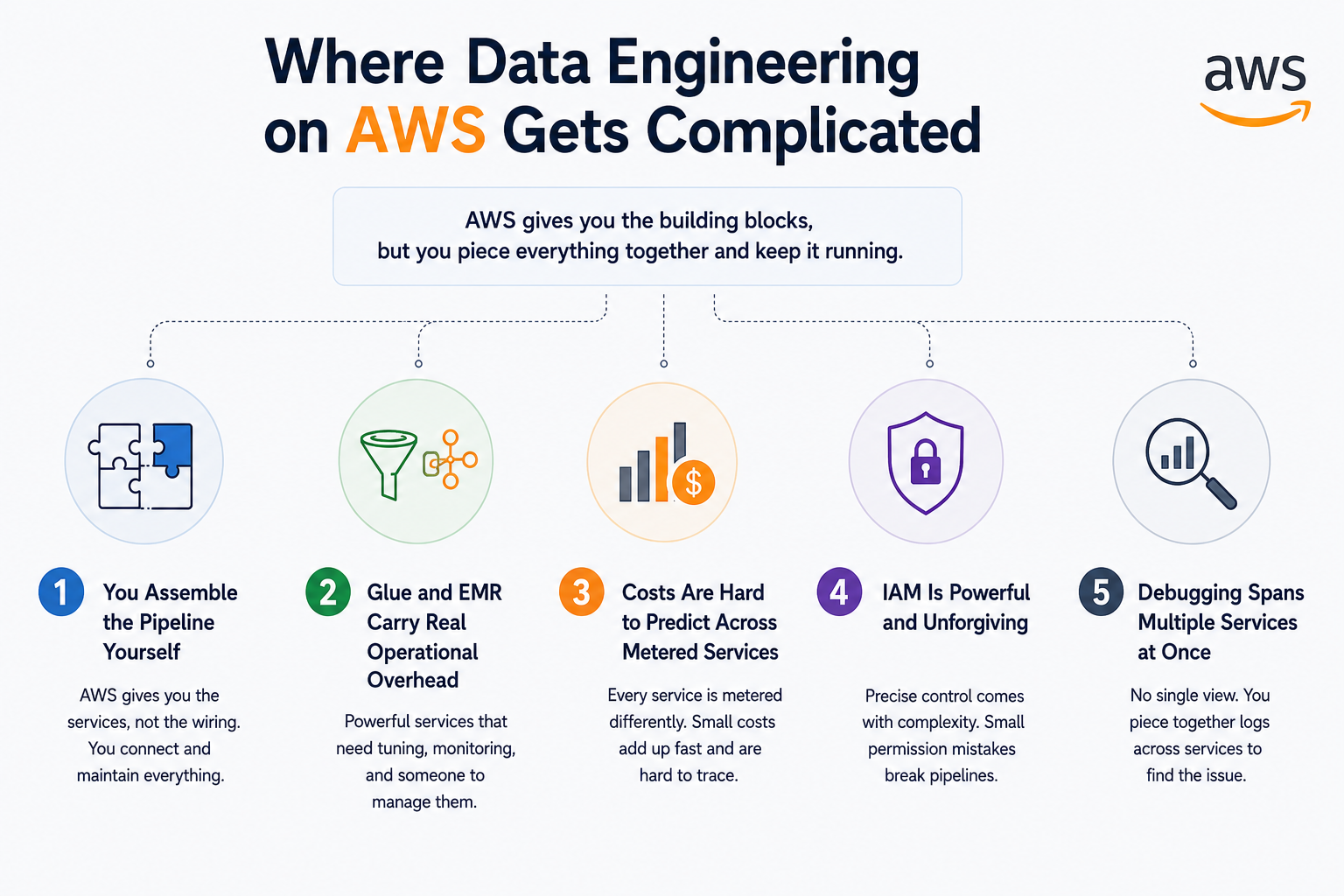
The same flexibility that makes AWS powerful is what makes it hard to run. AWS gives you building blocks and assumes you know how to assemble them, tune them, and keep them from quietly draining money. For a small team without a dedicated platform engineer, that assumption is where the trouble starts.
AWS gives you the services but not the wiring between them. Getting data from source to warehouse means connecting S3, Glue, a catalog, maybe Lambda, maybe EMR, then Redshift, and each connection is configuration you write and maintain yourself. Nothing arrives pre-integrated. A managed platform hands you a working pipeline on day one, while AWS hands you the parts and a documentation link. The build is yours, and so is every future change to it.
Glue and EMR are powerful, and both demand attention that catches teams off guard. Glue jobs need tuning for worker count, memory, and job bookmarks, and a misconfigured job either fails silently or bills you for capacity it never used. EMR is heavier still, since you are running Spark clusters that need sizing, monitoring, and shutting down when idle. Leave an EMR cluster running over a weekend by mistake and you will see it on the bill. This is managed infrastructure that still needs a manager.
AWS meters almost everything separately, which makes the total bill nearly impossible to forecast. S3 charges for storage, requests, and data transfer out. Glue charges by the second of compute. Redshift charges for the cluster whether or not it runs a query. Athena charges per terabyte scanned, so one badly written query against an unpartitioned table can cost more than a day of normal use. Each service is cheap to start and the combined bill grows in ways that are hard to trace back to a cause, which is why cost control becomes its own workstream in AWS data engineering.
IAM gives you precise control and punishes small mistakes. Permissions run down to individual actions on individual resources, which is exactly what regulated industries need. The cost of that precision is complexity. A pipeline that will not run is often an IAM policy missing one permission, and a security gap is often an IAM role granted more access than it needed. Debugging permission errors across five services that each need their own role is a normal part of the work, and it consumes far more time than most teams plan for.
A single failed pipeline can involve four or five services, and AWS gives you no single place to see the whole thing. When a job breaks, the cause could sit in the Glue script, the IAM role, the S3 event trigger, the Redshift load step, or the orchestration layer. Logs live in CloudWatch, spread across separate log groups, and stitching them into one timeline is manual work. There is no unified view of a pipeline from end to end, so tracing a failure means checking each service in turn until you find the break.
The three platforms solve the same problem and charge you in different currencies. AWS charges you in engineering effort, Snowflake charges a premium for taking that effort away, and Databricks charges for a unified engine built around large-scale processing. The question is not which is best. It is which cost you would rather carry.
Here is how the three stack up on the factors that usually decide it.
|
Factor |
AWS |
Snowflake |
Databricks |
|
What you manage |
The full stack, service by service |
Almost nothing |
The workspace and clusters |
|
Best suited to |
Teams with engineering depth |
Teams wanting a warehouse that just works |
ML and heavy processing workloads |
|
Pricing model |
Per service, metered separately |
Separate compute and storage credits |
Compute per second, DBU-based |
|
Setup effort |
High, you build it |
Low, load and query |
Medium, configure and run |
|
Cost at high steady volume |
Lowest if tuned well |
Can climb fast |
Moderate, scales with compute |
|
Main strength |
Control and flexibility |
Simplicity |
Unified analytics and ML |
AWS gives you raw services and expects you to build the platform yourself. You get the pieces:
S3 for storage
Glue and EMR for processing
Redshift for warehousing
Connecting them into a working platform is your job. The upside is control, since you decide how every piece fits and pay only for what you run. The cost is time, because someone owns the assembly and maintenance for the life of the system.
Best for teams with real engineering depth who want to own their stack.
Snowflake removes the infrastructure work and charges you for the convenience. You load data and run queries, and it handles the scaling and tuning underneath. Compute and storage are billed separately, so you pay for query time and stored volume with no servers to manage.
The premium is real. At high and steady query volumes, that convenience can cost more than running your own infrastructure would. Knowing where a data lake and a data warehouse each fit is usually the first decision that shapes which platform earns the budget.
Best for teams that want warehouse power without a platform engineer.
Databricks is built around the lakehouse, combining data lake storage and warehouse-style querying in one system. It runs on Spark and is strongest when the work involves large-scale processing, machine learning, and data science alongside standard analytics.
For workloads that lean heavy on transformation and ML, Databricks does in one platform what would take several separate AWS services to replicate. The trade-off is specialization. For a team that only needs a straightforward warehouse and some scheduled jobs, it can be more engine than the work requires.
Best for teams running ML and heavy processing, not just analytics.
Every decision between these three comes down to how much of the work you want to own. AWS gives the most control and asks for the most effort. Snowflake gives the least operational burden and charges a premium for it. Databricks sits between the two on effort while adding processing power the others do not match at scale.
There is no answer that holds across every team. Only the tradeoff that fits your workload, your budget, and whether you have someone to run the platform. A closer comparison of these data platforms helps once you know which side of that line you sit on.
Sometimes, and only when you have the team to run it well. Native AWS has the lowest sticker price of the three platforms, but the sticker price is not the real cost. The real cost is infrastructure plus the engineering time to build and maintain it, and once you add the second number, the answer stops being obvious.
On raw infrastructure, AWS is the cheapest of the three. You pay per service at metered rates, with no managed-platform premium sitting on top. S3 storage is cheap, Redshift is priced below most managed warehouse equivalents, and if your jobs are tuned well you pay only for the compute you actually use.
The savings are real but conditional. They hold only when someone is watching the meters, sizing clusters correctly, and shutting down idle resources. An untuned AWS setup can cost more than a managed platform that at least prevents obvious waste.
Cheapest on paper, if the paper is well managed.
This is the number most teams leave out. AWS needs a person, and often more than one. Someone has to build the pipelines, tune the jobs, manage IAM, watch the bill, and debug failures across services, and that time is a salary, not a line on the AWS invoice.
A managed platform folds much of that work into its price. With AWS you pay it separately, in headcount. For a small team, one engineer spending half their week keeping the platform alive can easily outweigh whatever was saved on infrastructure.
The invoice is only half the bill. Payroll is the other half.
Total cost is infrastructure plus engineering plus the cost of getting it wrong. Judged that way, native AWS is cheapest for teams that already have platform engineering skill, and often the most expensive for teams that do not. A migration onto or off the platform adds its own cost too, and planning a cloud data migration properly is often where the hidden expense of switching platforms shows up.
Here is the shape of the true cost, not the sticker price.
|
Cost driver |
Native AWS |
Managed platform |
|
Infrastructure |
Lowest, if tuned |
Higher, premium built in |
|
Engineering time |
High, you own it |
Low, priced into the service |
|
Cost of misconfiguration |
Falls on you |
Largely absorbed |
|
Predictability |
Low, many metered services |
Higher, simpler billing |
|
Cheapest when |
You have the team to run it |
You do not |
AWS makes more sense when you have the engineering depth to run it and a reason to keep everything on one platform. It rewards teams who can own the infrastructure and punishes teams who cannot, so the honest answer depends less on the technology and more on who is sitting at the keyboard.
Reach for native AWS when:
Your application already runs on AWS, and keeping the data next to it avoids moving everything across providers
You have a data engineer or platform engineer who can build and maintain the stack
You need fine control over cost and configuration, down to individual services
Your compliance requirements are already met by AWS certifications, which matters in fintech and healthcare
Your workloads vary enough that per-service metering works out cheaper than a flat managed premium
You expect to scale fast and want a stack that grows without a replatform
The common thread is capability. AWS is the right call for teams equipped to run it, and the wrong one for teams hoping the platform will run itself.
Look beyond native AWS when the engineering cost of running it outweighs what you save. The platform stops being the cheaper option the moment you are spending more on the person managing it than a managed service would have cost outright, and that line arrives sooner than most teams expect.
The signals that you have crossed it:
You have no one on the team who can own the platform, and pipelines break faster than they get fixed
The monthly bill keeps climbing and nobody can trace which service is driving it
Your engineers spend more time maintaining infrastructure than building anything with the data
You need a warehouse running this week, not a stack assembled over the next quarter
Your workload is heavy on machine learning or large-scale processing, where a lakehouse engine does in one place what AWS needs several services to match
None of these mean AWS was the wrong starting point. They mean the platform has grown past what your team can carry, and a managed alternative would buy back the time you are now spending just to keep it running.
Yes, if you have the people to run it. That caveat is doing more work in 2026 than it used to.
AWS itself has not slipped. It is still the most flexible way to build a data stack, still the cheapest on raw infrastructure, and still the platform that scales furthest without forcing a rebuild. The problem is that Snowflake and Databricks have spent the last few years quietly removing the exact work that makes AWS expensive to run, and they have gotten good at it. A managed platform that took a serious engineering effort to justify against AWS three years ago now stands up in an afternoon.
So the calculation has shifted. For a team with a capable platform engineer, none of this changes the answer. You get more control and a lower bill by staying on AWS, and the time cost is one you can absorb. Stay where you are.
For everyone else, 2026 is the year it gets harder to defend. If you are paying an engineer's salary mostly to keep pipelines from falling over, a managed platform is probably cheaper once you count that salary honestly. AWS is not the wrong choice here. It is just no longer the obvious one.
The choice was never really about AWS. It was about whether your team is built to run it.
AWS gives a data engineer more power and more control than any managed platform, and it charges for that in the one currency teams forget to budget: engineering time. If you have that time and the skill to use it well, native AWS is still the strongest and cheapest way to build. If you do not, the bill you save on infrastructure comes back as a salary, and Snowflake or Databricks will often work out cheaper once you count it honestly.
So before committing either way, be honest about who is going to run the thing. That single answer decides more than any feature comparison will.
If you are weighing that decision and want a second opinion from a team that builds these platforms for a living, our data engineering services are built around exactly this kind of call.
A data engineer uses AWS to store, move, and process data across a pipeline. That usually means S3 for storage, Glue or EMR for transformation, Redshift for warehousing, and services like Athena and Kinesis for querying and streaming.
Start with S3, Glue, Redshift, and IAM, since almost every pipeline touches those four. Once those are comfortable, add Athena for querying, Lambda for event-driven jobs, and a streaming service like Kinesis.
It depends on whether you have someone to run the platform. AWS gives more control and lower infrastructure cost but needs an engineer to manage it, while Snowflake handles the operational work for you at a higher price.
No, the certification is not required, but it helps prove baseline knowledge if you are early in your career or moving into a data role. Most teams weigh real project experience more heavily than the certificate itself.
AWS has the lowest infrastructure cost of the major platforms, but the total cost includes the engineering time to build and maintain it. A well-managed setup is cheap, while an untuned one can cost more than a managed alternative.
You might also like

Hello, we are BRILLIAN’S. Trying to make an effort to put the right people for you to get the best results. Just insight !