Last updated June 24, 2026
Databricks Pricing Explained: What You'll Actually Pay

5 mins read
Summarize with AI:


Data
AI
The Stack Underneath
You search for "databricks pricing" expecting a number. What you get instead is a page about Databricks Units, a pricing calculator, and three different cloud providers, none of which tells you what you'll actually pay each month. That's not an accident. The platform charges for what you run, not a flat seat, so there's no sticker price to hand you up front.
Here's the part nobody states plainly. Your bill has two halves that show up separately, the rate changes based on which kind of work you run, and the single most expensive mistake costs nothing to fix once you spot it. Most teams find all of this out from their first invoice instead of before it.
This breaks down how the pricing model works, what drives the number up, what a real monthly bill looks like for a small team versus an enterprise, and where the money leaks. The numbers only make sense once you know what Databricks is and the lakehouse architecture underneath it, which is where the DBU model comes from in the first place. By the end you'll be able to estimate your own spend and walk into a deployment knowing where the bill comes from.
Databricks runs on a pay-as-you-go model. No monthly subscription, no per-seat license, no upfront commitment. You're billed for the compute you consume, measured in the platform's own currency, which is why two companies running Databricks can pay wildly different amounts for the same software.
Your Databricks bill is not one number. It's two, billed by two different companies, and missing the second one is the most common reason a first estimate comes in low.
|
Cost layer |
Who charges you |
What it covers |
|
DBU charges |
Databricks |
The software itself, measured in Databricks Units consumed |
|
Cloud infrastructure |
AWS, Azure, or GCP |
The actual machines and storage doing the work |
Every Databricks job runs on virtual machines rented from your cloud provider, billed at standard cloud rates that are completely separate from anything Databricks charges. That cloud layer typically works out to somewhere between 30 and 50 percent of total spend, so if you price only the DBUs and forget the machines underneath, you'll under-budget by roughly a third before running a single job.
A DBU is not a dollar amount and not a fixed unit of hardware. It's a normalized measure of processing power consumed per hour, closer to a kilowatt-hour for compute than to a price tag. It lets Databricks charge consistently whether you're running a tiny notebook or a massive GPU cluster.
The part that catches people: the same raw horsepower burns DBUs at different rates depending on what you're doing with it. Run an automated job and you pay one rate. Run an interactive notebook on the identical machine and you pay several times more. Two things set that rate, the type of workload and the edition tier your workspace is on, and everything else on your bill flows from those two dials.
Five things move the number more than anything else. The pattern worth memorizing before you read the table: compute is where the money goes, storage almost never is.
|
Factor |
Impact on cost |
Why |
|
Compute usage |
Highest |
More machines, bigger machines, longer-running jobs. Idle clusters are the classic leak |
|
Workload type |
High |
Interactive notebooks cost 3–4x what automated jobs do, same hardware |
|
Edition tier |
Moderate to high |
Premium and Enterprise charge a higher DBU rate than the now-retired Standard |
|
Cloud provider |
Varies |
Underlying machine prices differ across AWS, Azure, and GCP, and so do regions |
|
Storage |
Low |
Cheap object storage on S3, ADLS, or GCS. Processing data costs far more than holding it |
The teams that get surprised by their first invoice almost always got surprised on the top two rows. Storage is rarely the problem. A cluster someone left running over the weekend is.
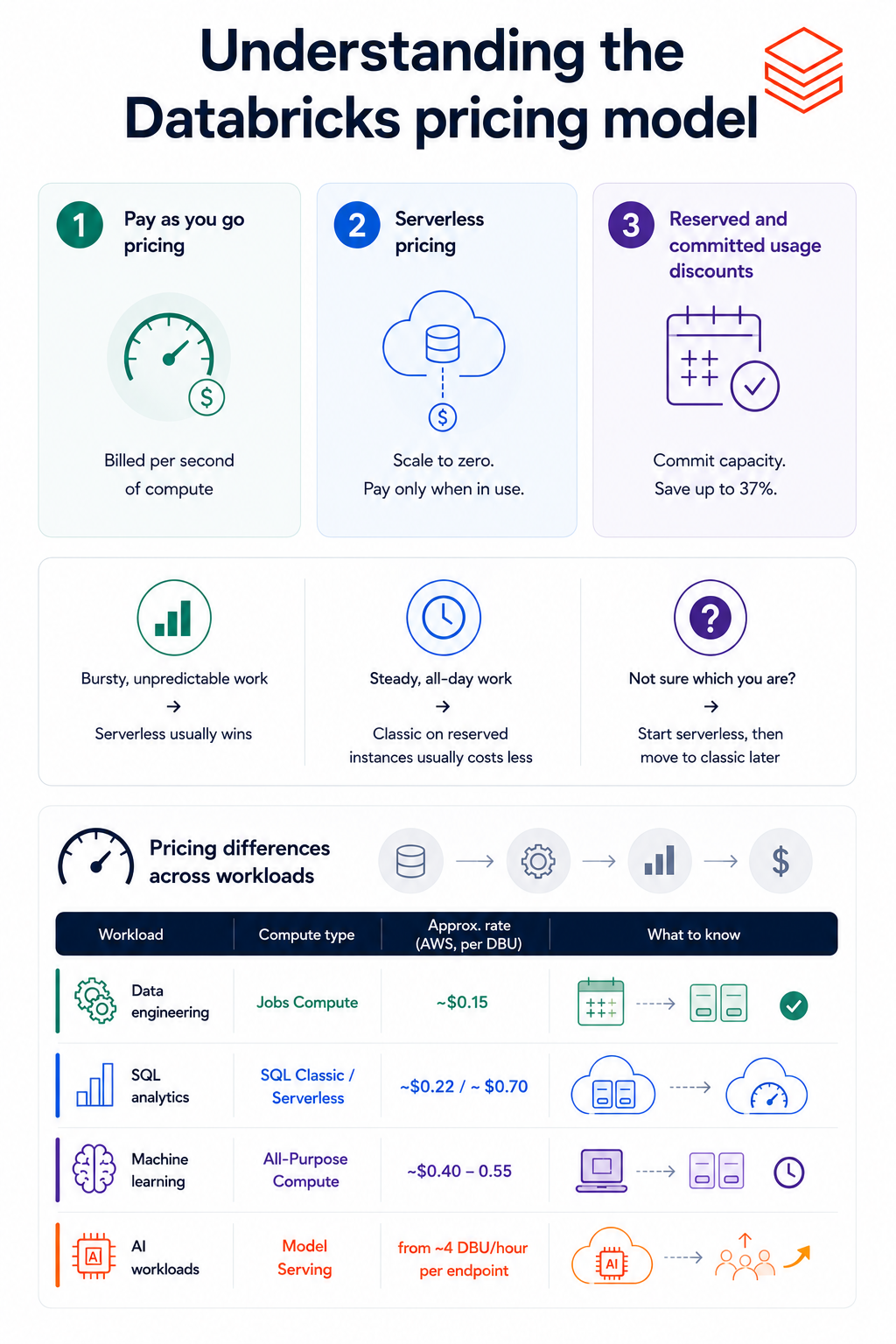
The base model is pay-as-you-go, but it isn't the only way to pay, and the DBU rate shifts depending on which kind of work you run. Three payment options, then the dial that moves your bill the most.
The default, and the right starting point. No commitment, billed per second of compute. This is the right call while you're still learning your own usage, because you can't intelligently commit to a discount until you've watched a few months of real consumption first.
Databricks runs the compute on its own infrastructure here, so the cloud VM charge folds into one DBU rate (typically $0.35–0.95) instead of arriving as a separate bill. The rate looks higher, but it already includes the machine. What makes it often win is scale-to-zero. A serverless warehouse stops billing the instant a query finishes, while a classic cluster sitting idle keeps charging you.
Bursty, unpredictable work → serverless usually wins, since you're not paying for idle time.
Steady, all-day work → classic on reserved instances usually costs less.
Not sure which you are? Start serverless, then move to classic later if the usage data proves it saves money.
Once consumption is large and predictable, you can pre-purchase capacity at a discount. On Azure these are Databricks Commit Units (DBCUs), bought for one or three years, and they cut up to 37 percent off pay-as-you-go rates. AWS and GCP run comparable structures. The part most teams skip is timing. Don't commit until you have six months of usage history to anchor the forecast, because if you commit to a number you can't hit, the discount turns into shelfware you've already paid for.
This is the dial that moves your bill the most, and the one most teams never think to touch. The same computation costs a different amount depending on the compute type you run it on. Same machine, different rate.
|
Workload |
Compute type |
Approx. rate (AWS, per DBU) |
|
Data engineering |
Jobs Compute |
~$0.15 |
|
SQL analytics |
SQL Classic / Serverless |
~$0.22 / ~$0.70 |
|
Machine learning |
All-Purpose Compute |
~$0.40–0.55 |
|
AI workloads |
Model Serving |
from ~4 DBU/hour per endpoint |
Data engineering: Scheduled pipelines belong on Jobs Compute, the cheapest category. Clusters terminate when the job ends, so there's no idle tail left running.
SQL analytics: Classic runs in your own cloud account at a lower rate; serverless costs more per DBU but scales to zero between queries.
Machine learning: Interactive notebooks run on All-Purpose Compute, the most expensive type. The trap is leaving these clusters running through lunch.
AI workloads: Model serving deploys a trained model as an endpoint, billed on its compute profile and concurrency. GPU serving scales up fast.
One number is worth taking from here. Running production ETL on All-Purpose instead of Jobs Compute costs three to four times more for the same work, with no change to the hardware. We'll fix that in the optimization section.
AWS is the reference point. Widest feature set of the three clouds, usually the cheapest rates, with US East (N. Virginia) typically the lowest-cost region. If you see a DBU rate quoted with no cloud attached, it's almost always the AWS number.
|
Compute type |
DBU rate |
Use case |
|
Model Serving |
$0.07 |
Foundation Model APIs (cheapest per-DBU) |
|
Jobs Compute |
$0.15 |
Production batch pipelines |
|
Lakeflow Declarative Pipelines |
$0.20 |
Managed ETL |
|
SQL Classic |
$0.22 |
BI on classic warehouses |
|
Serverless jobs / pipelines |
$0.40 |
Serverless jobs (compute included) |
|
All-Purpose Compute |
$0.40–0.55 |
Interactive notebooks (2.7–4x Jobs) |
|
SQL Serverless |
$0.70 |
Managed SQL warehouses (compute included) |
AWS is the reference point. Widest feature set of the three clouds, usually the cheapest rates, with US East (N. Virginia) typically the lowest-cost region. If you see a DBU rate quoted with no cloud attached, it's almost always the AWS number.
Azure is the odd one out, in a way that works in your favor if you already live in the Microsoft ecosystem. Azure Databricks is a first-party Microsoft service, not a third-party tool bolted on. You get one unified bill from Microsoft instead of separate Databricks and cloud charges, plus native integration with Data Lake Storage, Synapse, and Entra ID. For a team already on Azure, that single-vendor billing is the main reason to run it here.
|
Compute type |
DBU rate |
Use case |
|
Model Serving |
$0.07 |
Foundation Model APIs (cheapest per-DBU) |
|
Jobs Compute |
$0.15 |
Production batch pipelines |
|
Lakeflow Declarative Pipelines |
$0.20 |
Managed ETL |
|
SQL Classic |
$0.22 |
BI on classic warehouses |
|
Serverless jobs / pipelines |
$0.40 |
Serverless jobs (compute included) |
|
All-Purpose Compute |
$0.40–0.55 |
Interactive notebooks (2.7–4x Jobs) |
|
SQL Serverless |
$0.70 |
Managed SQL warehouses (compute included) |
Rates track AWS closely. What's different on Azure is everything around them.
There's one naming quirk that confuses everyone. The Premium tier on Azure corresponds functionally to what AWS and GCP call Enterprise — same capability, different label. Compare an Azure quote against an AWS quote tier-for-tier by name and you'll mismatch them.
And one deadline that still bites: Standard tier is being retired. New Standard workspaces were blocked on April 1, 2026, and the rest get auto-upgraded to Premium by October 1, 2026 — roughly a 35 percent rate jump. If you're still on Standard, budget for it now. The tradeoffs that decide between clouds are the same ones behind any AWS versus Azure decision, and they usually come down to where your data and team already sit, not the DBU rate.
GCP follows the same model as AWS, consumption-based, per second, Premium as the baseline since Standard retired in October 2025.
|
Compute type |
DBU rate |
Use case |
|
Model Serving |
$0.07 |
Foundation Model APIs (cheapest per-DBU) |
|
Jobs Compute |
$0.15 |
Production batch pipelines |
|
Lakeflow Declarative Pipelines |
$0.20 |
Managed ETL |
|
SQL Classic |
$0.22 |
BI on classic warehouses |
|
Serverless jobs / pipelines |
$0.40 |
Serverless jobs (compute included) |
|
All-Purpose Compute |
$0.40–0.55 |
Interactive notebooks (2.7–4x Jobs) |
|
SQL Serverless |
$0.70 |
Managed SQL warehouses (compute included) |
Same rates as the other two. The catch on GCP isn't price, it's coverage. Not every Databricks product ships here, Lakebase, the managed Postgres for agents, and the GPU AI Runtime for heavy model serving are both currently absent. If your roadmap runs toward AI agents or GPU-served models, confirm the products you need are live on GCP before you choose it on cost alone.
There's no monthly subscription to quote you, which is exactly why this question gets Googled so much. You don't buy a seat or a tier. You pay for the compute you burn, so two companies the same size can land thousands of dollars apart depending on how they run their workloads.
One reality check before the numbers. Everything below is the full cost, DBUs plus the cloud infrastructure underneath, because quoting only the DBU line is how teams underestimate by 30 to 50 percent. If a calculator says $1,000, budget $2,000 to $3,000.
|
Profile |
Typical setup |
Realistic monthly cost (all-in) |
|
Small analytics team |
5 analysts, one SQL warehouse, light volume |
Low hundreds |
|
AI startup |
Jobs + notebooks + some serverless, Premium |
Low thousands |
|
Enterprise platform |
Multi-team ML, streaming, 1,000–5,000 DBUs |
$7,500–$45,000+ |
What each profile should watch:
Small team: the Free Edition or trial credits can cover early experimentation before you pay anything. The bill only climbs when the warehouse runs all day.
AI startup: the interactive notebooks are the quiet leak, since All-Purpose Compute is the priciest rate and clusters get left running between sessions.
Enterprise: committed-use discounts pull the effective rate down 20 to 40 percent. At this scale negotiation isn't optional, it's where the real money is saved.
The band you land in is set by behavior more than headcount. Two teams of the same size diverge mostly on whether someone is watching the clusters. To pin down your own number, the Databricks Pricing Calculator models DBU consumption by workload. Add 50 to 100 percent for the infrastructure it leaves out.
Paid at its core, with a genuinely free way in that isn't a trial clock ticking down. Running real workloads costs real money, but two free routes are worth knowing before you put a card down, and they serve different purposes.
The one most people miss, because it used to be called something else. Community Edition was retired on January 1, 2026, and Free Edition replaced it. It's perpetually free, no credit card, no expiry, built for students and anyone learning the platform. You get a serverless workspace to build pipelines, train models, query data, even experiment with agents.
The catch is the license, not the clock. Free Edition is personal-use only, explicitly not for commercial work, and runs in a quota-limited, serverless-only environment. Fine for learning. Not a way to run your company's data on the house.
The route for evaluating Databricks on real, commercial workloads. You get 14 days and up to $400 in credits, no card to start, full platform access. The clock ends whichever comes first, the 14 days or the $400, then the account converts to pay-as-you-go.
One thing teams forget: the credits cover Databricks' DBU charges, but if you run on your own cloud account, your provider still bills you for the VMs and storage underneath. The trial frees the Databricks layer, not the whole stack.
After the trial there are no plans in the seat-and-tier sense. You're on pay-as-you-go, billed per second for the DBUs you consume, Premium as the baseline and Enterprise above it for regulated workloads. Commit to a year or more of predictable usage and you trade flexibility for up to 40 percent off. That's the model. The meter, plus an optional discount for committing to it.
We covered the obvious driver already, compute. These are the lines that don't show up in a DBU estimate and surprise you on the invoice.
Data transfer (egress): Moving data between regions, or out of your cloud entirely, triggers egress fees from your provider that have nothing to do with Databricks. Multi-region setups bite hardest. Keep your workspace in the same region as your data and most of it disappears.
Model inference: Serving a model in production isn't a one-time training cost, it's a meter that runs every time the model is called. GPU serving scales fast, from a small single-GPU endpoint up to multi-GPU setups that burn DBUs an order of magnitude quicker. If your roadmap includes AI agents or live serving, this grows with usage in a way batch jobs never do, the same economics behind the cost of building AI agents on any platform.
Support fees: Enterprise support contracts run 12 to 30 percent of license costs and are easy to overlook when you're modeling DBUs. They're negotiable. Some teams have pushed support from 15 percent down to 12, and a few buying through the Azure marketplace have had them waived.
Calculator blind spots: The official calculator models only the DBU layer. It won't show your VMs, storage, or egress, which is why its number can land 50 percent or more below the real bill. Useful tool, partial answer.
None of these appear when you price the compute, and together they're how a $1,000 estimate becomes a $2,500 invoice.
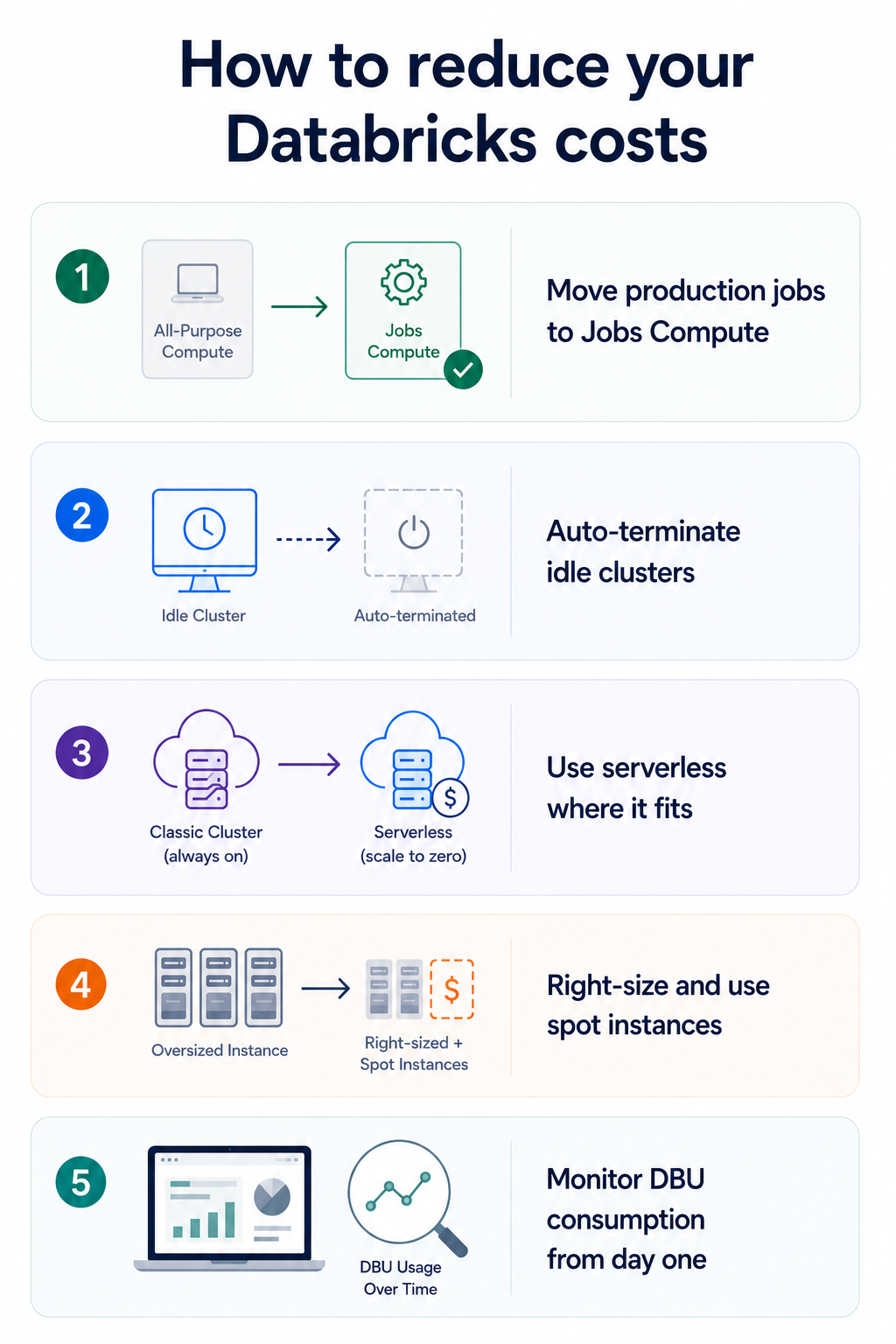
Most overspending traces back to a handful of habits, not the platform being expensive. Here are the five fixes that move the bill the most, roughly in order of how much they save for how little effort.
The single highest-ROI change, and the one we keep coming back to. Running a scheduled pipeline on All-Purpose Compute instead of Jobs Compute costs three to four times more for identical work. Audit what's running on All-Purpose, and move every automated job off it. This one reclassification often cuts a bill more than the other four combined.
The classic leak. Someone opens a notebook, runs a cell, walks away, and an All-Purpose cluster bills all afternoon for nothing. Set auto-termination on every interactive cluster, 15 to 30 minutes of inactivity is the usual window. Idle and misassigned clusters together can waste 40 percent or more of total spend, and this is the half-minute setting that stops it.
For bursty or intermittent work, serverless scales to zero between runs, so you stop paying for a warm cluster sitting idle waiting for the next query. The per-DBU rate is higher, but for spiky workloads the elimination of idle time usually wins on total cost. Steady all-day workloads are the exception, where classic on reserved instances still comes out cheaper.
Match the machine to the job instead of provisioning for peak. Start with the smallest cluster that does the work and let autoscaling add power only when a job genuinely needs it. For non-critical workloads, spot instances (Spot VMs on Azure, Preemptible VMs on GCP) cut the cloud hardware bill by 60 to 90 percent, with the tradeoff that they can be reclaimed mid-job.
You can't cut what you can't see. Track what's burning DBUs from the first workload, not after the first surprise invoice, using the platform's own usage system tables. Tag workloads by team or project so the bill is legible, and once you have six months of steady history, a committed-use contract takes another 20 to 40 percent off the rate.
The thread through all five: Databricks costs are controllable, but only if someone owns watching them. The platform will not economize for you. Left unattended, it faithfully bills you for every idle cluster and oversized job until someone decides to look.
Comparing data platform prices straight across is a trap, because they don't bill the same way. Databricks meters DBUs, Snowflake sells credits, BigQuery charges by data scanned. The number that matters is which model fits your workload, not whose per-unit rate looks lowest. Here's how the three line up.
|
Platform |
How you're billed |
Pricing transparency |
Cheapest for |
Watch out for |
|
Databricks |
DBUs + cloud infra, per second |
Complex (two bills) |
Batch ETL, ML, streaming at scale |
Needs Spark expertise to optimize |
|
Snowflake |
Credits ($2–4 each) + storage |
Clear, per-second |
Multi-team SQL/BI with concurrency |
Idle warehouses add up fast |
|
BigQuery |
$5–6.25 per TB scanned |
Very clear |
Sporadic, ad-hoc analyst queries |
One bad query on an unpartitioned table |
A few takeaways the table can't hold. Databricks wins when SQL meets machine learning, and loses when all you need is dashboards. Snowflake is the easiest to operate for analyst-heavy teams, but runs several times pricier for ML work. BigQuery is cheapest for spiky, occasional querying, right up until someone scans an unpartitioned table.
One structural difference worth flagging. Your Databricks data lives in your own cloud storage in Delta Lake, so leaving doesn't mean paying egress to extract it from a closed warehouse. That isn't true of the other two, and it's real money over time.
So don't pick on sticker price. Model your actual top workloads on a trial of each, because the same three platforms can finish in any order depending on what you run.
It depends on the shape of your data problem, and the split is clean.
|
Worth it when |
Overkill when |
|
Data arrives in volume from many sources |
It fits in a single database |
|
Engineers, analysts, and scientists share it |
A few people run simple reports |
|
You're doing serious ML and AI work |
No ML on the horizon |
|
Your data is scattered and copies disagree |
One team, modest needs, no time for a learning curve |
Three or more on the left, and the pricing stops looking expensive next to the cost of running three separate systems. Mostly on the right, and you'll pay for power you never touch.
One thing the rate cards won't tell you. Databricks is rarely expensive by design, but easy to make expensive by accident. It won't economize for you. With workload-type discipline and someone watching the meter, the model pays back fast. Without that, it bills you for every idle cluster while you work it out.
So name the bottleneck you want gone, run it where your data already lives, and put real numbers on the trial before you commit. What you pay is set less by the platform than by how well Databricks fits the problem you're actually solving.
If that problem is scattered data, or an AI project stuck behind it, that's the work Brilworks does. A short conversation will tell you whether Databricks is the right foundation or whether something lighter gets you there cheaper.
DBU rates are nearly identical across all three. The real difference is structure: Azure bills everything through Microsoft on one invoice, while AWS and GCP split Databricks and cloud charges. AWS usually has the lowest-cost regions, but your existing cloud should decide it, not the rate.
The official calculator only counts DBU charges. It leaves out cloud VMs, storage, and egress, which add 50 to 100 percent on top. A $1,000 calculator estimate usually means a $2,000 to $3,000 real bill once infrastructure is included.
DBUs are what Databricks charges for its software, measured per second of compute. Cloud costs are what AWS, Azure, or GCP charges for the actual machines and storage running the work. You pay both, and the cloud layer is often 30 to 50 percent of total spend.
The fastest win is moving production pipelines off All-Purpose Compute onto Jobs Compute, which costs three to four times less for the same work. After that, set auto-termination on idle clusters and right-size your compute before committing to anything bigger.
The 14-day trial gives up to $400 in credits covering Databricks' DBU charges, with no card required to start. If you run on your own cloud account, your provider can still bill you for the VMs and storage underneath, so the trial isn't always fully free.
You might also like

Hello, we are BRILLIAN’S. Trying to make an effort to put the right people for you to get the best results. Just insight !