Most teams don't struggle to move data. They struggle to move it reliably, at the volume they actually have, without an engineer babysitting the process at 2 a.m. That gap is what data pipeline tools exist to close, and picking the wrong one is how a six-month project turns into a rebuild.
The market doesn't make it easy. Ingestion tools, transformation tools, orchestrators, streaming platforms, cloud-native services, all of them overlap in ways the marketing pages never admit. A tool that fits a team loading a few SaaS sources into a warehouse is the wrong tool for a team processing millions of events a second. Both are called "data pipeline tools." Neither works for the other job.
This guide walks through what a data pipeline tool actually does, the categories they fall into, and eleven of the strongest options in use today, including where each one fits and where it starts to cost you. The tooling is only half the picture, since the data pipeline development process itself determines which tools you'll even need.
What Is a Data Pipeline Tool?
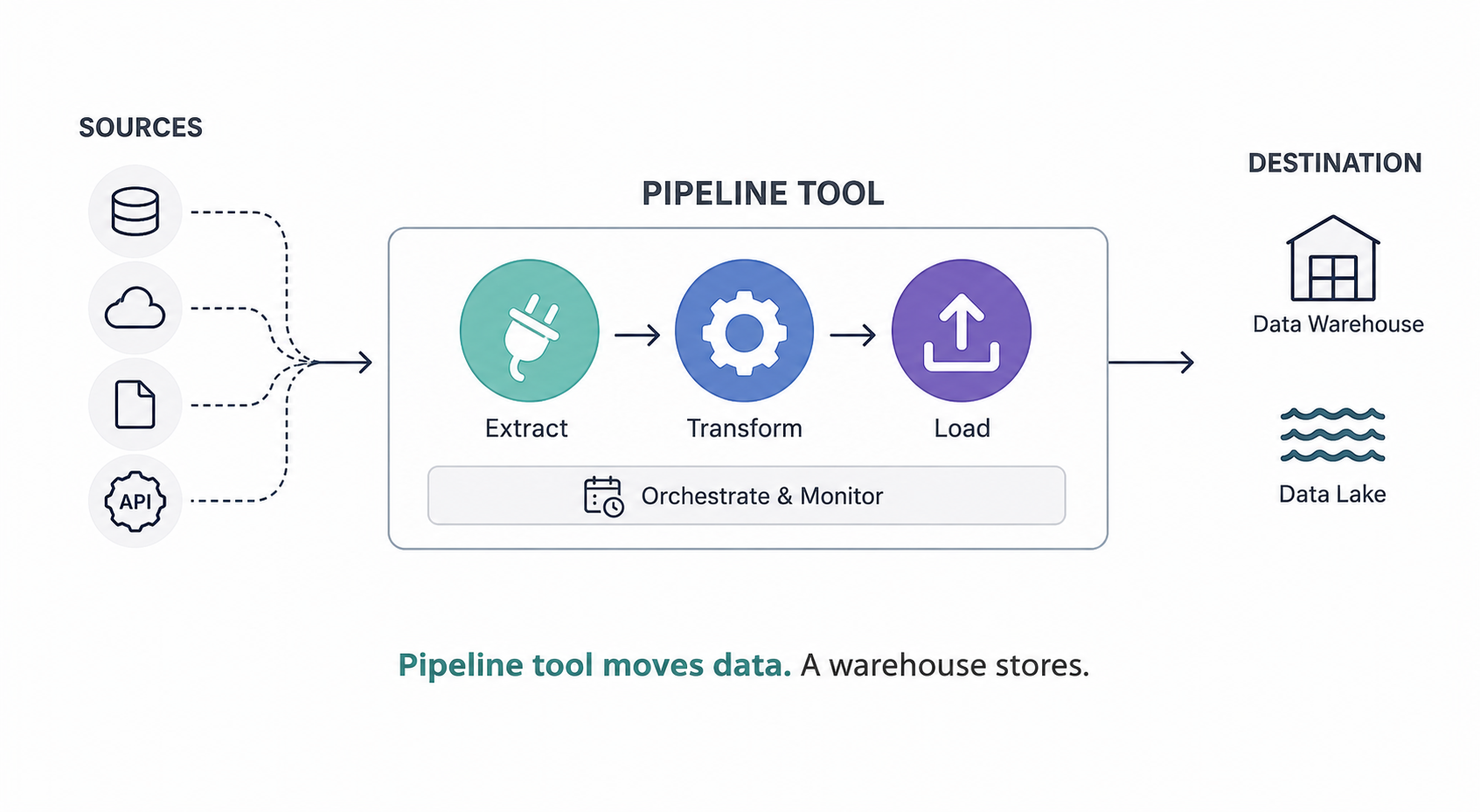
A data pipeline tool is software that moves data from where it's created to where it's used, and handles the steps in between. It pulls from your sources, transforms the data into a usable shape, and lands it in a destination like a warehouse or lake, on a schedule or in real time.
It is not a database, and it's not a place your data lives. It's the machinery that carries data between the places it lives. A warehouse stores. A pipeline tool moves.
Under the hood, most of these tools handle some mix of four jobs. They connect to sources and pull data out. They transform it, cleaning, joining, or reshaping so it matches what the destination expects. They load it into the target system. And they orchestrate the whole thing, deciding what runs when, what depends on what, and what happens when a step fails.
That last job is the one people underestimate. Anyone can write a script that copies a table once. The hard part is what happens on night forty, when a source API changes its schema, a load half-finishes, and something has to notice, retry, and alert a human without corrupting the data already in the warehouse. Reliable data management lives in that gap between "it ran" and "it ran correctly every time." A good pipeline tool is mostly a machine for handling the failures you didn't plan for.
The reason there are so many tools is that no single one does all four jobs equally well. Some are built for ingestion and barely transform. Some only orchestrate and move no data themselves. The categories in the next section map to which jobs each type is actually good at.
Types Of Data Pipeline Tools
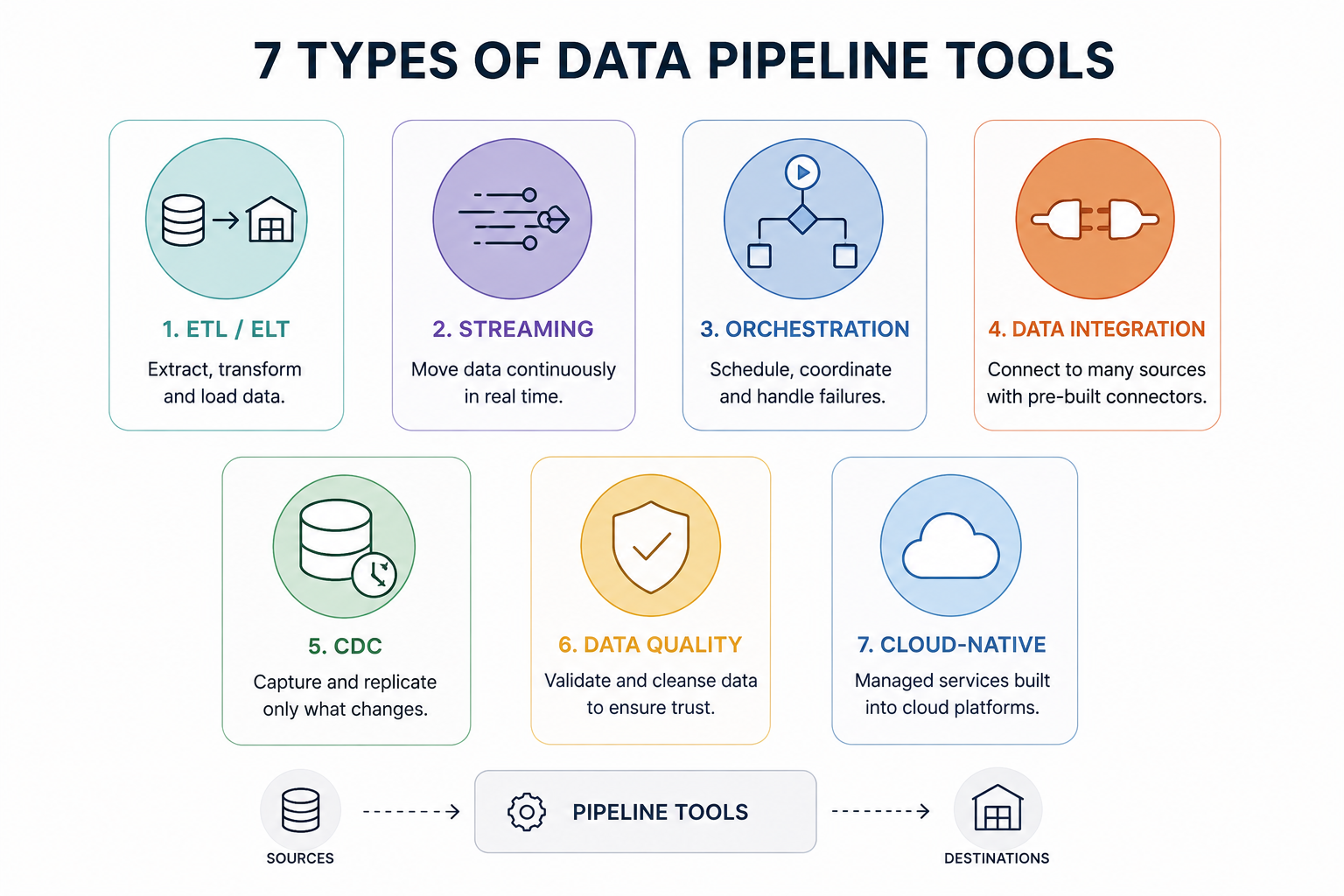
Most data pipeline tools fall into one of seven categories, and the categories matter more than the brand names. Once you know which type you need, the shortlist of actual tools gets short fast. The trap is buying a tool from the wrong category and trying to force it into a job it was never built for.
Here's how the categories break down.
1. ETL/ELT
ETL and ELT tools handle the core extract, transform, and load work, and the only real difference is where the transform happens. ETL transforms the data before it lands in the destination. ELT loads it raw first and transforms it inside the warehouse afterward. Which order makes sense depends on your warehouse and your volume, so it's worth understanding the difference between ETL and ELT before you commit to a tool that only does one of them.
2. Streaming
Streaming tools move data continuously instead of in scheduled batches. When you need events processed within seconds of them happening, fraud checks, live dashboards, sensor feeds, batch is too slow and streaming is the category you want.
3. Orchestration
Orchestration tools don't move much data themselves. They decide what runs, in what order, and what happens when a step fails. Think of them as the scheduler and traffic controller sitting on top of everything else in the stack.
4. Data Integration
Data integration tools focus on connecting to lots of sources and pulling data out with minimal setup. Their whole value is pre-built connectors, so you're not writing custom extraction code for every SaaS app and database you own.
5. CDC
Change data capture tools track row-level changes in a source database and replicate only what changed. Instead of copying an entire table every run, they move the handful of rows that were inserted, updated, or deleted, which keeps large databases in sync cheaply.
6. Data Quality
Data quality tools check the data as it flows, catching nulls, duplicates, broken schemas, and values that don't make sense before bad data reaches the people relying on it. This is where pipelines and data governance meet, since the rules a tool enforces are usually the rules your governance policy defined.
7. Cloud-native
Cloud-native tools are the managed pipeline services built into AWS, Azure, and Google Cloud. They trade some flexibility for tight integration with the rest of their platform, which is convenient if you're already all-in on one cloud and limiting if you aren't.
Most real stacks use more than one of these. A team might run a data integration tool for ingestion, an orchestrator on top, and a separate data quality layer, because no single category covers everything.
Best Data Pipeline Tools
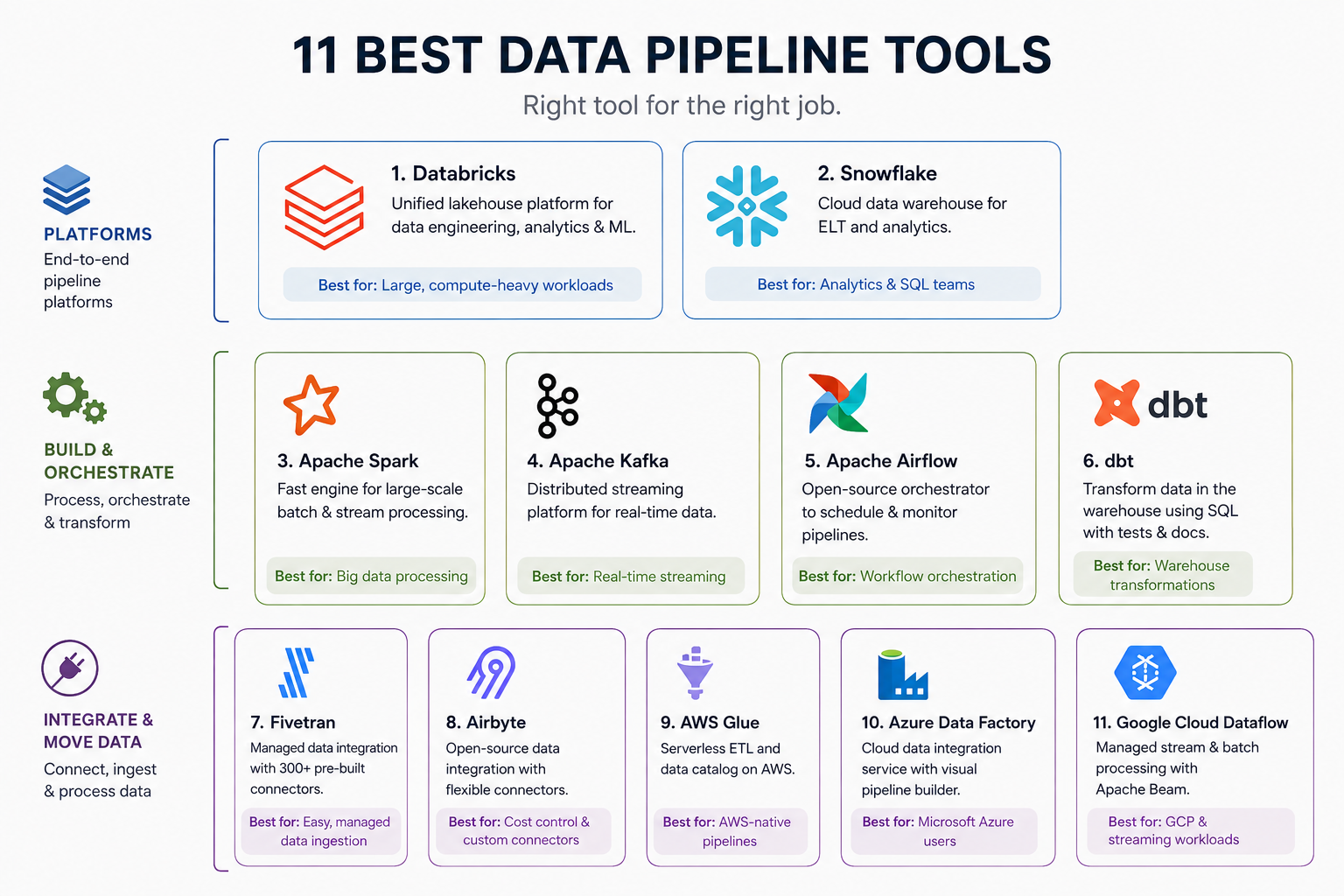
There's no single best tool here, only the best tool for a specific job. The eleven below are the ones that actually show up in production data stacks, grouped loosely from full platforms down to focused single-job tools. For each, here's what it does, who it fits, and where it starts to cost you.
1. Databricks
Databricks is a unified platform for data engineering, analytics, and machine learning, built on Apache Spark. It handles the whole pipeline, ingestion, transformation, and orchestration, inside one lakehouse environment, so teams doing heavy processing and ML on the same data don't stitch three tools together. It's strongest when your workloads are large and compute-heavy. The tradeoff is that it's a lot of platform. For a team that just needs to load a few sources into a warehouse, Databricks is more power, and more cost, than the job calls for.
2. Snowflake
Snowflake is a cloud data warehouse that separates storage from compute, so you can scale each independently and pay for what you actually use. As a pipeline tool it shines on the load-and-transform end, especially in ELT setups where raw data lands first and gets transformed in-warehouse. It's the default choice for analytics-heavy teams that want SQL and minimal infrastructure to manage. Where it strains is heavy streaming and complex ML, which is exactly the line people weigh when they compare Databricks and Snowflake for a data platform decision.
3. Apache Spark
Apache Spark is an open-source engine for large-scale data processing, and it's the compute layer underneath a lot of other tools on this list. It handles batch and stream processing across a cluster, which makes it the workhorse for transforming huge datasets fast. It's best when your volume has outgrown what a single machine can process. The catch is operational. Running Spark yourself means managing clusters, tuning memory, and debugging distributed jobs, which is why many teams reach for a managed layer on top of it rather than raw Spark.
4. Apache Kafka
Apache Kafka is a distributed event streaming platform, and it's the standard when data has to move continuously rather than in batches. It ingests high-throughput event streams, fraud signals, clickstreams, IoT feeds, and lets multiple systems consume them in real time. It's built for scale that most batch tools can't touch. Kafka is not a transformation tool, though, and it's not simple to run. You're operating a cluster and usually pairing it with other tools to process what it moves, so the operational overhead only pays off at real streaming volume.
5. Apache Airflow
Apache Airflow is an open-source orchestrator that schedules and monitors pipelines as code, and it moves no data itself. You define workflows as Python, and Airflow decides what runs when, tracks dependencies, and retries failures. It's the most widely used orchestrator for good reason, but it's showing its age for some teams, which is why newer alternatives like Dagster and Prefect have gained ground. Dagster leans into data-asset awareness and testing, and Prefect into a lighter, more dynamic execution model. If Airflow feels heavy for your setup, one of those two is usually the reason people switch.
6. dbt
dbt handles the transform step, and only the transform step, which is the point. It lets analysts write transformations as SQL with version control, testing, and documentation built in, turning warehouse transformation into something that behaves like real software. It's the default T in modern ELT stacks. What it doesn't do is extract or load, so dbt is never your whole pipeline. It sits inside one, paired with an ingestion tool that gets raw data into the warehouse first, and on its own it moves nothing.
7. Fivetran
Fivetran is a managed data integration tool that handles extract and load without anyone maintaining pipeline code. You connect a source, pick a destination, and it keeps the two in sync using hundreds of pre-built connectors, so most common sources work out of the box. Teams reach for it when they want ingestion handled and their engineers focused on transformation instead of plumbing. The tradeoff is cost. Fivetran prices on monthly active rows, and bills climb fast once your data volume grows, which is the point where teams start pricing out alternatives.
8. Airbyte
Airbyte is an open-source data integration tool, and it's the answer to Fivetran's pricing for a lot of teams. It offers a large connector catalog plus the ability to build your own, and you can self-host it to control cost at high volume. It fits teams that want managed-style ingestion without per-row billing, or that need a connector nobody else supports. The tradeoff is maturity. Self-hosting means you own the upkeep, and some community connectors are less battle-tested than a commercial vendor's, so reliability varies by source.
9. AWS Glue
AWS Glue is Amazon's serverless data integration service, and it's the natural pick if your stack already lives in AWS. It handles ETL work without provisioning servers, discovers and catalogs your data, and plugs directly into S3, Redshift, and the rest of the AWS ecosystem. Convenience is the whole pitch. The flip side is lock-in. Glue is built to work inside AWS, so it's a strong choice when you're committed to that cloud and a poor one if you want to stay portable across providers.
10. Azure Data Factory
Azure Data Factory is Microsoft's cloud data integration service, and it's the Glue equivalent for teams on Azure. It offers a visual, low-code interface for building pipelines, connects to a wide range of sources, and integrates tightly with Synapse and the rest of Azure. It suits organizations already standardized on Microsoft's stack, especially ones that prefer building pipelines visually over writing code. The same caveat applies as with Glue. The tight Azure integration that makes it convenient is also what ties you to Azure.
11. Google Cloud Dataflow
Google Cloud Dataflow is a fully managed service for both stream and batch processing, built on Apache Beam. It handles real-time and scheduled pipelines with the same programming model and autoscales to your workload, which makes it strong for teams that need streaming without running Kafka and Spark themselves. It fits Google Cloud users well. The constraints are the familiar ones. It's tied to GCP, and the Beam model has a real learning curve, so the payoff comes on genuinely streaming-heavy work rather than simple batch loads.
How to choose the right tool
Start with the job, not the tool. Most bad tooling decisions come from picking a popular name first and then bending the workload to fit it. Work the other direction. Answer these questions about your actual situation, and the category, and usually the shortlist, falls out on its own.
Batch or streaming?
If you need data within seconds, you're in streaming territory and most batch tools are out. If hourly or daily is fine, batch is simpler and cheaper. Don't buy streaming complexity you won't use.
ETL or ELT?
This depends on where you want the transform to happen and how powerful your warehouse is. Modern warehouses have made ELT the default, but it isn't automatic.
How many sources, and how custom?
A dozen standard SaaS sources point to a connector-based integration tool. Obscure or internal sources may mean building your own or self-hosting something open source.
What's your team's skill set?
A SQL-heavy analytics team and a team of distributed-systems engineers should not buy the same tools. Match the tool to who's actually going to run it at 2 a.m.
Are you committed to one cloud?
If you're all-in on AWS, Azure, or GCP, the native service is convenient and well-integrated. If you want to stay portable, that same integration becomes lock-in.
What's the real cost at your volume?
Per-row and per-compute pricing looks cheap in a demo and expensive at scale. Model the bill at next year's data volume, not today's.
Two things worth saying plainly. First, you will almost certainly use more than one tool. The realistic question is which combination fits, not which single winner to crown. An ingestion tool, an orchestrator, and a transformation layer working together is a normal stack, not a failure to consolidate.
Second, the tool matters less than the design it runs on. A well-chosen tool on a badly designed pipeline still fails, which is why the data pipeline architecture underneath these tools is worth settling before you shortlist anything. Get the flow right first. The tool is how you run that flow, not a substitute for having one.