Last updated June 24, 2026
What Is Snowflake? A Practical Guide to the Cloud Data Platform

9 mins read
Summarize with AI:


Data
AI
The Stack Underneath
Most teams don't ask what is Snowflake until a query that used to take two minutes starts taking forty. That's usually the moment a founder realizes the database that carried them through their first three years can't carry them through the next one. Snowflake is a cloud data platform built to handle that exact wall, separating storage from compute so your data can grow without your queries grinding to a halt.
It isn't a database you install. It isn't a server you patch at 2 a.m. when storage fills up. Snowflake runs entirely in the cloud, on top of AWS, Azure, or Google Cloud, and you pay for the compute you actually use rather than a box that sits idle overnight.
We've built on it enough to know where it earns its price and where it quietly runs up a bill nobody approved. This guide covers what Snowflake is, the features that matter, how pricing actually works, where it fits, and how it stacks up against Databricks when you're choosing between the two.
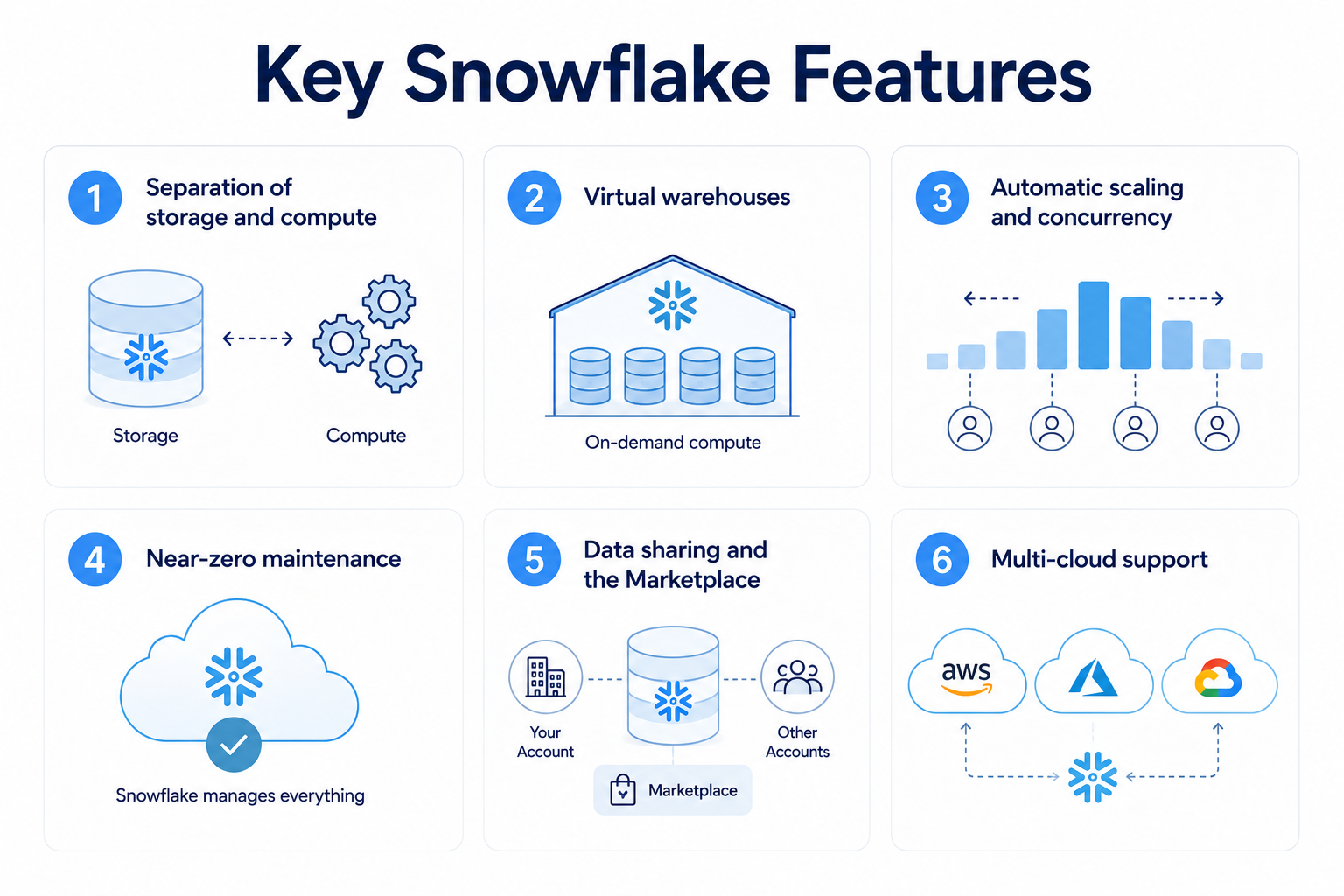
The thing that makes Snowflake worth understanding isn't a single headline feature. It's the architecture underneath, which solves a problem most teams only notice once their data outgrows the database they started on. These are the Snowflake features that actually change how a data team works, and the ones we keep coming back to on client builds.
In most traditional databases, storage and compute are welded together. Add more data and you're forced to pay for more processing power whether you need it or not. Snowflake pulls the two apart. Your data sits in cloud storage, and the compute that queries it runs separately, so you can scale one without touching the other. A team holding two billion rows but running light queries pays for the storage and almost nothing for idle compute. This single design choice is the reason most of the other features on this list are even possible.
A virtual warehouse is Snowflake's name for a compute cluster you spin up to run queries. You can run several at once, each sized differently, each isolated from the rest. Your analytics team can hammer a large warehouse with heavy reporting queries while your data loading jobs run on a small one, and neither slows the other down. When the work stops, the warehouse can suspend itself and stop charging you. We've seen teams cut their compute spend just by right-sizing warehouses they'd over-provisioned out of habit.
Snowflake is easy to start and surprisingly easy to overspend on, and the difference comes down to how it's built and run. Talk to our team, and we'll help you set it up so it scales without the runaway bill.
Query load is rarely steady. It spikes when the whole company opens a dashboard on Monday morning and goes quiet by Friday afternoon. Snowflake handles those spikes with multi-cluster warehouses that add capacity when concurrent demand climbs and remove it when demand falls. Your users don't sit in a queue waiting for a query slot during the busy hour. The system absorbs the surge and scales back down on its own, so you're not paying peak rates around the clock.
Snowflake is fully managed, which means there's no server to patch, no index to tune by hand, no storage volume to expand at 2 a.m. before it fills up. The work that normally eats a data engineer's week, the upgrades, the partitioning, the vacuuming, mostly disappears. This is the feature that doesn't show up in a demo but shows up in your team's calendar. For a lean team, the hours you don't spend on database upkeep are hours that go back into actual data work.
Sharing data the old way usually means copying it, emailing a file, or standing up an API, and every copy drifts out of date the moment it's made. Snowflake lets you share live data with another account without moving or duplicating it. The other side queries your data directly, always current, and you control exactly what they see. The Snowflake Marketplace extends this to third-party datasets you can pull into your own environment the same way. For companies that exchange data with partners or clients, this removes a whole category of brittle plumbing.
Snowflake runs on AWS, Azure, and Google Cloud, and it behaves the same way on all three. If your company is already committed to one provider, Snowflake fits into it rather than forcing a second vendor relationship. If you operate across more than one cloud, you can run Snowflake in each and even share data between regions and providers. This matters most when you wouldn't otherwise have a choice.
A client locked into Azure for compliance reasons can still run Snowflake without fighting their own infrastructure policy. The same logic we walk clients through when we scope a cloud migration roadmap applies here, because the platform shouldn't dictate the cloud you've already standardized on.
Snowflake pricing trips up more teams than any other part of the platform, and almost never because the rates are high. It's because the bill depends entirely on how you use it. There's no fixed monthly subscription. You pay for what you consume, across three separate meters, and a team that ignores those meters can watch the cost climb without ever knowing why.
The three things you pay for:
Compute - measured in credits consumed by virtual warehouses, billed per second with a 60-second minimum every time a warehouse starts or resumes.
Storage - billed per compressed terabyte per month, separate from compute entirely.
Data transfer - charged when you move data across regions or between cloud providers. Movement inside the same region is usually free.
Compute is where most of the bill comes from. A credit is the unit Snowflake uses to measure compute, and the dollar value of one credit depends on your edition, your cloud provider, and your region. Standard runs around $2.00 per credit in US East, and the same workload on the VPS tier in EU regions can hit $5.40, a 2.7x spread that makes edition and region bigger cost levers than warehouse size.
Snowflake sells four editions, and the per-credit price climbs as you add security and compliance features. These are on-demand baselines for AWS US East, verified June 2026. Check the live rate for your region before you build, because non-US regions carry a premium.
|
Edition |
Approx. cost per credit |
What it adds |
|
Standard |
~$2.00 |
Core data warehousing, data sharing, 1-day Time Travel |
|
Enterprise |
~$3.00 |
Multi-cluster warehouses, materialized views, up to 90-day Time Travel |
|
Business Critical |
~$4.00 |
HIPAA/PCI support, Tri-Secret Secure, customer-managed keys |
|
Virtual Private Snowflake |
Custom |
Dedicated, isolated environment for the strictest regulatory needs |
Standard fits non-production work. Enterprise is the default for production workloads with no regulatory requirement. Business Critical is required for healthcare, payment data, and anything needing customer-managed encryption. Most teams don't need VPS, and a fair number overpay by defaulting to Business Critical when Enterprise would have covered them.
Warehouse compute follows a t-shirt sizing model, and each step up doubles your credit burn per hour.
|
Warehouse size |
Credits per hour |
|
X-Small |
1 |
|
Small |
2 |
|
Medium |
4 |
|
Large |
8 |
|
X-Large |
16 |
|
2X-Large |
32 |
Over-provisioning warehouse size is one of the most common causes of cost overruns. A Medium warehouse costs four times an X-Small for every hour it runs, and teams routinely pick a size larger than the query actually needs.
Storage on AWS in US regions runs around $23.00 per terabyte per month, after Snowflake's compression. Non-US regions cost more, with AWS in Zurich at $26.95. Storage is the smaller part of most bills. The traps are elsewhere.
A few costs catch teams off guard:
Idle warehouses: A single X-Small warehouse left running 24/7 on Standard costs roughly $1,460 to $2,260 a month depending on the rate. Auto-suspend is the setting that prevents this, and forgetting it is the single most expensive mistake we see.
The 60-second minimum: A 5-second query still bills 60 seconds of compute. Frequent start-stop activity in short windows stacks up these minimums.
Time Travel storage: Historical data versions retained for recovery quietly count toward your storage bill.
Cross-cloud egress: Moving data between providers or regions is billed separately and surprises teams during replication or cross-region sharing.
On-demand or capacity is the other decision. On-demand bills a fixed rate per credit with no commitment, which suits experimentation and early-stage projects but costs the most per credit. Pre-purchased capacity means buying credits upfront, usually annually, for discounted rates and more predictable budgeting. The discounts are real at scale. A three-year commitment at 500,000 credits can drop Enterprise from $3.00 to roughly $1.65 per credit, a 45% reduction.
Here's the honest version of all of this. Snowflake isn't inherently expensive. Poor usage management is usually the cause of high spend. The consumption model rewards attention and punishes neglect, which is exactly why we treat cost optimization as part of the build rather than something to fix after the first scary invoice. This is the same discipline we bring to controlling hidden cloud migration costs, where the line items nobody budgeted for are the ones that hurt.
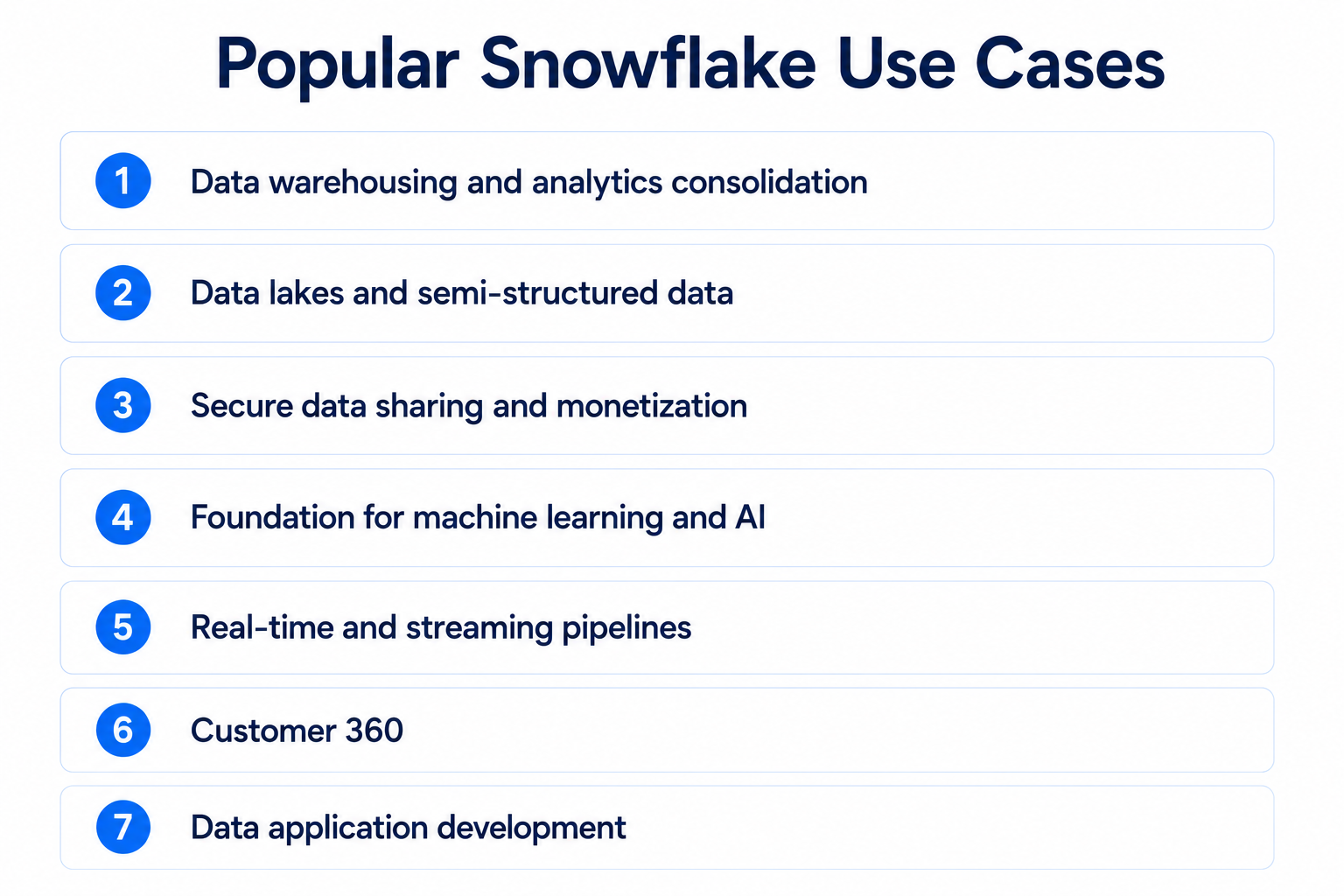
Snowflake gets reached for in a lot of situations, but the strong use cases share a pattern. They involve data that's too big, too varied, or too spread out for the database a team started on. This is also the answer to why Snowflake is so popular. It didn't win on one killer feature. It won because the same platform handles a range of jobs that used to need separate tools. Here are the ones we see most.
This is the core job. Most teams arrive at Snowflake with data scattered across a production database, a few SaaS tools, and a pile of spreadsheets, and no single place to ask a question that spans all of it. Snowflake becomes that single place. You load data from every source into one Snowflake data warehouse, point your BI tool at it, and your analysts stop stitching together exports by hand. The separation of compute means heavy reporting queries don't slow down the dashboards everyone else is watching.
Not all data arrives in neat rows and columns. Event logs, API responses, and IoT feeds show up as JSON, Avro, or Parquet, and traditional warehouses make you flatten all of it before you can query anything. Snowflake stores semi-structured data natively and lets you query it with standard SQL, no separate processing layer required. A team can land raw JSON and start asking questions of it the same afternoon. This is where the old wall between a data lake and a data warehouse stops mattering, which is a big part of how Snowflake competes with platforms like Databricks.
Plenty of companies sit on data their partners or customers would pay to access, and the old way of selling it meant shipping files and watching them go stale. Snowflake lets you share live data with another account without copying or moving it, and you control exactly what the other side sees. Some companies use this internally to give every department the same numbers. Others turn it into a revenue line, listing datasets on the Snowflake Marketplace. Either way, nobody is emailing CSVs anymore.
Models are only as good as the data feeding them, and most ML projects stall on the plumbing long before the modeling. Snowflake holds the clean, unified data that ML workflows need, and tools like Snowpark let teams run Python data preparation directly where the data already lives, instead of shuffling it out to a separate system. For a team building toward AI, getting the data layer right first is the part that decides whether the rest works. The same logic applies when you're choosing an AI platform for your business, where the data foundation usually matters more than the model.
Some decisions can't wait for last night's batch job. Fraud checks, inventory levels, and live dashboards need data that's minutes old, not a day old. Snowflake ingests streaming data through tools like Snowpipe and Snowpipe Streaming, so events land and become queryable continuously rather than in a once-a-day dump. This is the difference between knowing a stockout happened and preventing it.
A single customer leaves traces in a dozen systems, the CRM, the support desk, the billing tool, the product itself, and none of those systems talk to each other. A customer 360 use case pulls all of it into Snowflake so the whole company sees one complete picture of each customer instead of six partial ones. Marketing stops guessing, support stops asking customers to repeat themselves, and the data finally agrees with itself.
Sometimes the analytics aren't for your internal team. They're a feature inside the product your customers use. Building that the traditional way means standing up and scaling your own backend to handle every customer's queries at once. Snowflake can sit underneath a data-heavy application as the engine, scaling compute automatically as usage grows, so the product team ships the feature without becoming a database operations team. This is where Snowflake stops being a back-office tool and starts being part of what you sell.
This is the comparison every data team ends up making, and most of the content written about it is useless because it's trying to crown a winner. There isn't one. Snowflake and Databricks were built on different assumptions, and the right answer depends entirely on what you're running. We've built on both, and the choice usually comes down to a single question: is your center of gravity SQL analytics, or is it data engineering and machine learning?
Snowflake started as a SQL-first data warehouse. Databricks started as a Spark engine for data engineering and ML. Both have spent the last few years expanding into each other's territory, which is what makes the decision harder now, not easier. They overlap more than ever, but their cores still pull in different directions.
|
Dimension |
Snowflake |
Databricks |
|
Origin |
Cloud SQL data warehouse |
Apache Spark engine for data engineering and ML |
|
Architecture |
Separated storage and compute, micro-partitioned |
Lakehouse, open formats on object storage |
|
Best at |
SQL analytics, BI, high-concurrency dashboards |
Heavy ETL, streaming, ML and AI workloads |
|
Learning curve |
SQL-first, analyst-friendly |
Code-centric, needs Python or Scala |
|
Operations |
Fully managed, little tuning |
More tuning, cluster configuration |
|
Cost sweet spot |
Variable and ad-hoc analytics workloads |
Large-scale ETL and ML, when well-optimized |
|
Billing unit |
Credits |
DBUs (Databricks Units) |
On performance, the honest read is that they're closer than either marketing team admits. Two things actually separate them, and they pull in opposite directions.
For typical BI workloads in the 100TB to 1PB range, Snowflake tends to deliver 15 to 30% faster query response than Databricks SQL Warehouses. The gap shows up most on concurrent queries, the kind that hit a dashboard at 9 a.m. when the whole analyst team logs in at once. Snowflake's virtual warehouses isolate each workload on its own cluster, so nobody waits in line. Databricks narrowed this with its Photon engine, but it was built for single-job compute, not a crowd hitting one dashboard.
Databricks runs 15 to 30% cheaper on large-scale data engineering, AI, and ML workloads, thanks to optimized compute and cheaper storage. Snowflake tends to cost less for SQL-based BI and smaller ad-hoc analytics, where auto-suspending idle warehouses cuts waste. The word doing the work there is "optimized." Teams report 20 to 40% higher Snowflake costs for equivalent workloads versus a well-tuned Databricks setup, but Databricks takes real expertise to tune, and a badly configured cluster burns money fast. No deep Spark knowledge on the team? Snowflake's predictability is usually worth the premium.
On machine learning, it isn't close. Databricks ships a full ML stack:
MLflow for experiment tracking
Native GPU clusters for training
Model serving for deployment
Snowflake's ML story keeps improving through Snowpark, and it makes basic ML reachable for SQL teams. But serious model training is still Databricks territory. If your roadmap leans hard on AI, that one fact can decide the whole thing. We get into the engineering side in our breakdown of Databricks features, and the Databricks pricing model explains why DBUs behave so differently from Snowflake credits.
Reach for Snowflake when:
Your work is analytics-first
Many people query the same data at once
You want a platform your team can run without a dedicated infrastructure specialist
Reach for Databricks when:
You're doing heavy transformation at scale
You need real-time streaming or genuine ML development
You have the engineering depth to tune it
And for a growing number of teams, the answer is both, with Databricks handling the heavy ETL and Snowflake serving the BI layer on top. That's not a cop-out. It's where a lot of mature data stacks actually land in 2026.
So, what is Snowflake? It's a cloud data platform that pulls storage and compute apart so your data can grow without your queries slowing to a crawl, runs fully managed across AWS, Azure, and Google Cloud, and charges you for what you actually use instead of a box that sits idle overnight. That last part is the catch worth remembering. The consumption model rewards teams that pay attention and quietly punishes the ones that don't.
If there's one thing to take from all of this, it's that the platform is rarely the hard part. Snowflake will hold your data, scale your queries, and share your tables without much fuss. Running it efficiently month after month, keeping warehouses right-sized and idle compute switched off, is where the real engineering lives. It's the same lesson the Snowflake versus Databricks question keeps circling back to. The better tool is the one that fits your workload and your team, not the one with the louder pitch.
That's the part we care about most. We've put Snowflake into production enough times to know where it earns its price and where the bill creeps up on people, and most of our work is making sure it's the former. If you're weighing Snowflake for your own stack, or trying to figure out whether it or Databricks fits what you're building, that's a conversation worth having before the first invoice, not after.
No. SQL is the language you use to query data. Snowflake is the platform you run that SQL on. You write standard SQL queries, and Snowflake executes them against your data in the cloud. Think of SQL as the question and Snowflake as the engine that answers it.
Not in the traditional sense. A database is something you usually install and manage on a server. Snowflake is a fully managed cloud data platform that you never install or patch. It stores and queries structured and semi-structured data like a database would, but it separates storage from compute and runs entirely in the cloud, which a conventional database doesn't do.
Yes, that's its core job. Snowflake is a cloud data warehouse, meaning it's built to consolidate data from many sources into one place so you can run analytics and reporting across all of it. It has since grown past pure warehousing into data lakes, sharing, and ML support, but warehousing is still what most teams reach for it to do.
Because one platform handles jobs that used to need several separate tools. It runs analytics, stores semi-structured data, shares live data, and supports ML workloads, all without a team patching servers or tuning indexes by hand. The separation of storage and compute means you scale and pay for each independently, which is a real cost lever for teams whose data grows faster than their query load.
Mostly for pulling scattered data into one place and making sense of it. Teams use Snowflake to power BI dashboards, build data lakes, share live data with partners, run real-time pipelines, and feed clean data into machine learning. If a job involves analyzing data that's too big or too spread out for a standard database, it's usually a fit.
You might also like

Hello, we are BRILLIAN’S. Trying to make an effort to put the right people for you to get the best results. Just insight !