Last updated June 17, 2026
A Complete Guide to Databricks Features

7 mins read
Summarize with AI:


Data
AI
The Stack Underneath
Most teams looking at Databricks features start in the wrong order. They go straight to the AI tooling and the model serving because that's what's exciting, and skip past the parts that decide whether any of it works. Delta Lake. The Spark engine. The governance layer. The unglamorous machinery that makes the exciting stuff possible.
Knowing what Databricks is gets you the map. Knowing its features gets you the terrain, where the real differences live between teams who get value out of the platform and teams who pay for capability they never use. This article walks every major feature, what it does, and the situations where it matters versus the ones where it's overkill.
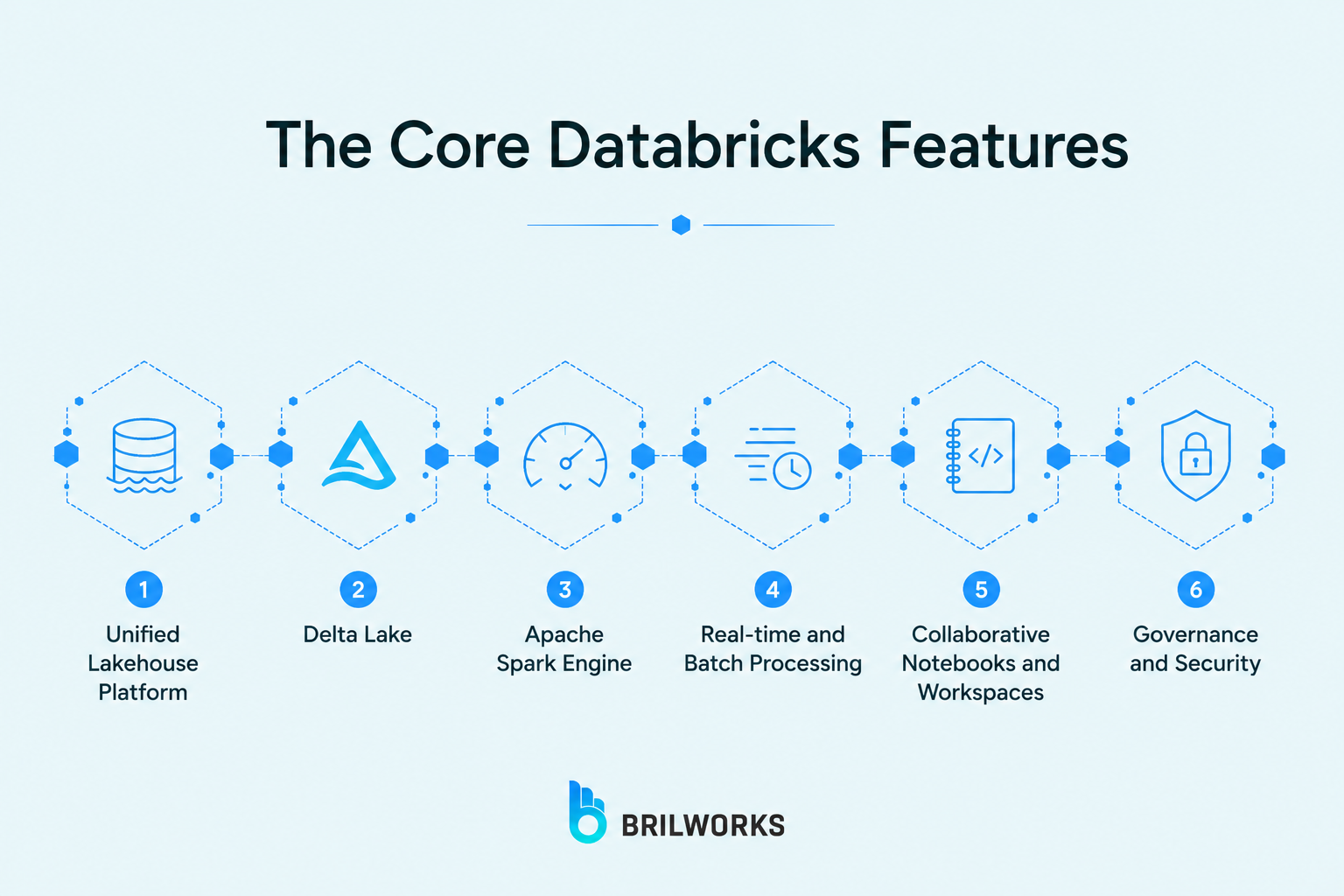
Databricks bundles a lot under one roof. These are the features that actually matter when you're deciding whether the platform fits, what each one does and when it's worth caring about.
The feature everything else hangs off. The lakehouse puts the cheap, flexible storage of a data lake and the structure and reliability of a warehouse on one system, so you stop running two and syncing between them. One copy of the data, every team working off it. It earns its place when your data is already scattered across separate tools, and does nothing for you if it's sitting tidy in a single database.
The storage layer that makes the lakehouse trustworthy, and the default format for every table on Databricks. It wraps standard Parquet files in a transaction log, so writes either finish completely or roll back instead of leaving a half-written mess. You get ACID transactions, time travel (querying a table as it looked last Tuesday), and schema enforcement that rejects bad data before it corrupts the table. Without this, a lakehouse is just a swamp with better branding.
The distributed engine that does the heavy lifting, splitting a huge job across many machines so it finishes in minutes instead of hours. Databricks was built by Spark's original creators and runs an optimized version with its Photon engine, pushing queries 10 to 100 times faster than open-source Spark on a plain data lake. You write the logic, the platform handles the clusters. Overkill if your data fits in a single database, indispensable at terabyte scale, and the cloud platform you run it on shapes the bill since you're renting real machines underneath.
One framework for both. Spark Structured Streaming uses the same API for a nightly batch load and a live event feed, so pipeline logic doesn't fork based on how fast data arrives. On top sits Lakeflow Declarative Pipelines (older docs call it Delta Live Tables), where you declare what the pipeline should produce and the platform handles retries, quality checks, and lineage. Worth it when you need sub-minute freshness, fraud detection, live monitoring, or feeding fresh data to AI agents that act on events as they happen. Skip it when hourly reporting answers your questions.
Interactive documents where you write code, run it, and see results inline, shared across a team on one set of data. The real value is language mixing: an engineer writes Python, an analyst drops into SQL, a scientist uses R, all on the same tables, no exporting or translating. Closer to a shared document than the usual setup where everyone argues about whose copy of the numbers is right. Less useful if you're a team of one.
Once every team works on the same data, you need one place to control who sees what. Unity Catalog handles that, centralized permissions, data lineage to track where data came from, and audit logs for who touched it. For regulated industries like finance and healthcare, this layer is the price of entry, not a nice-to-have. The more teams you put on the platform, the less optional it gets.
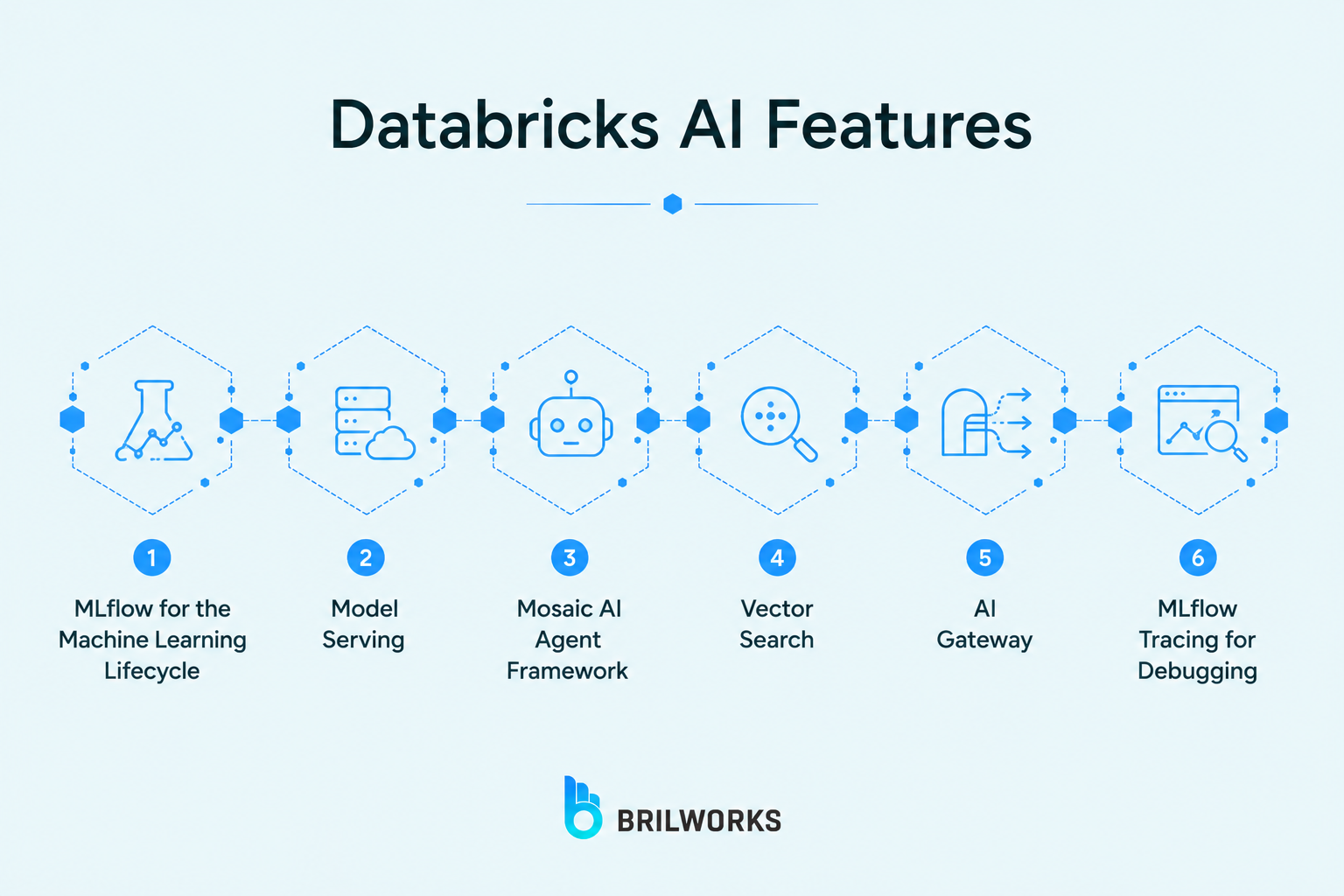
This is the part Databricks has bet the company on, and the Databricks AI features split cleanly into two groups, the machine learning tooling that's been there for years, and the generative AI layer that's newer and louder. Here's what's actually inside.
The backbone of ML on the platform. MLflow tracks every experiment run with its parameters and results, so three weeks later you can still tell which model version trained on which data instead of guessing. It's open source, Databricks created it, and they run it as a managed service. The payoff is simple: when "which version is in production" stops being answerable from memory, MLflow is what keeps the thread.
Trained a model? This deploys it as an auto-scaling REST endpoint without you standing up any infrastructure. It serves classic ML models, generative models, and agents through the same path, scaling up when traffic spikes and back down when it doesn't, so you're not paying for idle machines between requests.
Databricks' system for building and shipping AI agents in production. This is not a Python library you pip install on top of your stack. It's a platform layer that wires your governed data straight to LLMs through Vector Search for retrieval, MLflow tracing for debugging, and Unity Catalog for governance. The honest trade-off: it's the most complete enterprise agent platform going if your data already lives in Databricks, but it's not the fastest route to a quick prototype. Something like LangChain gets you a demo by Friday. The framework gets you a deployment your security team will sign off on.
The retrieval engine behind any generative AI app on the platform. It indexes your documents as embeddings so an agent can pull the relevant ones by similarity instead of keyword matching, which is what makes retrieval-augmented generation work. Your company data becomes searchable the way an LLM needs it to be, without copying it into a separate vector database.
One managed door to every external model. Instead of wiring up separate integrations for GPT, Llama, and Claude, AI Gateway routes to all of them through a single entry point, with rate limits and usage tracking handled centrally. Swap the underlying model without rewriting the app around it.
The feature that quietly saves the most time. When an agent returns a wrong answer, tracing shows exactly which documents it retrieved and why it ignored the relevant ones. One retail analytics team used it to cut debugging on a broken retrieval pipeline from three days to four hours. That's the kind of thing the integration actually buys, less guessing about why the agent is wrong.
Databricks ships constantly, and the latest Databricks new features all point one direction: making the platform the place you build and run AI agents, not just store the data behind them. Most of these landed at the Data + AI Summit in June 2026. The ones worth knowing:
Agent Bricks (expanded): The agent-building platform grew into a full developer toolkit. It now offers model choice across OpenAI, Anthropic, Gemini, Qwen, Kimi, and Grok, with managed agent memory and secure compute sandboxes for isolated execution. Databricks says over 100,000 agents have been built on it, processing more than a quadrillion tokens a year. Customers shipping on it include AstraZeneca, 7-Eleven, and Block.
Genie One: An agentic coworker for business teams. It connects to Google Drive, Jira, Slack, Confluence, SharePoint, and 50-plus other apps, then automates work across both structured and unstructured data, no SQL required from the person using it.
Lakebase: A managed, serverless Postgres database built for the agent era, now generally available. Agents need a transactional system of record to track state and actions across sessions, and Lakebase gives them one that lives right next to the lakehouse instead of in a separate operational database.
Lakehouse//RT: A real-time analytics engine (codenamed Reyden) delivering sub-100ms latency at 12,000 queries per second directly on governed Delta Lake and Iceberg tables. Databricks claims it runs up to 16x faster than bolting on a separate real-time serving stack.
Genie Code: Agentic data engineering. From a single prompt it retrieves the relevant assets, writes and runs the code, fixes its own errors, and visualizes the result, with an agent mode now cleared for HIPAA, PCI-DSS, and FedRAMP environments.
MCP-connected context retrieval: Agents can now pull context from external sources like Google Drive, Jira, Slack, and GitHub through MCP, all governed centrally in Unity Catalog, so an agent reaches outside the lakehouse without anyone losing track of what it touched.
One pattern stands out here. Almost nothing in this list is about storing data better. It's all about giving agents governed access to that data and a safe place to run. That tells you where Databricks thinks the next few years are going, and you can see the same shift across the wider AI agent development space, not just on this platform.
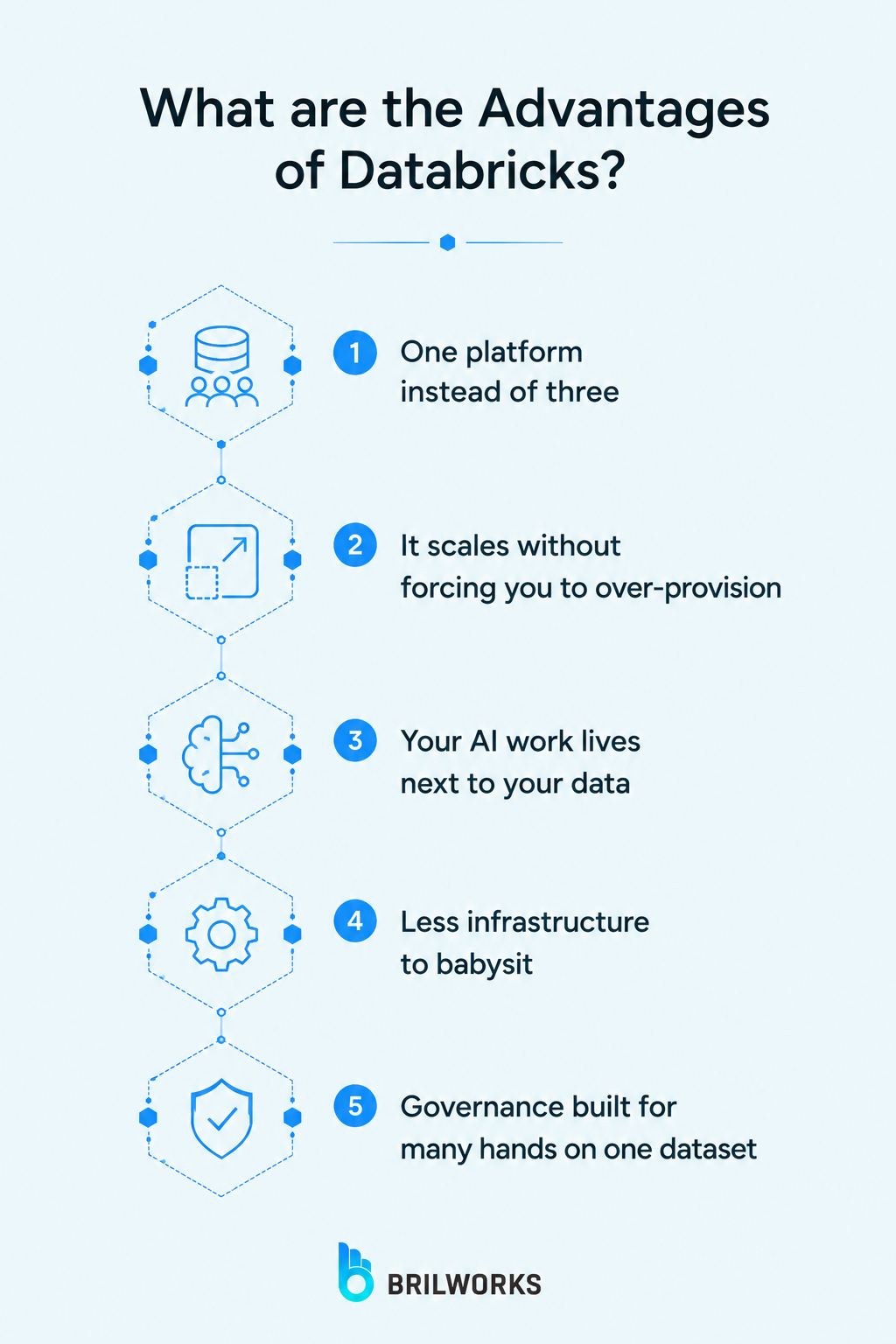
Features are what the platform has. Advantages are what you actually get from them. Here's what teams gain when Databricks fits the job.
The biggest one. Engineering, analytics, and AI run on a single copy of the data, so the constant exporting and reconciling between separate tools stops. No more copying tables out of the warehouse so a data scientist can model on them, no more arguing about whether the dashboard and the model are looking at the same numbers. Fewer tools to license, fewer integrations to keep from breaking.
Built on distributed processing, Databricks handles data volumes that would choke a single machine, and it scales up or down with the workload instead of making you size for peak and pay for it year-round. You rent the horsepower when a job needs it and release it when the job's done.
Because the data and the modeling sit in the same place, Databricks is a natural home for machine learning and generative AI. Models train next to the data instead of across an export boundary, which removes the most tedious part of real ML work. For a company whose AI plans are stuck behind messy, scattered data, this is the advantage that unblocks them, the data problem and the model problem get solved in one environment. It's the same reasoning that leads teams to a generative AI development partner when the data foundation is the thing holding the AI back.
Managed infrastructure means you're not building and running your own clusters, lake, warehouse, and governance separately. Databricks runs the machinery, you run the work. For a small team, that's the difference between hiring a platform engineer and not needing one.
When every team touches the same data, central control stops being optional. Unity Catalog gives you one place to define who sees what, trace where data came from, and audit who touched it. For regulated industries, this is what makes the platform usable at all, not a feature you bolt on later.
The honest answer is that it depends entirely on the shape of your data problem, and it splits cleanly in two directions. Match yourself to one of these lists.
Your data arrives in large volumes from many sources
Engineers, analysts, and data scientists all need to work the same data without tripping over each other
You're doing or planning serious machine learning and AI work
Your data is scattered across disconnected tools and the copies no longer agree
Your data fits comfortably in a single database
Your needs are straightforward reporting a warehouse or BI tool handles fine
Your team is small, with no appetite for a learning curve
You have no real ML or AI ambitions on the horizon
If three or more of the first list describe you, Databricks isn't just worth it, it's close to purpose-built for your situation. If you landed mostly in the second, the platform is overkill, and you'll pay in cost and complexity for capability you never touch. A lighter setup serves you better and cheaper.
The deciding question is one line. Is your data big, scattered, and shared across teams who keep stepping on each other? Then it earns its keep. Is it small, simple, and used by a handful of people? Then you're buying a freight train to carry a backpack.
A quick glossary to anchor the terms that run through everything above. If you remember six things about the platform, remember these.
Lakehouse: The core architecture. A data lake and a data warehouse combined into one system, cheap flexible storage with warehouse-grade structure on top of the same files.
Delta Lake: The storage layer that makes the lakehouse reliable. It wraps Parquet files in a transaction log so writes don't land half-finished, and it's the default table format on Databricks.
Apache Spark: The distributed engine that does the heavy processing, splitting big jobs across many machines. Databricks was founded by its creators and runs an optimized version.
Unity Catalog: The governance layer. One place to control who can access which data, trace where it came from, and audit who touched it.
DBU (Databricks Unit): The billing meter. It measures processing power consumed per hour, and your bill is DBUs plus the cloud compute they run on.
Medallion architecture: The standard way to organize data on the platform, raw data lands in a bronze layer, gets cleaned into silver, and arrives business-ready in gold.
Strip away the lakehouse, Delta Lake, the DBU math, and Agent Bricks, and Databricks comes down to one idea. It puts data engineering, analytics, and AI on a single foundation, so teams who used to work in separate tools finally work on the same data. Every feature in this article is detail underneath that.
Which features matter depends entirely on you. If your data is large, scattered, and shared by teams stepping on each other, the unified platform, Spark, and Delta Lake earn their keep on day one. If you're building agents on top of that data, the AI layer is where the platform pulls ahead of anything you'd stitch together yourself. And if your data is small and sits tidy in one database, most of this power is weight you'll carry without using.
So don't start by spinning up a cluster. Start by naming the one bottleneck you want gone, scattered data, slow pipelines, an AI project stuck behind messy inputs, and check it against the feature that solves it. If the platform fits, the build still has a hard part, and it isn't the setup. It's migrating messy data cleanly, setting governance before the data lands, and turning that clean data foundation into the AI agents the best data platforms are built to support. That's the work that goes faster with a team that's done it before.
If that's the build in front of you, let's talk. A short conversation will tell you whether Databricks is the right foundation for your data, or whether something lighter gets you there faster.
No. A database stores and serves individual records for an application, fetching one user's profile when they log in. Databricks processes and analyzes huge volumes of data instead. It's an analytics and AI platform built on the lakehouse, not a place to serve live records to an app.
Three reasons mostly. It was built by the creators of Apache Spark, so the engine has real credibility. It coined and popularized the lakehouse, which ended the lake-versus-warehouse split teams were stuck with for years. And it consolidates three separate tools into one, which is the entire appeal for a company drowning in copies of its own data.
Data warehousing and analytics, building data engineering pipelines, machine learning and AI development, real-time streaming, and business intelligence reporting. Most real deployments combine several of these at once on the same data.
It has a real learning curve. The platform rewards teams that understand distributed data processing and slows down teams that don't. A team new to this world will spend genuine time getting fluent before it pays off, which is a cost worth planning for, not a footnote.
There's no flat subscription. You pay for DBUs (the Databricks software meter) plus the cloud compute and storage underneath, billed by what you actually run. Costs climb fastest from idle clusters and oversized compute, not from the platform itself, so monitoring usage from day one is how you keep the bill predictable.
It can. The lakehouse runs warehouse-style analytics on the same data the rest of the platform uses, so teams often fold a separate warehouse into it. Whether that's worth doing depends on whether you also need the lake and AI sides, if all you need is structured reporting, a traditional warehouse may be simpler and cheaper.
You might also like

Hello, we are BRILLIAN’S. Trying to make an effort to put the right people for you to get the best results. Just insight !