Last updated June 25, 2026
Snowflake Pricing and the Costs That Sneak Up on You

6 mins read
Summarize with AI:


Data
AI
The Stack Underneath

Snowflake pricing surprises teams for one reason, and it isn't the rates. Snowflake charges for what you consume rather than a flat monthly fee, so the same setup can cost one team a few hundred dollars and another team a few thousand on near-identical work. The difference is never the price list. It's how each team runs the platform.
You sign up, load your data, point a few queries at it, and month one looks cheap. Then a warehouse runs over a weekend, a job fires every few minutes against a meter you forgot about, and the next invoice lands with a number nobody can explain. We get called in to audit that exact invoice more than once a year. This guide breaks down how the billing works, what each part costs in 2026, and where the spend hides. Before any of it makes sense, it helps to be clear on what Snowflake is underneath, because the pricing is a direct consequence of how the platform is built.
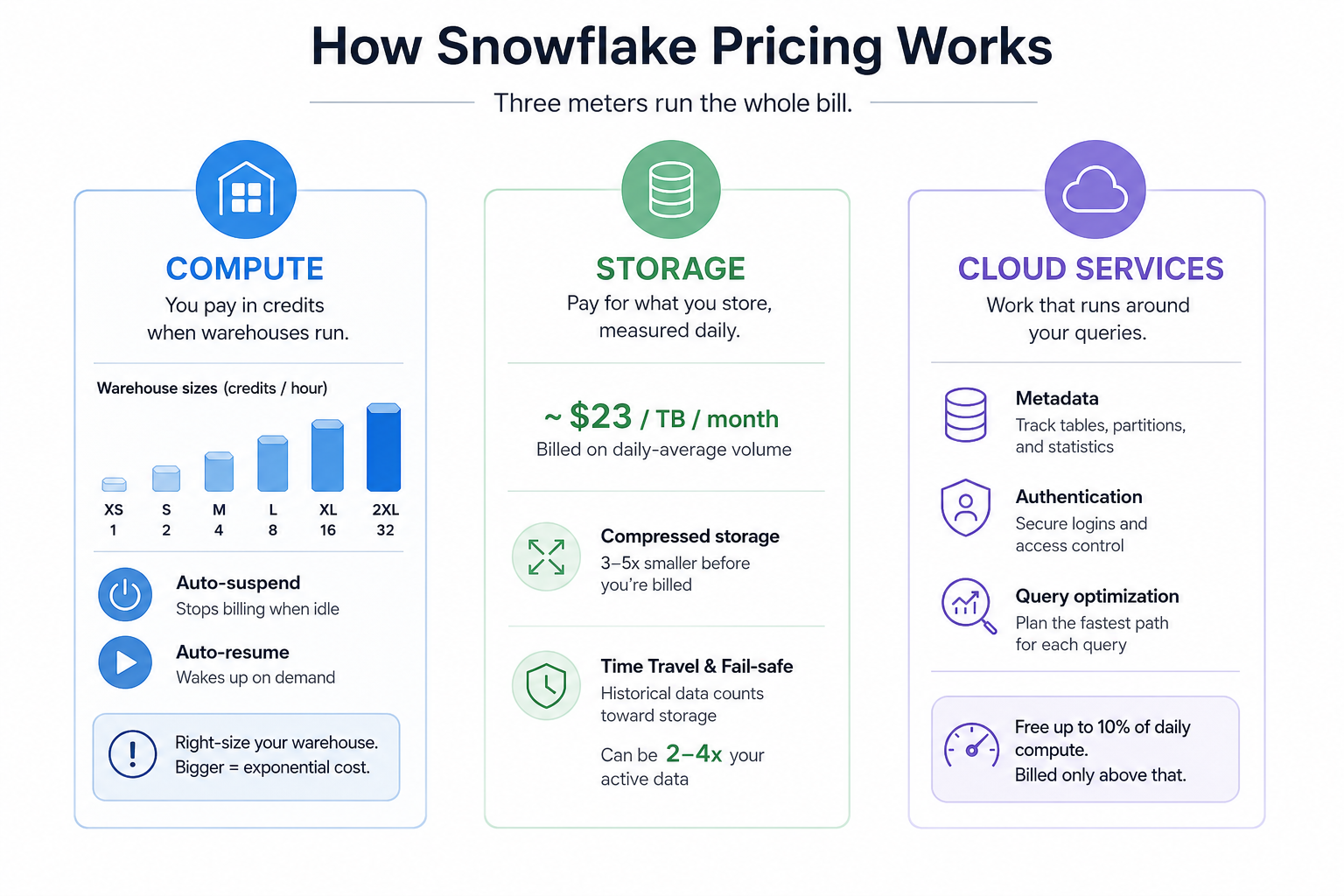
Three meters run the whole bill. Compute, storage, and cloud services. Almost everything you pay flows through one of them, and once you can see all three, the surprise invoice stops being a surprise.
Compute is where most of the bill comes from, usually by a wide margin. It's metered in credits, and a credit is consumed when a virtual warehouse runs.
A few things drive what compute actually costs:
Virtual warehouses: A virtual warehouse is the compute cluster you spin up to run queries. You can run several at once, each sized differently and walled off from the others, so a heavy reporting job and a light loading job don't fight for the same resources.
Credits: A credit is the unit Snowflake bills compute in. The dollar value of one credit depends on your edition, your cloud provider, and your region, so the same hour of compute can cost very different amounts.
Warehouse sizes: Warehouses follow a t-shirt sizing model, and each step up doubles the credits burned per hour. An X-Small is 1 credit per hour, Small is 2, Medium is 4, Large is 8, and it keeps doubling from there.
Auto-suspend and auto-resume: A warehouse bills per second while it runs, with a 60-second minimum every time it starts. Auto-suspend stops it when work ends so it stops charging, and auto-resume wakes it when a query arrives. Leaving auto-suspend off is the most expensive mistake we see.
The trap is picking a warehouse size for the worst query you might ever run instead of the work you actually do. A Medium costs four times an X-Small every hour it's awake. Teams routinely run a size too large and pay double for headroom they never touch.
Storage is the steady part of the bill, and for most teams it's the small one.
Pay per TB: Snowflake charges around $23 per terabyte per month on AWS US East, billed on your daily-average volume. One correction worth banking, since older guides get this wrong. The on-demand rate used to be $40/TB. That's gone. The current published rate is $23, so if a guide quotes $40, it's running on pre-2026 numbers.
Compressed storage: You're billed after Snowflake's compression, which usually shrinks raw data three to five times before the meter counts it. Your billed terabytes are almost always fewer than your raw terabytes.
Backup and fail-safe storage: Time Travel and fail-safe keep historical versions of your data for recovery, and those versions count toward storage. On a high-churn table with 90-day retention, that history can hold two to four times the active data size. Useful insurance, real cost, routinely underestimated.
The cloud services layer handles the work that runs around your queries rather than the queries themselves.
Metadata: Tracking what's in your tables, partitions, and statistics so queries know where to look.
Authentication: Logging users in and enforcing access control.
Query optimization: Planning the fastest path for each query before it runs.
When cloud service charges apply: This layer is free up to 10% of your daily compute. Most teams never pay for it. You only get billed when cloud services usage crosses that 10% line, which usually means heavy metadata operations or very short, frequent queries.
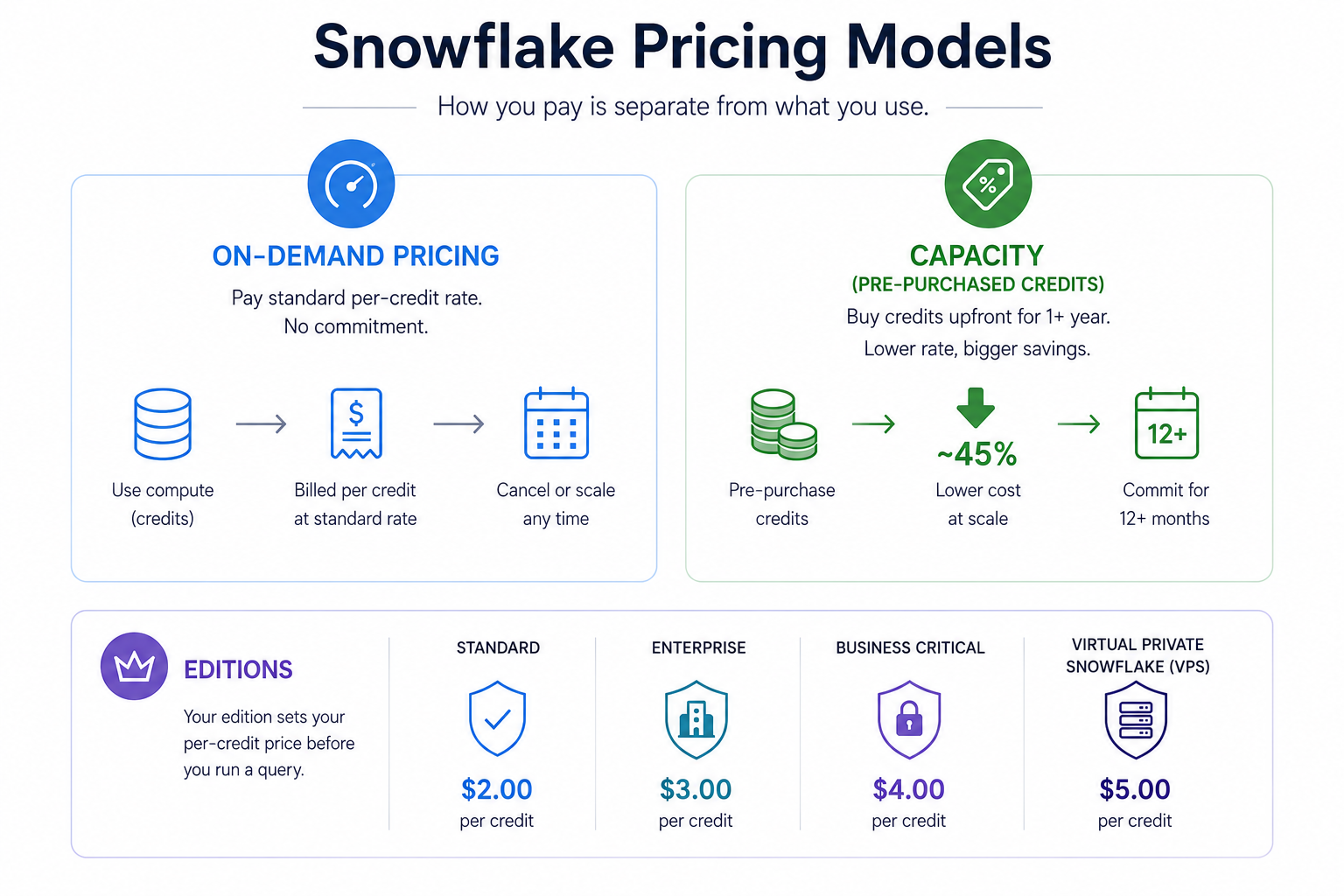
How you pay is a separate decision from what you use, and it splits two ways.
On-demand bills you at the standard per-credit rate with no commitment. You pay for what you use, month to month. It's where every team should start, because you don't know your real usage pattern in month one, and committing before you've watched a few invoices locks in a number that turns out wrong.
Capacity means buying credits upfront, usually for a year or more, at a lower rate. The discount is real and grows with volume and term. A large multi-year commitment can pull an Enterprise credit from around $3.00 toward $1.65, roughly a 45% cut. The catch is the trap of buying more than you'll burn. On weaker terms, unused credits expire, so a team that over-forecasts hands Snowflake money for compute it never ran. Commit only once your spend has held steady for a quarter and your forecast reaches the commit comfortably.
Your edition sets your per-credit price before you run a single query. Each tier up adds security and compliance, and charges more for the same compute. These are on-demand baselines for AWS US East, verified June 2026.
|
Edition |
Approx. cost per credit |
What it adds |
|
Standard |
~$2.00 |
Core warehousing, data sharing, 1-day Time Travel |
|
Enterprise |
~$3.00 |
Multi-cluster warehouses, materialized views, up to 90-day Time Travel |
|
Business Critical |
~$4.00 |
HIPAA and PCI support, customer-managed keys, failover |
|
Virtual Private Snowflake |
Custom |
Fully isolated, dedicated environment for the strictest needs |
Most teams overpay by defaulting up a tier for features they rarely trigger. Standard fits non-production. Enterprise is the right call for most production work. Business Critical is for regulated data only. We've flagged two audits where teams ran Business Critical when Enterprise covered them, paying a 100% markup over Standard for protection they didn't use.
You can estimate your bill before committing to a setup, and it comes down to a handful of factors that don't carry equal weight. Some swing the bill hard, others barely move it.
|
Factor |
Impact on cost |
|
Warehouse size |
High |
|
Query frequency |
High |
|
Auto-suspend settings |
Medium |
|
Data stored |
Medium |
|
Number of users |
Low |
|
Time Travel retention |
Medium |
Warehouse size and query frequency dominate because they drive compute, which is the biggest meter. A small analytics team on an X-Small Standard warehouse running 8 hours a day across 22 workdays burns about 176 credits, near $352 in compute, plus around $23 for a terabyte of storage. Scale to a Medium warehouse on Enterprise running 10 hours a day and compute alone jumps to roughly $2,640 a month before you add separate warehouses for loading and data science. The number of users barely registers on its own, which surprises teams who assume seats drive the bill. To skip rebuilding this arithmetic every time a variable changes, our Snowflake cost calculator takes size, edition, hours, and storage and returns a monthly estimate.
So how much does Snowflake cost in practice? A light analytics team often lands near $400 a month. A mid-size team with several warehouses sits between $5,000 and $10,000. Large enterprises on Business Critical run well past that. The range is wide because the platform charges your usage, not a fixed plan.
Is Snowflake costly? Not inherently. High bills almost always come from usage management, not the rate card, which means most overspend is fixable. The levers that actually move the bill:
Set auto-suspend tight: A warehouse idling 24/7 with no auto-suspend can cost $1,460 to $2,260 a month doing nothing. Set it to 60 seconds on dev, a few minutes on production.
Right-size warehouses: Most teams start oversized and never revisit. A smaller warehouse at 60% utilization usually beats a larger one at 30%.
Watch Time Travel retention: High-churn staging and log tables don't need 90 days of history. Trim retention on tables that change constantly.
Use resource monitors: Set credit quotas at the account and warehouse level. It's the fastest cost control Snowflake gives you, at no extra charge.
Check transfer assumptions: Moving data across regions or clouds bills per gigabyte and surprises teams during replication. These are the same line items nobody plans for when cloud migration costs run over, the ones that hurt because nobody wrote them down at the start.
This is the discipline we treat as part of the build rather than something to fix after the first scary invoice. The consumption model rewards attention and punishes neglect.
Is Snowflake better than AWS? It depends on what you're comparing, because the question usually means Snowflake against Amazon Redshift, AWS's own data warehouse. They price differently at the root. Redshift bills mainly for provisioned compute you run, while Snowflake bills consumption with compute and storage fully separated.
|
Snowflake |
AWS Redshift | |
|
Pricing basis |
Per-credit consumption |
Provisioned nodes or per-second serverless |
|
Storage and compute |
Billed separately |
Coupled on provisioned clusters |
|
Idle cost |
Near zero with auto-suspend |
Pay for running clusters unless paused |
|
Best fit |
Variable, spiky analytics |
Steady, predictable heavy workloads |
The honest read is that neither wins outright. Snowflake's separation of storage and compute means you stop paying for compute the moment work ends, which suits variable load. Redshift can come out cheaper for steady, predictable workloads running close to capacity around the clock. If your usage is spiky, Snowflake's auto-suspend usually saves more than Redshift's provisioned model. If it's flat and heavy, the math can tip the other way. The same logic plays out in the Databricks pricing model, where consumption units behave differently again depending on workload shape.
Snowflake pricing is rarely the hard part. The platform will hold your data and scale your queries on three meters, compute, storage, and cloud services, and charge you for what you actually use. Running it efficiently month after month, with warehouses right-sized and idle compute switched off, is where the real engineering lives, and it decides whether your bill makes sense six months in.
If you're weighing Snowflake for your own stack, start on-demand, watch your first few invoices, and right-size before you commit to anything. Run your real warehouse hours through the cost calculator above and you'll have a number worth budgeting against, not a guess. And if the bill is already climbing and you can't see why, that's the audit we do, and it's a conversation worth having before the next invoice, not after.
Snowflake charges for usage, not a flat fee, so the bill varies widely. A light analytics team often lands near $400 a month. A mid-size team running several warehouses sits between $5,000 and $10,000. Large enterprises on Business Critical run higher. Your cost depends on warehouse size, hours run, edition, and storage, not a fixed plan.
Not inherently. High Snowflake bills almost always come from usage management rather than the rates themselves. Idle warehouses, oversized compute, and forgotten meters drive most overspend, and all of them are fixable. Set auto-suspend tight, right-size warehouses, and watch your retention settings, and the cost stays reasonable.
It depends on your workload. Compared against Amazon Redshift, Snowflake suits variable, spiky analytics because auto-suspend means you stop paying for compute the moment work ends. Redshift can be cheaper for steady, heavy workloads running near capacity around the clock. Neither wins outright.
A credit is the unit Snowflake uses to bill compute. One credit runs an X-Small warehouse for an hour, and each size up doubles the credits burned. The dollar value of a credit depends on your edition, cloud provider, and region, so the same hour of compute can cost different amounts.
Start on-demand. You pay the standard rate with no commitment, which suits early usage you can't yet predict. Move to capacity once your spend has held steady for a quarter and your forecast reaches the commit volume, because the discount only pays off if you actually use what you buy.
You might also like

Hello, we are BRILLIAN’S. Trying to make an effort to put the right people for you to get the best results. Just insight !