Most legacy data warehouses do not fail loudly. They just get slower and more expensive until a finance team is waiting three hours for a report that used to take twenty minutes.
That slowdown compounds. A system built for nightly batch data gets asked to handle streaming events, semi-structured logs, and machine learning workloads it was never designed for. Maintenance bills climb. New data sources sit in silos because the schema cannot bend to fit them. Decisions slow down because the answers arrive too late to matter.
Data warehouse modernization is how you fix it, and it is one pillar of a broader data modernization effort. This guide covers what modernization involves, the signs your legacy data warehouse has hit its limit, the four approaches you can take, and a seven-step process to get it done without breaking the business.
What Is Data Warehouse Modernization?
Data warehouse modernization is the process of upgrading an outdated data warehouse into a flexible, cloud-based platform that handles larger data volumes, faster queries, and modern analytics workloads. It usually means moving off on-premise hardware, redesigning how data is loaded and stored, and rebuilding the architecture around cloud-native services.
It is not a simple lift-and-shift. Copying an old warehouse onto cloud servers without changing anything gets you the same rigid system with a monthly bill attached. Real modernization rethinks the parts that were holding the system back, including batch-only pipelines, fixed compute and storage, and schemas that cannot absorb new data types.
The goal is a warehouse that scales with demand, serves real-time analytics, and can support machine learning and AI without another rebuild two years later.
Legacy Data Warehouse vs. Modern Data Warehouse
A legacy data warehouse ties storage and compute together on fixed hardware, while a modern data warehouse separates them so each scales independently in the cloud. That single design difference drives most of the others.
Legacy data warehouse
Modern data warehouse
Infrastructure
On-premise hardware you buy and maintain
Cloud-native, fully managed
Storage and compute
Tied together, scale as one
Separated, scale independently
Cost model
Fixed, sized for peak load
Pay for what you query
Data types
Structured only
Structured, semi-structured, streaming
Data loading
Batch ETL, scheduled overnight
ELT, near real-time
Scaling
Buy more hardware
Adjust in a console
Analytics
Historical reporting
Real-time analytics, ML, and AI
Legacy warehouses were sized for peak load and paid for whether you used them or not. Adding capacity meant buying hardware, and handling a new data type often meant reworking the schema. A modern cloud data warehouse drops that ceiling. You scale compute in a console, load raw data first and transform it in place, and feed the analytics and machine learning tools sitting on top without a second system.
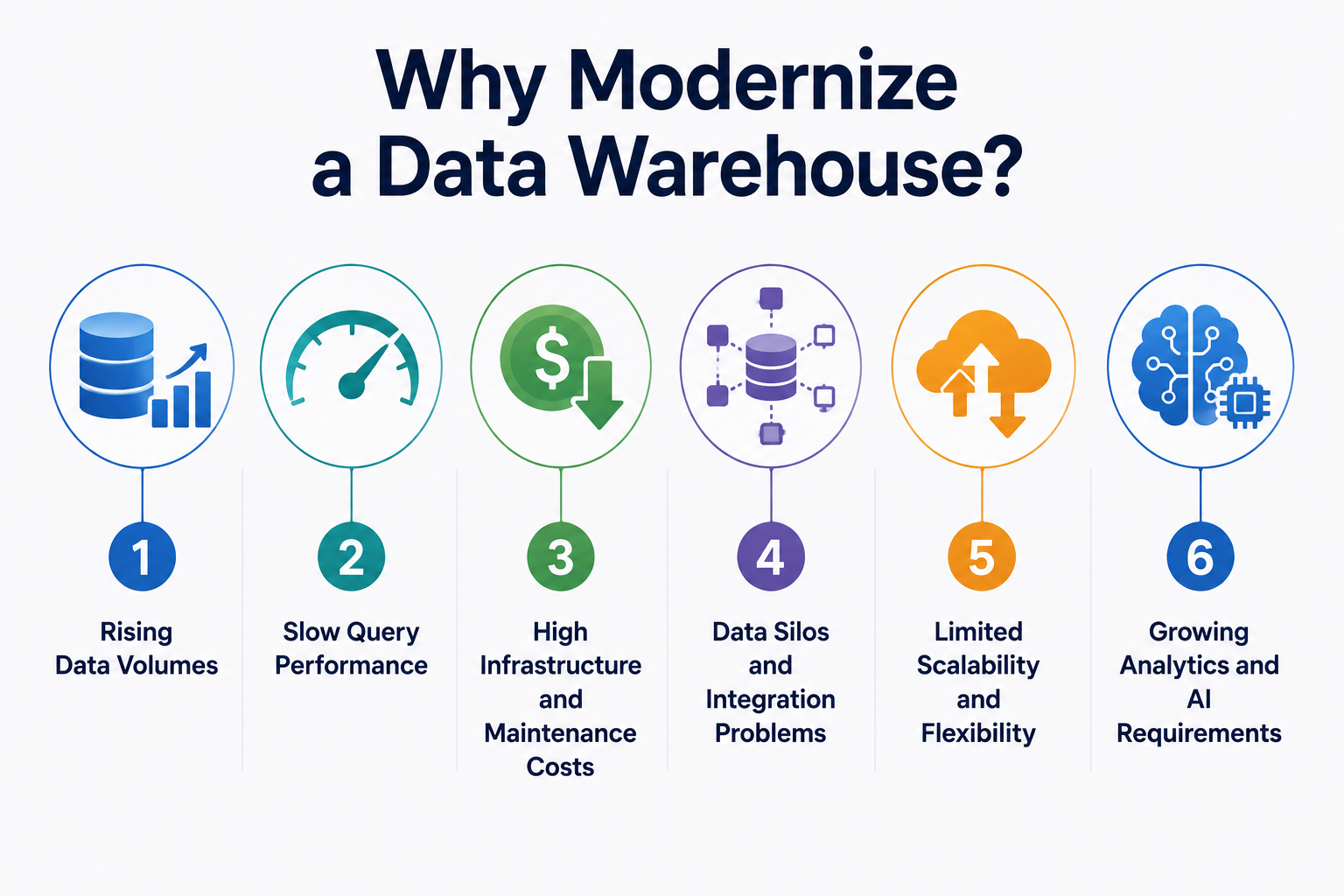
Why Modernize a Data Warehouse?
Most teams do not modernize because a vendor told them to. They do it because something specific broke, and it kept breaking. Here are the six pressures that push a legacy data warehouse past its limit.
1. Rising Data Volumes
A legacy data warehouse hits a wall when data volume outgrows the hardware it was sized for. What started as a few terabytes of transactional data becomes clickstream events, IoT readings, and application logs arriving faster than nightly batches can absorb.
You can buy bigger servers for a while. Then you are re-sizing hardware every year and still falling behind. A cloud data warehouse absorbs the growth because storage scales on its own, without a procurement cycle attached.
2. Slow Query Performance
When storage and compute are locked together, heavy queries starve everything else. A single analyst running a large aggregation slows the dashboards every other team depends on.
Reports that took twenty minutes start taking three hours. People stop trusting the numbers because by the time they arrive, the moment to act has passed. Separating compute fixes this, since each workload gets its own resources instead of fighting for one shared pool.
3. High Infrastructure and Maintenance Costs
Legacy warehouses cost money whether you use them or not. You size for peak load, pay for that capacity year-round, and staff a team to patch, tune, and upgrade the hardware underneath it.
The license renewals are the part nobody enjoys explaining to finance. A pay-for-what-you-query model turns a fixed capital cost into an operating cost that tracks actual usage, which is usually a fraction of what the old system billed at rest.
4. Data Silos and Integration Problems
A rigid schema cannot absorb data it was not designed for, so new sources end up in separate systems. Marketing data sits in one place, product analytics in another, and finance in a third, none of them talking to each other.
Every cross-team question then needs a manual export and a reconciliation step. Modern platforms handle structured, semi-structured, and streaming data together, which is why choosing between a data lake and a data warehouse matters less once the warehouse itself can hold varied data types.
5. Limited Scalability and Flexibility
Legacy systems scale in one direction, up, and only by buying hardware. There is no way to burst capacity for month-end reporting and release it the next day.
So you pay for peak capacity you use a few days a month. Cloud-native architecture scales both ways on demand, and moving there is one reason a cloud data migration becomes the trigger for a full modernization rather than a straight copy.
6. Growing Analytics and AI Requirements
The clearest signal is a warehouse that cannot feed the tools your business now wants. Machine learning models, real-time dashboards, and AI workloads all need data the legacy system cannot serve fast enough or in the right shape.
This is the pressure that turns modernization from optional to urgent. A model is only as good as the data pipeline behind it, and a batch-only warehouse cannot deliver features in real time. Modern platforms load raw data through ELT pipelines and hand it straight to the analytics and AI layer on top.
Data Warehouse Modernization Approaches
There is no single right way to modernize. The approach you pick depends on how much of the old system is worth keeping, how much risk you can absorb, and how fast you need the payoff. These are the four you will actually choose between.
Migrate to a Cloud Data Warehouse
Migrating means lifting your existing warehouse onto a cloud data warehouse platform like Snowflake, BigQuery, or Redshift. It is the most common path, because it delivers the scale-and-cost benefits of the cloud without a full ground-up rebuild.
This works best when your data model is still sound and the main problem is the hardware underneath it. It works less well when the underlying schema and pipelines are the actual bottleneck, in which case a straight data warehouse migration just moves the old problems to a new address. Most teams pair the move with at least some pipeline redesign for this reason.
Modernize the Existing Warehouse
Modernizing in place means keeping the warehouse where it is and upgrading the parts that hurt. You rebuild batch pipelines into ELT, add automation, and layer in new tools without moving the whole platform.
Choose this when a full migration is off the table for compliance or budget reasons and you need incremental wins. The catch is a ceiling. You can improve a legacy system only so far before the fixed architecture underneath caps what any upgrade can deliver.
Build a New Data Warehouse
Building new means starting from a clean cloud-native design and moving data into it, rather than carrying any of the old structure forward. You get the architecture you actually want, with no legacy debt baked in.
This is the right call when the old warehouse is beyond saving or the business has outgrown it entirely. It is also the most expensive and the slowest to deliver, and it carries the most migration risk, so it is hard to justify when the existing system still mostly works.
Extend the Existing Warehouse
Extending means keeping the legacy warehouse for what it does well and adding modern components alongside it. A data lake or a cloud layer handles the new workloads while the old system keeps running the reports it already runs.
This fits when ripping out the core system is too disruptive but new data types and workloads still need a home. The downside is complexity. You now run two systems and the integration between them, which is more surface area to maintain and monitor.
Data Warehouse Modernization Process
Modernization fails more often from skipped planning than from bad technology. Teams that jump straight to migration consistently underestimate scope and overrun their timelines. This seven-step process keeps the sequence in the right order, where each step de-risks the one after it.
1. Assess the existing data warehouse
Start with a full inventory of what you have. Map every data source, pipeline, table, dependency, and report the business relies on, and flag which ones are business-critical.
Skip this and you will discover a load-bearing report three weeks after you decommission the thing feeding it. This step is the one teams most want to rush and least can afford to.
2. Define modernization goals
Decide what success actually means before choosing any technology. Lower cost, faster queries, real-time analytics, and AI-readiness are different goals, and they point at different architectures.
Write the goals as numbers you can measure. "Cut report latency from three hours to under ten minutes" is a target you can test against later, and a vague goal like "improve performance" is not.
3. Choose the right modernization approach
Match one of the four approaches to your goals and constraints. A sound data model with aging hardware points to a migration, while a broken schema points to a rebuild.
The wrong approach here is expensive to reverse. Picking a full rebuild when a migration would have cleared the bottleneck burns budget you did not need to spend, so anchor the choice to the assessment, not to a vendor pitch.
4. Design the target architecture
Design the destination before moving anything into it. Decide how storage and compute separate, how ELT pipelines will load and transform data, and how governance and access control work in the new platform.
Build governance in now, not later. Teams that retrofit data ownership and quality standards after migration spend years cleaning up, which is why a data governance strategy belongs in the design phase rather than the cleanup phase.
5. Migrate and transform data
Move data in phases, not in one high-risk cutover. Start with a low-risk, high-value workload as a pilot, prove it works end to end, then expand from there.
This is where a redesign earns its keep. Rebuilding batch jobs into ELT during the move means the data pipelines land modern instead of carrying old inefficiencies into the new system. A big-bang cutover is the approach that most reliably ends in a rollback.
6. Test data, performance, and security
Validate three things before anyone trusts the new warehouse. Data fidelity, so numbers match the source. Performance, so queries hit the targets from step two. Security, so access controls hold.
Run the old and new systems in parallel and reconcile the outputs. If a modernized report disagrees with the legacy one, you want to find that in testing, not in a board meeting.
7. Deploy and monitor
Cut over once the pilot and testing hold, then watch the system closely. Track query performance, cost, and pipeline health from day one, because cloud spend can drift quickly when compute scales on demand.
Modernization is not a finish line. The monitoring is what keeps the new warehouse from slowly becoming the next legacy system.
Benefits of Data Warehouse Modernization
The payoff from data warehouse modernization shows up in cost, speed, flexibility, and what your data can finally do. Each one traces back to a specific design change, not a vague promise.
Lower total cost: You pay for compute when you query instead of funding peak capacity year-round, so a fixed capital bill becomes an operating cost that tracks real usage.
Faster queries: Separated compute means workloads stop fighting for one shared pool, and reports that took hours land in minutes.
Elastic scale: Capacity flexes up for month-end load and releases the next day, with no hardware to buy.
Unified data: Structured, semi-structured, and streaming data live in one platform, so the silos that forced manual exports collapse.
Real-time analytics: ELT pipelines load data in near real time rather than overnight, so decisions run on current numbers.
AI and ML readiness: A modern warehouse feeds the analytics and AI layer directly, which is the benefit that saves you from rebuilding all over again.
Final Thoughts
Data warehouse modernization is worth doing when a legacy system is actively costing you, in slow reports, rising bills, or data your business cannot use. If your warehouse still answers the questions people ask of it, on time and within budget, you do not need this yet.
When it does slow down, the mistake to avoid is treating modernization as a technology swap. The teams that struggle are the ones that pick a platform first and figure out the goals and the migration later. The ones that succeed assess what they have, decide what success means in numbers, choose the approach that clears their actual bottleneck, and move in phases with governance built in from the start.
The platform matters less than the plan. Snowflake, BigQuery, and Databricks are all capable, and a good process on any of them beats a rushed cutover onto the best of them.
If you are weighing where your legacy warehouse sits and which approach fits, our data modernization services team can help you assess the current system and map the path before any data moves.
FAQ
Most modernization projects run three to nine months, depending on data volume, the number of pipelines, and how much the schema needs to be reworked. A straight migration of a sound data model moves faster, while a full rebuild with governance restructuring sits at the longer end. Phasing the work by workload keeps each stage shippable instead of waiting on one large cutover.
Cost depends on the approach, not a fixed price, since a lift-and-shift migration, an in-place upgrade, and a ground-up rebuild carry very different budgets. The bigger shift is in the cost model itself, where a fixed capital expense on owned hardware becomes a usage-based operating cost that tracks how much you actually query. Most teams see the ongoing bill drop once they stop paying for peak capacity year-round.
No, migration is one part of modernization, not the whole of it. Migration moves data from one system to another, while modernization also redesigns pipelines, separates storage and compute, and rebuilds the architecture so the new warehouse actually performs better. A migration that copies the old design onto cloud hardware gives you a new bill without the benefits.
No, a phased move is safer and more common than a single cutover. Teams usually start with one low-risk, high-value workload as a pilot, prove it works end to end, then expand from there. Some keep parts of the legacy system running alongside the new platform for as long as those parts still do their job.
Not if it is done in phases with the old and new systems running in parallel. Reconciling outputs between the two during testing catches any mismatch before the business relies on the new numbers, so reporting keeps running on the legacy system until the modernized version is proven. The disruption risk comes almost entirely from big-bang cutovers that skip this step.
Vikas, the visionary CTO at Brilworks, is passionate about sharing tech insights, trends, and innovations. He helps businesses—big and small—improve with smart, data-driven ideas.