Last updated October 27, 2026
What Drives Databricks Migration Cost and How to Plan for It

10 mins read
Summarize with AI:


Data
AI
The Stack Underneath
You set your Teradata renewal against Databricks DBU rates and decide the move pays for itself. Most of the data migration cost never appears in that comparison. It sits in stored procedures that engineers rewrite by hand. It sits in months of paying for two platforms while report owners validate numbers. Then the cloud bill that classic compute adds on top of every DBU.
That gap is why migration budgets overrun. Finance approves one number and receives another a year later.
This guide breaks down what a Databricks migration really costs. It covers the factors that move the bill and how cost differs across Snowflake, Teradata and Hadoop. It also explains what migration tools automate and where engineers still step in. The final section gives you a five-step method to estimate your own budget.
A data platform migration for a mid-size to large enterprise typically costs between roughly $170,000 and several million dollars once every cost is counted. Smaller moves covering one or two workloads land well below that range. The spread comes from scope. A 50 TB table with a simple daily load can move in days. A schema with 400 stored procedures can take months.
|
Migration scope |
Typical example |
Typical timeline |
Biggest cost driver |
|
Focused workload |
One reporting domain or a handful of pipelines |
2 to 3 months |
Code conversion for that domain |
|
Mid-size warehouse |
A full Snowflake or SQL Server warehouse with BI and dbt models |
6 to 12 months |
Stored procedures and parallel running |
|
Enterprise estate |
Teradata or Hadoop with thousands of jobs and scripts |
12 months or more |
Manual rewrites, dual-run overlap and validation |
The table shows why Databricks migration cost tracks code rather than terabytes. A few cost lines carry most of the budget in every band. Complex objects are usually few in number but often consume 30 to 50 percent of total migration hours. Parallel running is the next biggest line. One planning benchmark puts the dual-run period at 40 to 80 percent of one platform’s monthly cost, lasting three to nine months. A contingency buffer of at least 20 percent covers complexity that surfaces after assessment.
Honestly, no published range will price your estate accurately. The number firms up only after someone reads the code and maps the dependencies. The factors in the next section decide which row of the table your project falls into.
Six factors decide where a project lands in the cost table above. Some add engineering hours. Others stretch the timeline and keep two platforms billing at once. Most projects feel all six to some degree.
The source platform sets the baseline for how much work a migration needs. Snowflake data unloads to Parquet with little friction, so the effort goes into procedures, tasks and streams. A Teradata estate brings years of BTEQ scripts, macros and stored procedures. Hadoop sits closest to Databricks because existing Spark jobs often port with modest changes.
Complexity inside the platform matters just as much. Two Snowflake accounts can land in different rows of the cost table. One runs plain SQL reporting. The other runs JavaScript stored procedures, which have no Databricks equivalent and must be rewritten.
Data volume affects transfer time and storage cost. Pipelines and their dependencies affect far more of the budget.
Projects overrun when a forgotten job surfaces halfway through. An old Hadoop cluster runs cron scripts nobody owns. A Snowflake task feeds a finance extract nobody documented. Each discovery adds conversion work, testing and another week of parallel running. This pattern shows up in most legacy data migration projects, so the inventory needs to count more than tables.
Scheduled jobs and their upstream and downstream dependencies
Reports and extracts that read each table
External applications that write into the source
Shell scripts and cron jobs running outside the main scheduler
Volume still matters at the extremes. Moving data out of a cloud source can bring network egress charges and duplicated storage while both copies exist. Very large tables also need date-partitioned exports, since one failed multi-terabyte extract is expensive to retry.
Code conversion is usually the largest single line in a data migration cost. That sounds odd when automated converters exist. The catch is where automation stops.
|
Code type |
How much tools automate |
Cost impact |
|
Standard SQL queries and views |
Most of it |
Low |
|
Stored procedures and macros |
Partial |
High |
|
Dynamic SQL and platform-specific functions |
Little |
Very high |
|
ETL tools like Informatica or SSIS |
Varies by tool |
High |
|
Application code with embedded SQL |
None |
Depends on the number of apps |
The bottom row is the one teams forget. Applications that build SQL strings in their own code need changes in their own repositories. Those changes then wait on each application’s release cycle, which can hold up cutover for an entire domain.
Skip validation and business users find the wrong numbers before your data team does. Trust in the new platform drops after that, and winning it back costs more than the checks would have.
Validation cost comes from three places. Engineers write and run comparison checks. Report owners spend hours comparing outputs side by side. Reconciliation also burns compute. Lakebridge Reconcile runs on serverless compute by default, so repeated full comparisons on large tables appear on the Databricks bill. Teradata sources need a hash function installed before row and data reconciliation can run. Dirty source data adds its own cleanup work on top.
Budget validation as a separate workstream with its own hours. A data quality framework set up during migration keeps those checks running after go-live. A pilot on non-critical data is the exception, where row counts and aggregates are usually enough.
Governance work raises the early cost of a migration. Retrofitting it after go-live raises the total. The setup tasks that add hours include the following.
Mapping source roles to Unity Catalog groups
Tagging sensitive columns and setting masking rules
Defining row filters for regulated data
Rebuilding audit trails that compliance teams rely on
Regulated sectors like healthcare and fintech add documentation and sign-off cycles to every migration wave. A proof of concept on non-sensitive data can run on a minimal setup. Production workloads cannot.
Tight downtime windows raise cost because they force longer parallel running. A team that can accept a weekend outage can plan a short cutover. A team serving customer-facing data around the clock needs incremental syncs, a rollback plan and weeks of dual operation. Testing scales with the same tolerance. Benchmarking critical queries on production-scale data adds compute hours before go-live.
Team expertise is the factor estimates miss most often. Limited Databricks experience is one of the conditions that pushes a migration estimate up. Engineers new to Spark tend to convert code line by line and then rework it when jobs run slowly or land on expensive all-purpose compute. The first wave usually runs slower than later ones while the team learns the platform. Budgeting training or experienced Databricks engineers for that wave costs less than paying for the rework. A team already running Spark on Hadoop needs far less ramp-up time.
Snowflake to Databricks migrations spend little on moving data and most of their budget on logic and testing. Both platforms run in the cloud, so tables unload to Parquet and register as Delta tables without much effort. The cost sits in dbt models, Snowflake Scripting procedures, tasks and streams.
A Lovelytics team shared one such migration on r/databricks. They moved 847 dbt models and 35 Info Mart tables in 12 weeks and cut cost per run by roughly 77% on a 2XL warehouse.
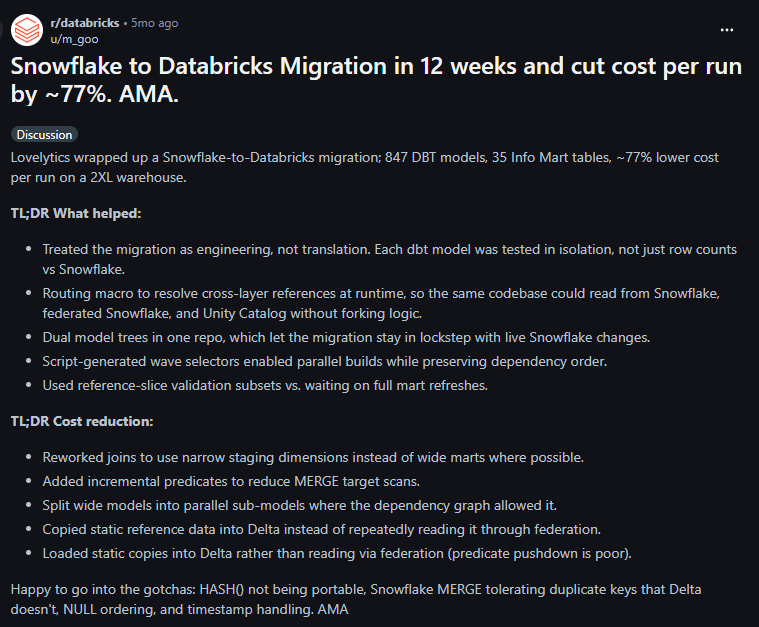
Two details from that thread are worth noting for budgeting. The savings came from reworking the models after conversion. The team narrowed joins, added incremental predicates to MERGE statements and split wide models into parallel sub-models. They also copied static reference data into Delta, because reading it through federation was slow. Their list of gotchas shows where testing hours go on a Snowflake source.
HASH() results differ between the two platforms
Snowflake MERGE tolerates duplicate keys that Delta rejects
NULL ordering behaves differently in sorts
Timestamp handling needs checking column by column
Read that 77% figure carefully. It measures cost per run after migration. It says nothing about what the 12 weeks of engineering cost, so it belongs in the savings side of your model rather than the migration budget.
Contract timing changes the maths too. If a Snowflake commitment has 18 months left, dual-run cost usually swamps the projected savings. Teams still unsure about the move should settle the Databricks vs Snowflake question before pricing it.
Teradata migrations carry the highest code cost of the common sources. The money concentrates in a few places.
BTEQ scripts that mix SQL with control logic
Stored procedures and macros written over many years
FastLoad, MultiLoad and TPT ingestion jobs that need rebuilding
Table design based on primary indexes, which has to be rethought around liquid clustering and partitioning
Validation of string logic, since Teradata defaults to case-insensitive matching
Lakebridge covers Teradata at every stage, which keeps the standard SQL share affordable. Reconciliation needs one extra step first. A hash function must be installed on the Teradata side before row and data reconciliation can run.
The licence renewal date usually sets the budget more than anything else. Finishing before renewal saves a full year of Teradata fees. Missing it means paying for both platforms through another contract term. That pressure is why many of these projects run as part of a wider data warehouse modernization program with a fixed end date.
Hadoop is often the cheapest source to convert and the most expensive to scope. Databricks runs on Spark, so many existing Spark jobs port with modest changes. Hardware savings also arrive early, since retiring on-prem clusters removes refresh cycles and data centre costs.
The scoping cost comes from what the cluster has accumulated. Hive jobs, Oozie workflows and shell scripts often have no clear owner. Lakebridge can only analyze Hive, Oozie and Impala. It cannot convert them, so every Hive job and Oozie workflow is rebuilt by hand. Budget more engineering hours here than the Spark-heavy parts of the estate suggest.
Storage is the other line to model. Data moves from HDFS into cloud object storage, where it becomes a monthly bill instead of a sunk hardware cost.
Oracle, SQL Server, Redshift, Synapse and Netezza follow the same pattern as Teradata, with lighter code estates in most cases. ETL platforms are where costs climb, because tool support for conversion is uneven.
|
Source |
Where the cost concentrates |
|
Oracle and SQL Server |
PL/SQL and T-SQL procedures, plus applications with embedded SQL |
|
Amazon Redshift and Azure Synapse |
Procedure rework and BI repointing, with data movement fairly light |
|
Netezza |
Validation, since Lakebridge Reconcile does not support it |
|
Google BigQuery |
Conversion through the newer Agentic Converter and checks on types that reconcile poorly |
|
SSIS and DataStage |
Package rebuilds as notebooks or Lakeflow pipelines, partly automated |
|
Talend, Alteryx, Ab Initio and SAS |
Full manual rebuilds, since conversion tools only assess them |
The last row is the expensive one. A warehouse with a light SQL estate can still carry a heavy data migration cost if hundreds of Talend or Alteryx jobs feed it. Count the ETL jobs before you count the tables.
Databricks migration tools lower the cost of the repetitive work and leave the expensive judgement calls to engineers. Most of them carry no licence fee. Their cost shows up as compute, review time and the manual work they hand back.
Migration tools automate assessment, standard code conversion, data loading and row-level comparison. Each one covers a slice of the migration, so most projects combine several.
|
Tool |
Licence cost |
Where it adds cost |
|
Lakebridge |
Free |
Engineer review of converted code, compute for profiling and reconciliation |
|
Auto Loader and COPY INTO |
Included in Databricks |
Compute for bulk loads and incremental syncs |
|
Lakeflow Connect |
Usage-based |
Ingestion compute, varies by connector |
|
Lakehouse Federation |
Included in Databricks |
Query compute during parallel running, slow reads where predicate pushdown is weak |
|
UCX |
Free |
Engineer time for Hive metastore upgrades |
Funding can offset part of the bill. Some Databricks partners run credit programs that cover engagement costs on qualifying new deals. On AWS, the Workload Migration Program provides promotional credits that can cover labour, training and parallel environments. Eligibility depends on deal size and workload, so treat these as a possible discount and keep them out of the base estimate.
Lakebridge reduces manual effort most on SQL-heavy warehouses, where its converters handle the bulk of standard queries. Databricks says it can automate up to 80% of migration tasks. That share covers the cheapest work in the estate, which still saves real hours on a large migration.
Its first cost benefit comes before any conversion. The Analyzer rates every object from low to very high complexity, which turns a rough guess into a scoped estimate. The Profiler goes further on supported sources and measures data volumes and workload patterns from a live connection. Running both before asking vendors for quotes gives you a baseline to judge their numbers against.
Conversion speed depends on which transpiler fits your source. Morpheus and BladeBridge are deterministic and fast on the dialects they know. Switch uses an LLM call for every file, which makes it slower and still experimental. Our Databricks Lakebridge review breaks down source coverage and the limits of each stage.
Manual engineering is still necessary for the remaining share of the code, and that share takes far more than its proportion of the effort. It holds the oldest and least documented logic in the estate.
Several pieces of work stay with your team regardless of tooling.
Complex stored procedures, dynamic SQL and platform-specific functions
Every ETL tool the converters only assess, such as Talend or Alteryx
Data movement, since Lakebridge copies no tables
Business-level validation of report outputs with their owners
Performance tuning after conversion, which is where the Lovelytics team found its 77% saving
Deciding which pipelines to retire instead of migrate
The last item can save the most money. Converters translate whatever you feed them, including pipelines nobody has queried in years. An hour spent with workload owners deciding what to retire removes conversion, testing and parallel-running cost for that pipeline entirely.
Lakebridge also comes without Databricks SLAs. A blocking bug on a fixed cutover date goes to its GitHub queue, so leave schedule buffer around any stage that depends on it.
A defensible estimate takes five steps, and each one feeds the next. Skipping one usually means the number finance approves is missing an entire cost line. The steps below follow the same order a migration does, so the estimate stays tied to real work.
Start the estimate with a full inventory of what runs today, because every cost line multiplies against it. Teams that estimate from a table list alone miss the jobs, scripts and reports that create most of the effort.
Pull the inventory from three sources. Query logs and scheduler metadata show what actually runs. The Lakebridge Analyzer scans code repositories and maps dependencies between files and tables. Short interviews with workload owners catch the cron jobs and extracts that neither tool sees. Mark anything nobody has used in six months as a retirement candidate before it enters the estimate.
Assess complexity by sorting every object into tiers, since effort varies far more between tiers than between objects inside one.
|
Complexity tier |
Typical objects |
How to treat it in the estimate |
|
Low |
Standard views and simple queries |
Count in bulk, assume most converts automatically |
|
Medium |
Procedures with conditional logic, standard ETL jobs |
Estimate per object, assume partial automation plus review |
|
High |
Long procedures, macros, BTEQ scripts |
Estimate individually with a senior engineer |
|
Very high |
Dynamic SQL, unsupported ETL tools, embedded application SQL |
Treat as manual rebuilds and validate each one in the pilot |
The Analyzer’s own low to very high ratings map straight onto these tiers for supported sources. Unsupported sources need the same sorting done by hand.
Estimate hours by multiplying the object count in each tier by an hours-per-object rate, then adding testing time on top. The rates are the hard part. Published benchmarks rarely match your code.
A pilot wave gives you real rates. Migrate one or two representative workloads with a mix of tiers and track the hours spent on conversion, review and validation per object. Those numbers replace guesses for the rest of the estate. Expect high and very high tiers to dominate the total, since complex objects often take 30 to 50 percent of all migration hours.
Testing deserves its own line. Include engineer time for reconciliation checks, report owner time for side-by-side sign-off and performance benchmarking before cutover. The data migration cost calculator helps turn these hours into a first budget figure for each wave.
Infrastructure cost has two parts, the Databricks run rate and the overlap period where you pay for both platforms.
Databricks pricing is billed in DBUs, and the rate depends on compute type. On AWS Premium in US East, classic jobs list at $0.15 per DBU, while a serverless SQL warehouse lists at $0.70. Classic rates exclude the cloud provider’s instance bill, so add it on top. Map each workload to its compute type and size the baseline with the Databricks cost calculator. Our breakdown of Databricks pricing covers the full rate card.
Then add the overlap. One benchmark puts dual running at 40 to 80 percent of one platform’s monthly cost for three to nine months. A legacy platform costing $40,000 a month and running in parallel for six months adds roughly $96,000 to $192,000.
Add a contingency buffer of at least 20 percent to cover complexity nobody found during assessment. Every migration surfaces some. An undocumented job, a type mismatch that breaks a finance report or a converter bug that blocks a wave.
Go higher than 20 percent on Hadoop estates with unclear ownership and on sources where conversion tools only assess. A team that has already run a pilot and has real hours-per-object rates can stay near the floor. Fixed licence renewal dates also justify a larger buffer, since a slipped cutover means paying for another contract term.
Data migration cost follows the code, the dependencies and the length of the parallel run far more than the size of the data. That makes the Teradata renewal set against DBU rates the wrong starting point for a budget. The right one is an inventory sorted by complexity and a pilot wave that turns guesses into real hours per object.
Teams on SQL-heavy warehouses can lean on Lakebridge and expect most of their spend to land on complex procedures and validation. Teams on Hadoop or ETL-heavy estates should budget for manual rebuilds and a larger contingency from day one. Either way, retiring unused pipelines before conversion is the cheapest saving available.
Brilworks helps data teams run that assessment and pilot through its data modernization services, so the budget finance approves is the one the migration actually needs.
A Databricks migration for a mid-size to large enterprise typically costs between roughly $170,000 and several million dollars. Smaller migrations covering one or two workloads cost well below that. The final figure depends on code complexity, the number of pipelines and how long the old and new platforms run in parallel.
Engineering effort for code conversion is usually the biggest cost in a Databricks migration. Stored procedures, dynamic SQL and unsupported ETL jobs take most of the hours, since automated tools convert them only partly or not at all. Parallel running of both platforms is typically the second largest cost.
Yes, Databricks migration tools reduce cost on assessment, standard SQL conversion and data reconciliation. Lakebridge is free and can automate a large share of simple queries. Complex procedures, ETL rebuilds and business validation still need engineers, so tools lower the bill without removing the main cost lines.
Most data migrations run both platforms in parallel for three to nine months. During that period the overlap often costs 40 to 80 percent of one platform’s monthly bill. Phased migrations and tight downtime requirements stretch the period, while small single-wave migrations can shorten it to a few weeks.
A data migration budget should include a contingency of at least 20 percent. That buffer covers undocumented jobs, data type mismatches and conversion issues that surface after assessment. Hadoop estates, ETL-heavy sources and projects tied to a fixed licence renewal date usually need a larger buffer.
You might also like

Hello, we are BRILLIAN’S. Trying to make an effort to put the right people for you to get the best results. Just insight !