Last updated June 20, 2026
Top 10 Databricks Use Cases Across Industries

6 mins read
Summarize with AI:


Data
AI
The Stack Underneath
Most teams that adopt Databricks don't do it for a feature. The databricks use cases that actually matter are the ones that fix a real problem, not the ones that look good in a capabilities deck. And the problem is usually the same. Their data is scattered across an S3 bucket, a Postgres instance, and a warehouse nobody fully trusts, and every new question takes a week to answer.
That distinction gets lost in most write-ups. They list what Databricks can do and leave you to figure out whether your problem is on the list. This one runs the other direction. Each use case below is tied to a situation a real team was in, what Databricks did about it, and the cases where we'd have told them to reach for something lighter. If you're still fuzzy on what the platform actually is before getting into where it's used, the complete guide to Databricks for modern data teams covers the foundation.
We've built data pipelines on Databricks for clients, so these aren't lifted from a product page. A few are use cases we've watched teams over-engineer when a script would have done the job. Those count too.
Databricks is used to bring storage, processing, analytics, and machine learning into one place so teams stop stitching tools together. Most companies arrive at it the same way. They start with a data lake for raw files, add a warehouse for reporting, bolt on a separate ML environment, and end up maintaining three systems that don't talk to each other. Databricks runs all of that on a lakehouse architecture, which is the whole reason teams consolidate onto it.
So why use Databricks over a stack you've already got running? The answer is rarely a single feature, though the features that make Databricks work are what enable all of it. It's the cost of the seams between your tools. Every handoff between a lake, a warehouse, and an ML platform is a place where data gets copied, drifts out of sync, and breaks a downstream report at 2 a.m. One system means one copy of the data and one place to fix things when they go wrong.
In practice the work falls into three buckets. Data engineering, where pipelines move and clean data. Analytics, where teams query it and build reports. And AI, where that same data trains models and powers applications. The sections below walk all three, because almost every real deployment touches more than one.
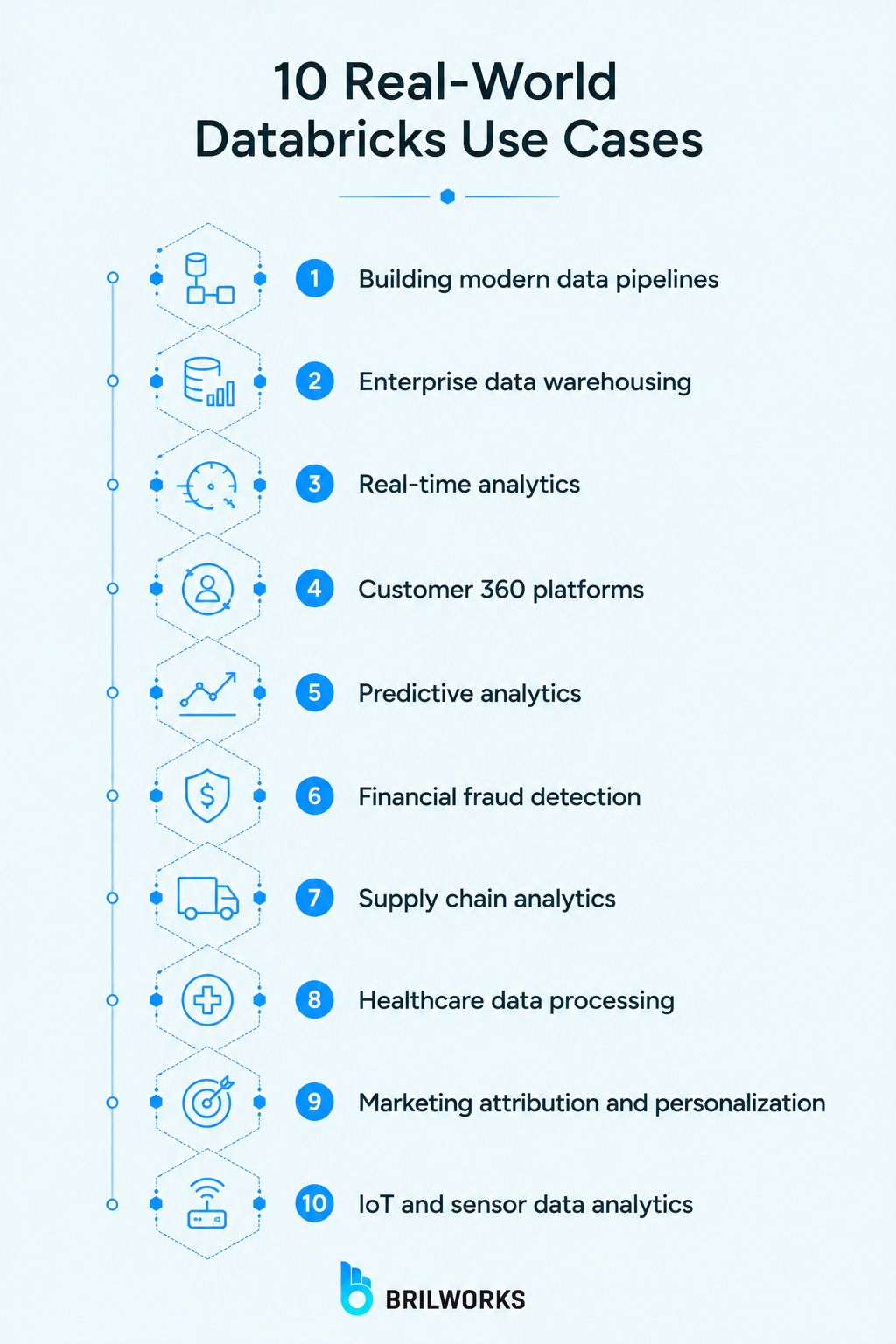
Grouped roughly by what the team was trying to do. Several overlap in real deployments, which is the point.
The most common reason teams land here. Raw data arrives from APIs, apps, and databases, and someone has to clean and join it before anyone can use it. Spark does the processing, Delta Lake keeps it reliable, so a failed job doesn't leave half-written garbage in your tables. One CSV and a nightly script? You don't need this. A dozen sources where freshness matters is where it starts paying off.
Databricks SQL lets analysts query the lakehouse with plain SQL, so you get warehouse-style reporting without copying everything into a separate warehouse first. Dashboards, scheduled reports, the BI tools the business already lives in. The whole pull is keeping one copy of the data instead of paying to sync a lake and a warehouse that always drift apart. A small team happy on BigQuery doesn't need to move. At scale, the saved sync is the argument.
Batch reporting tells you what happened yesterday. Some decisions can't wait. Structured Streaming lets events from an app or a sensor land and get analyzed within seconds, which is what powers live operational dashboards and anomaly alerts. Here's the thing most companies get wrong. They think they need real-time and actually need fast batch. Confirm the latency genuinely changes a decision before you pay for it.
Customer data sits in five places that disagree. CRM, support tickets, billing, product analytics. A Customer 360 build pulls all of it into one profile per customer so sales and support stop working off different versions of the truth, and Databricks suits it because it joins messy data at scale and keeps the view fresh as new events arrive. The hard part was never the tool. It's getting five systems to agree on what counts as one customer.
Once clean history lives in one place, forecasting is the obvious next step. Demand planning, churn prediction, revenue forecasts, all running on data already in the lakehouse instead of exported to yet another tool. The modeling sits right next to the data, so predictions stay current as fresh numbers land. One catch. Clean history or confident wrong forecasts, pick one.
Fraud is a streaming problem and a machine-learning problem at once, which is precisely where Databricks fits. Transactions get scored as they happen, models flag the suspicious ones, and patterns update as tactics shift. We've watched this play out in fintech builds where AI scores transactions in real time, and the recurring trap is false positives. Tune too aggressively and you block real customers, which costs more than the fraud you stopped.
Supply chain data is scattered across suppliers, warehouses, and logistics systems that were never built to talk to each other. Databricks pulls it together to forecast demand and flag delays before they become stockouts. The same unified data feeding your reporting also feeds the models predicting the next shortage, which is why teams doing serious AI in inventory management build on this layer. Run a single warehouse with steady demand and a spreadsheet still wins.
Healthcare data is high-volume, sensitive, and arrives in formats that rarely agree. Databricks processes patient records, imaging metadata, and device streams at scale while holding the governance and audit trails compliance teams demand. Hospitals use it to combine clinical and operational data for research and population health. The compliance overhead is most of the project. Scope a healthcare build assuming security is a checkbox and you'll be wrong about the timeline by months.
Which touchpoint actually drove the sale? Answering that means joining ad data, web events, email, and purchases into one timeline per customer. Databricks does the join at scale, then feeds the personalization models deciding what each user sees next. Same unified profile, two jobs. The honest limit is that attribution is a modeling opinion dressed as a fact, so the tool gives you a clean answer to a genuinely fuzzy question.
Connected devices produce a relentless stream of readings, most of it noise until something spikes. Databricks ingests sensor data through streaming, stores it cheaply in the lakehouse, and runs the analytics that separate a real event from background chatter. Manufacturing and energy teams use it to monitor equipment in close to real time. The volume is the trap. Store everything raw forever and the bill grows faster than the insight does.
The databricks ai use cases are where the platform stops being a data tool and starts being an AI one. Same data, same governance, now feeding models and applications instead of dashboards. This is also the half of the databricks use cases conversation that's grown fastest, so the six below are the ones we actually see shipping.
This is the foundation the rest sit on. Your training data already lives in the lakehouse, so you train where the data is instead of shuttling it to a separate ML environment and praying the two stay in sync. MLflow handles experiment tracking and model versioning, which is the part teams skip and regret. Skipping it works fine until you have forty model versions and no idea which one is in production.
Teams build GenAI features on Databricks because the model needs grounding in their data, and that data is already there. Summarization, content generation, internal copilots that answer from company knowledge. The platform connects the model to governed data so outputs stay tied to something real. Worth understanding the line between generative AI and machine learning before scoping one of these, because the two get conflated constantly and they cost very differently.
Retrieval-augmented generation is how you stop a language model from confidently making things up. The app retrieves relevant facts from your data first, then hands them to the model to answer from. Databricks supports the vector search and retrieval this needs sitting next to the source data. RAG is the right reach when answers must be grounded in current company information. When the model's general knowledge already covers the question, you're adding plumbing for nothing.
Agents go a step past answering. They take actions, calling tools and chaining steps to finish a task. Databricks has pushed hard here with agent tooling built into the platform, aimed at agents that operate on your governed data rather than wandering the open web. The honest state of things is that most production agents still need tight guardrails, so the gap between AI agents and agentic AI matters more than the demos suggest. Start narrow or watch it break in month two.
The classic machine-learning use case, and still one of the most valuable. The same unified customer profile behind a Customer 360 build feeds a model that decides what to show next, whether that's products, content, or the next best action. Databricks trains and serves these against live data, so recommendations move as behavior moves. Stale recommendations are worse than none. They actively annoy the user who already bought the thing you're still pushing.
Predictive maintenance closes the loop with the IoT data from earlier. Sensor streams feed a model that learns the signature of equipment about to fail, so you fix it on a schedule instead of after it breaks. Manufacturing and energy teams use this to avoid the unplanned downtime that costs real money. It only works with enough failure history to learn from. New equipment with three months of data won't give the model anything useful to predict on.
If you want the databricks use cases examples boiled down to a scan, here's the short version by industry.
|
Industry |
Use case |
What it solves |
|
Finance |
Real-time fraud detection |
Catches fraud as transactions happen, not in a next-day report |
|
Retail / e-commerce |
Recommendation engines |
Shows each user the next product based on live behavior |
|
Healthcare |
Clinical data processing |
Combines records and device data at scale, with audit trails intact |
|
Manufacturing |
Predictive maintenance |
Flags failing equipment before unplanned downtime hits |
|
Logistics |
Supply chain analytics |
Forecasts demand and surfaces delays before they become stockouts |
|
Marketing |
Attribution and personalization |
Joins every touchpoint into one customer timeline |
|
SaaS / tech |
Customer 360 |
One trusted profile per customer across every system |
The pattern across all of them is the same. One copy of the data, several jobs running off it, instead of a separate tool for each. That consolidation is also where the cost math gets interesting, since running multiple workloads on one platform changes how Databricks pricing actually adds up against a stack of separate tools.
The thing to take from all of this is that Databricks earns its place when you have several of these jobs running at once and the seams between separate tools are costing you. One pipeline, one report, one model, on clean data nobody disputes? You probably don't need it yet. A dozen sources, a warehouse drifting out of sync, and an AI roadmap on top of it all is exactly the situation it was built for.
So the useful question isn't whether Databricks can do what you need. It does almost all of it. The question is whether your problem has enough moving parts to justify consolidating onto one platform, because below a certain scale a lighter stack is cheaper and easier to run. Most of the databricks use cases above only pay off past that line.
Map your actual situation against the table before you commit to anything. If three or more of those rows describe problems you're living with right now, the consolidation math probably works in your favor. If only one does, start there with a lighter tool and revisit when the second one shows up. And if you want a second opinion on where your data stack sits on that line, Brilworks builds and migrates data platforms for teams making exactly this call.
No. Databricks scales down to small teams, and plenty of mid-size companies run it well. The real threshold isn't company size, it's data complexity. If you're juggling several data sources, a warehouse, and an AI roadmap, the platform fits whether you're 50 people or 5,000. One pipeline and a single report, and a lighter tool is cheaper to run.
Not for everything. Analysts can work entirely in Databricks SQL without touching Spark. You'll want Spark knowledge for heavy data engineering and custom pipeline work, but a large share of common databricks use cases, like reporting and dashboards, run on plain SQL.
In many cases, yes. The lakehouse model lets Databricks handle warehouse-style reporting on the same data your pipelines and models use, which removes the need to sync a separate warehouse. Whether you should replace yours depends on how embedded your current warehouse is. If a migration would touch dozens of downstream reports, the switching cost can outweigh the saved sync.
Both handle analytics and warehousing well. The short version is that Databricks leans stronger on data engineering and AI and machine learning workloads, while Snowflake is often simpler for pure SQL analytics teams. For the AI-heavy use cases in this blog, Databricks tends to be the more natural fit.
It varies more than most vendors admit. A straightforward pipeline or dashboard can ship in weeks. A Customer 360 build or a production AI agent is a multi-month project, mostly because the hard part is the data work underneath, not the platform itself. Anyone quoting you a fixed timeline without seeing your data is guessing.
You might also like

Hello, we are BRILLIAN’S. Trying to make an effort to put the right people for you to get the best results. Just insight !