Last updated August 18, 2026
Cloud Data Engineering Explained From Source to Consumption

8 mins read
Summarize with AI:


Data
AI
The Stack Underneath
Most teams don't decide to move their data to the cloud. They wake up one morning and realize the nightly batch job now runs into the afternoon, finance can't pull a report without the database locking up, and the on-prem server they've babied for six years is one failed disk away from a very bad week. That's when cloud data engineering stops being a slide in a strategy deck and becomes a project with a deadline.
Cloud data engineering is the practice of building the pipelines, storage, and processing systems that collect raw data, move it, clean it, and hand it to the people and tools that need it, on infrastructure that scales on demand instead of hardware you own. The pieces aren't new. What changed is where they run and how fast you can stand them up.
Here's the catch nobody mentions in the sales call. The cloud doesn't fix a badly designed pipeline. It lets that bad pipeline fail faster and bill you for the privilege.
This guide covers what cloud data engineering is, how the pipeline works from source to consumption, where a cloud data warehouse fits, how a data lake differs from a warehouse, what a cloud data migration involves, and what data engineering on AWS looks like in practice.
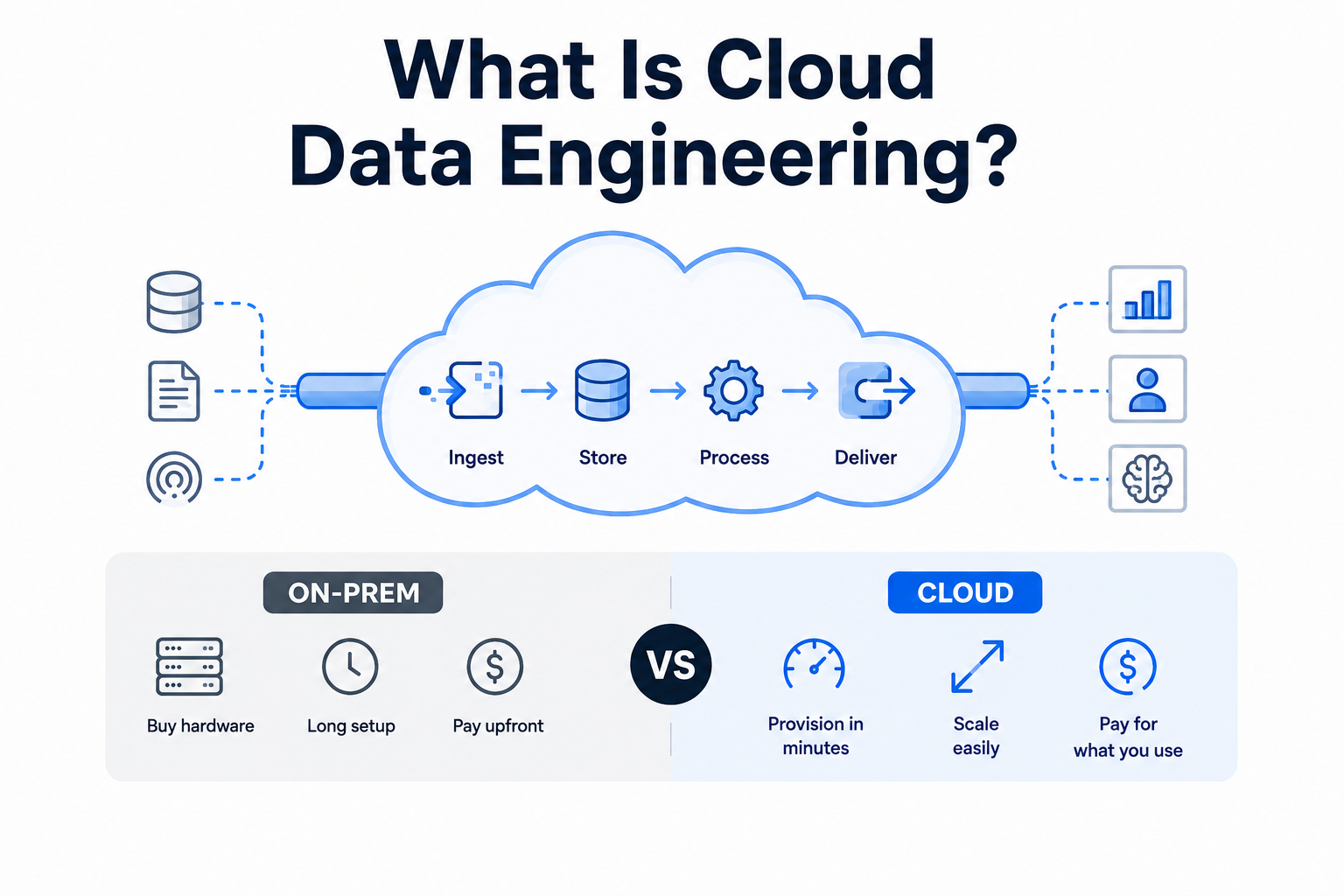
Cloud data engineering is the work of designing, building, and running the systems that move data from where it's created to where it's used, using cloud infrastructure instead of servers you buy and rack yourself. That covers the pipelines that pull data in, the storage that holds it, the processing that reshapes it, and the delivery that gets it in front of an analyst, a dashboard, or a model.
The difference from traditional data engineering isn't the goal. It's the economics and the speed. On-prem, adding capacity meant a purchase order, a delivery date, and someone physically installing hardware. In the cloud, you provision a warehouse in minutes and shut it down when the job's done. You pay for what you use, and you scale a single query without buying a machine that sits idle the other 23 hours of the day.
That flexibility is also the trap. When compute is a checkbox, it's easy to spin up more instead of fixing the pipeline that's wasting it. We see this constantly on cost-optimization audits. A team migrates a slow on-prem process straight to the cloud, the slowness comes with it, and now they're paying by the second for it. The cloud rewards good design and punishes bad design faster than any on-prem setup ever did.
So cloud data engineering isn't only a technical discipline. It's a cost discipline. The engineers who are good at it think about what a data pipeline costs to run, not just whether it runs.
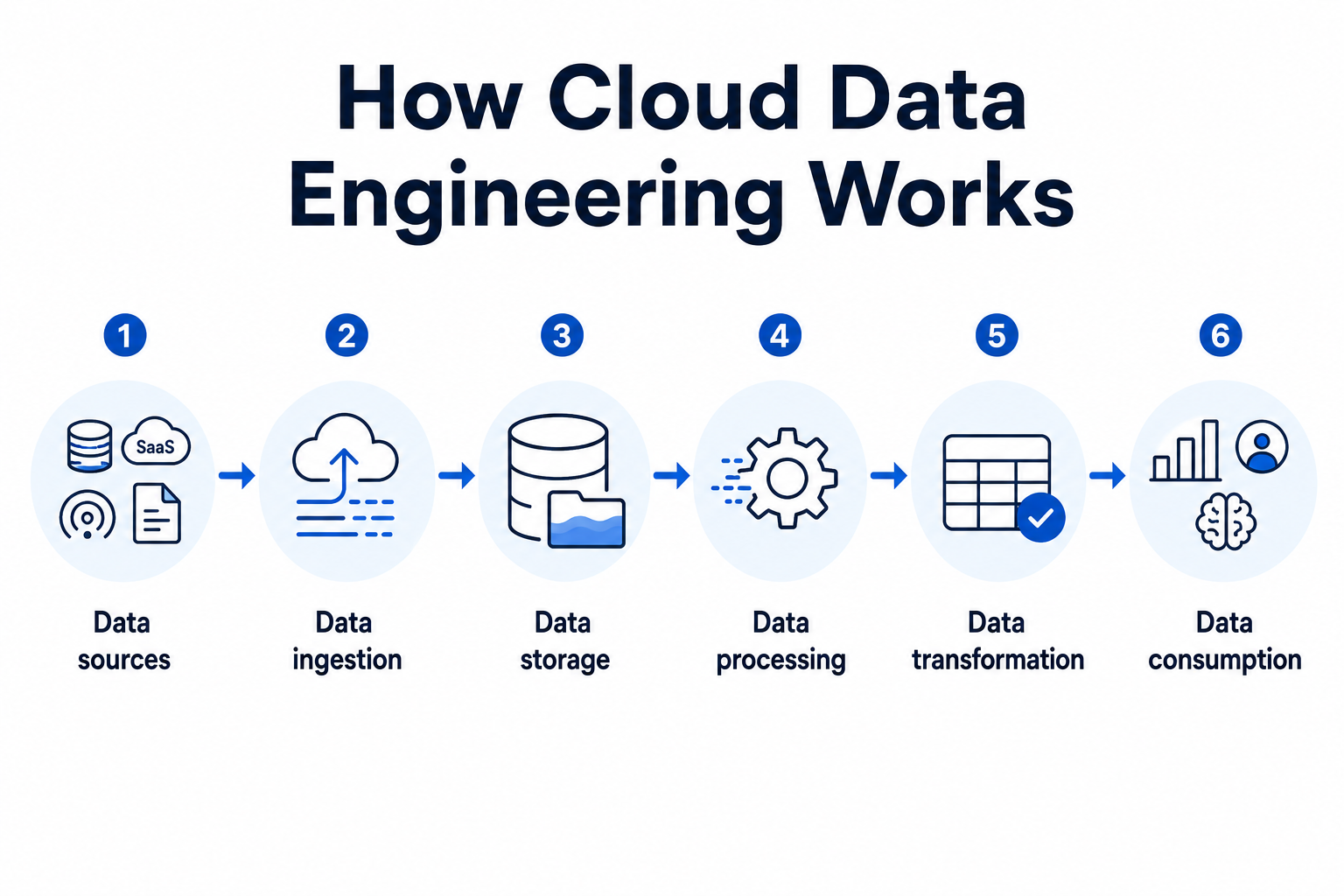
Every cloud data system does the same six things in order. Data comes from somewhere, gets pulled in, lands in storage, gets processed and reshaped, then goes out to whoever needs it. The tools change from one stack to the next. The sequence doesn't. Understanding these six stages is what lets you spot where a pipeline is actually broken instead of guessing.
Data sources are the systems that generate the raw data your pipeline collects. This is everything upstream of your platform: transactional databases, SaaS apps like Salesforce or Stripe, event streams from a mobile app, IoT sensors, server logs, third-party APIs. Some produce a steady trickle of events. Others sit still until you pull a batch from them overnight.
The thing that bites teams here is variety. A single company might have forty sources, each with its own format, refresh rate, and idea of what a timestamp looks like. Sales data arrives as JSON, the finance export is a CSV, the product database speaks SQL. Cataloging what you have and how often it changes is the unglamorous first step everyone wants to skip. Skip it and every stage after this inherits the mess.
Data ingestion is the process of pulling data out of those sources and moving it into your cloud environment. It happens in one of two modes. Batch ingestion collects data in scheduled chunks, say every hour or once a night, and suits reporting where a few hours of lag is fine. Streaming ingestion moves each event within seconds of it happening, which is what you need for fraud detection, live dashboards, or anything where stale data is useless.
Most real stacks run both. The choice isn't ideological, it's about how fresh the downstream use case actually needs the data to be, weighed against cost. Streaming everything sounds impressive and burns money on use cases that would've been fine with an hourly batch. The ETL vs ELT decision also lives here, and it changes where your transformation work happens.
Data storage is where ingested data lands and lives until something needs it. In the cloud this usually splits two ways. A data lake holds raw, unstructured data cheaply in object storage like Amazon S3, taking anything you throw at it without a fixed schema. A cloud data warehouse holds structured, query-ready data optimized for fast analytics. Many teams run both, and the line between them is where the next section of this guide spends its time.
The reason storage gets its own stage instead of being an afterthought is cost and access speed. Store everything in an expensive warehouse and your bill balloons. Dump everything in a cheap lake and your queries crawl. Getting the split right is one of the higher-leverage decisions in the whole data pipeline.
Data processing is the compute layer that runs the actual work of cleaning, joining, and reshaping data at scale. This is where engines like Spark, or the compute side of Snowflake and Databricks, do their job. Processing can run as batch jobs over large historical datasets or as continuous stream processing over live events, mirroring the ingestion mode feeding it.
What makes cloud processing different from the on-prem version is elastic compute. You spin up a large cluster for a heavy nightly job, run it, and shut it down, paying only for those hours. That model is powerful and it's exactly where costs run away from teams that don't monitor it. A misconfigured job left running over a weekend is a genuinely expensive mistake. We've seen the invoices.
Data transformation is the step that converts raw data into a clean, consistent, business-ready shape. Deduplicating records, standardizing formats, joining sources, applying business logic so "revenue" means the same thing across every report. It overlaps with processing, but it's worth separating because transformation is where data quality is won or lost.
Garbage in, garbage out is the whole story here. No dashboard, no model, no executive report survives dirty inputs. This is why teams building on the cloud pair transformation with a data quality framework rather than treating cleanup as a one-off fix. The transformation logic is also the part of the pipeline that changes most often, because business rules never stop shifting.
Data consumption is the final stage where processed data reaches the people and systems that use it. BI dashboards in Tableau or Power BI, analysts running SQL, machine learning models pulling training data, or another application calling an API for a clean feed. This is the only stage the rest of the business actually sees.
And it's the stage that judges everything before it. Nobody thanks you for an elegant ingestion layer. They notice when the dashboard is wrong or the report is a day late. Every earlier decision, from source cataloging to transformation logic, shows up here as either a fast, trustworthy answer or a slow, questionable one.
A cloud data warehouse is a fully managed analytics database that stores structured, query-ready data and runs fast queries against it at scale, operated by a cloud provider instead of your own team. Snowflake, Google BigQuery, Amazon Redshift, and Databricks SQL are the names you'll meet most.
A warehouse is not where you dump raw data. It's where you put data that's already been cleaned and structured, so queries stay fast and results stay trustworthy. Feed it messy, unmodeled data and you lose the speed and trust that were the whole point.
What makes cloud warehouses different from the on-prem generation:
Separated storage and compute: Store large datasets cheaply, pay for compute only when a query runs.
Independent scaling: Two teams query the same data on separate clusters without fighting for resources.
Per-second billing: Powerful, but a runaway query or a dashboard auto-refreshing every 30 seconds quietly burns real money.
Choosing a platform comes down to workload and pricing model as much as raw speed, which is why a Snowflake vs Databricks comparison is worth running before you commit. To model the numbers first, a cost calculator beats a guess.
When do you not need one? If your data fits in a regular database and queries are already fast, a warehouse is overkill. It earns its place once query volume, data size, or concurrency outgrow what a transactional database can handle.
A data lake stores raw data of any type cheaply, while a data warehouse stores cleaned, structured data for fast analytics. Most companies don't pick one. They use both, for different jobs.
Here's how they line up:
|
Data lake |
Data warehouse | |
|
What it stores |
Raw, any format (structured, semi-structured, unstructured) |
Cleaned, structured, modeled data |
|
Schema |
Schema-on-read (structure applied when you query) |
Schema-on-write (structure enforced on load) |
|
Cost |
Low, cheap object storage |
Higher, optimized compute |
|
Query speed |
Slower, needs processing first |
Fast, built for analytics |
|
Best for |
Data science, ML, archiving, exploratory work |
BI dashboards, reporting, known questions |
|
Typical user |
Data scientists, engineers |
Analysts, business teams |
The simplest way to hold the difference: a lake takes anything and asks questions later, a warehouse demands structure upfront and rewards you with speed.
Which one you reach for depends on the question:
You know the question in advance (weekly revenue, monthly active users) → warehouse. Structured, fast, repeatable.
You don't know the question yet (exploring data for a model, keeping raw logs for later) → lake. Cheap to store now, structure it when you need it.
The catch is that a lake left ungoverned turns into a swamp. Dump data in with no catalog, no ownership, no quality checks, and within a year nobody knows what's in there or whether it's trustworthy. This is why a lake needs a data governance framework far more than a warehouse does, since the warehouse's schema enforces some discipline for free while the lake enforces nothing.
This is also why the lakehouse showed up, combining a lake's cheap flexible storage with a warehouse's structure and query speed in one system. It's what platforms like Databricks are built around. Whether you need one or just a plain lake-plus-warehouse split depends on your team and workload, not on which architecture sounds newest.
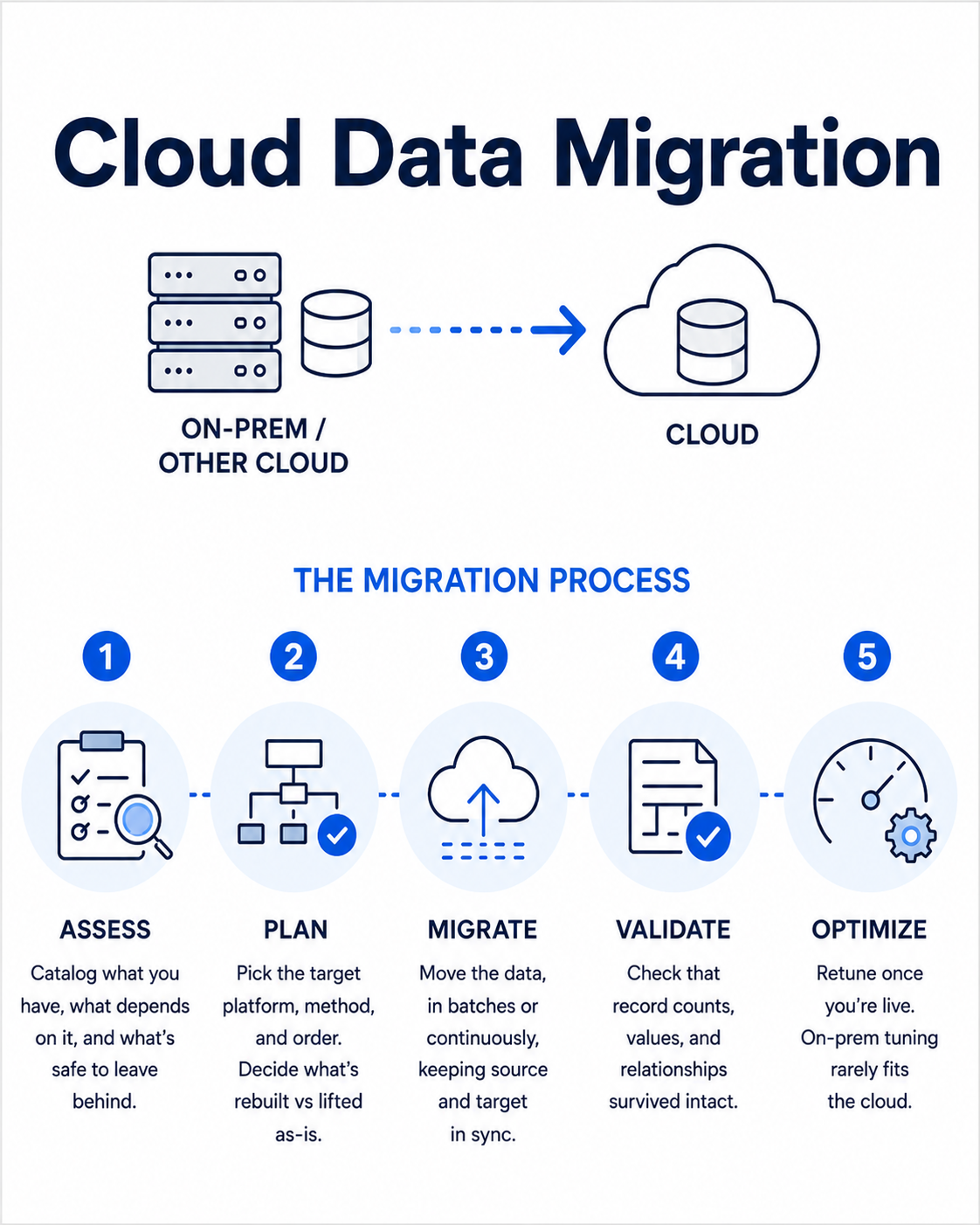
Cloud data migration is the process of moving data, and the systems that manage it, from on-premises infrastructure or one cloud into another. It sounds like a copy-paste job. It isn't. Moving the bytes is the easy part. Moving them without breaking pipelines, corrupting records, or racking up surprise costs is where the work lives.
A migration usually runs through a few clear phases:
Catalog what you have, what depends on it, and what's safe to leave behind. Most teams find data nobody's touched in years.
Pick the target platform, the migration method, and the order of moving. Decide what's rebuilt versus lifted as-is.
Move the data, in batches or continuously, keeping source and target in sync until cutover.
Check that record counts, values, and relationships survived intact. This is the step teams rush and regret.
Retune once you're live, because a workload tuned for on-prem is rarely tuned for the cloud.
The mistake that costs the most is lift-and-shift with no redesign. You move a slow, inefficient on-prem process straight across, and now you're paying cloud rates to run the same slowness. The workloads worth migrating are often the ones worth rethinking on the way, which our data migration best practices go into deeper.
Two things teams underestimate every time:
Hidden cost: Egress fees, dual-running both environments during transition, and validation effort rarely show up in the original estimate. The hidden costs of migration add up fast.
Downtime tolerance: How long can the business run without this data? That single answer decides your entire method, from a simple bulk transfer to a zero-downtime sync.
When is a migration not worth it? If the on-prem system works, isn't costing much, and nothing downstream needs cloud scale, moving for the sake of moving just buys you risk. Migrate when the current setup is actually holding the business back, not because the cloud is where everything's supposed to be. To pressure-test the numbers before committing, a migration cost calculator turns vague estimates into something you can defend.
Data engineering on AWS means building the full pipeline, from ingestion to consumption, using Amazon's managed data services instead of stitching together your own infrastructure. AWS is the most common starting point for cloud data work, partly because it has a service for every stage and partly because so many companies already run there. The flip side is that the sheer number of services is its own problem. Knowing which ones you actually need matters more than knowing they exist.
Here are the core AWS services mapped to the pipeline stages from earlier in this guide:
Storage on AWS starts with Amazon S3, the object store that acts as the data lake for most AWS setups. It holds raw data of any format cheaply and scales without you managing capacity. For the structured, query-ready side, Amazon Redshift is the managed data warehouse built for fast analytics over large datasets. Many teams run both, with S3 as the lake and Redshift as the warehouse, which is the lake and warehouse split applied to one cloud.
For ingestion and processing, AWS splits the work by whether data moves in batches or streams. The main ones:
AWS Glue handles ETL, cataloging, and batch transformation as a serverless service, so there's no cluster to manage.
Amazon Kinesis handles real-time streaming ingestion for live events and dashboards.
Amazon EMR runs big Spark and Hadoop jobs when you need heavy, large-scale processing.
AWS Lambda runs lightweight, event-driven transformations without provisioning anything.
The trap is reaching for EMR when Glue would've done the job. Spinning up a managed Spark cluster for a task a serverless service handles is a common way to overpay.
On the consumption side, Amazon Athena lets you query data sitting in S3 directly with plain SQL, no warehouse load required, which is ideal for occasional queries over lake data. For dashboards and BI, Amazon QuickSight is the native reporting layer. And because most of these services already speak to each other, the integration work that eats time on a self-assembled stack is mostly handled for you.
AWS is the right choice when you're already invested in its ecosystem or you want the widest service catalog under one roof. It's not automatically the best fit for every team. Azure often wins where a company is deep in Microsoft tooling, and the AWS vs Azure decision usually comes down to existing commitments more than a feature checklist. If you're planning a move onto AWS specifically, our AWS cloud migration services cover the path in detail.
If there's one thing to take from all of this, it's that the cloud rewards teams who understand their pipeline and punishes teams who don't, faster and more expensively than on-prem ever did. The six stages, the warehouse-versus-lake choice, the migration method, the AWS service you reach for, none of them are decisions you make once and forget. They're the levers that decide whether your data is fast and trustworthy or slow and questioned.
So before you pick a platform or greenlight a migration, get honest about two things. What does each stage of your pipeline actually cost to run? And where is it breaking today? The teams that answer those first build systems that scale. The teams that skip them build expensive versions of the problems they already had.
That's the real work of cloud data engineering. Not moving to the cloud, but designing for it once you're there. If you'd rather not figure out that design alone, that's the kind of thing our data engineering team does every week.
The goal is the same, but cloud data engineering runs on infrastructure that scales on demand instead of hardware you buy and maintain. You provision a warehouse in minutes, pay only for what you use, and scale a single job without a purchase order. The trade-off is that poor design costs you faster, since you're billed by the second for the compute a bad pipeline wastes.
Most companies use both, because they solve different problems. A data lake stores raw data of any format cheaply and suits exploration, machine learning, and archiving. A data warehouse stores cleaned, structured data for fast analytics and reporting. If your data is small and your questions are known in advance, a warehouse alone is often enough.
It depends on data volume, source complexity, and how much downtime the business can tolerate, so timelines range from a few weeks to several months. A straightforward bulk transfer of a clean dataset is fast. A migration involving live systems, redesign, and zero-downtime cutover takes far longer, and rushing the validation phase is where most delays actually come from.
There's no single best platform, since the right choice depends on your existing tooling, workload, and budget. AWS offers the widest service catalog and suits teams already invested in it. Azure often wins for Microsoft-heavy companies, and platforms like Snowflake and Databricks compete on warehouse and processing workloads specifically. The decision usually comes down to what you already run more than a feature comparison.
Cost is driven by compute usage, storage volume, and data transfer, not a fixed license, so the bill scales with how efficiently your pipeline is built. Two teams running the same workload can pay very differently depending on query design and how well idle compute is shut down. This is why cost monitoring is part of the engineering work, not an afterthought handled once the invoice arrives.
You might also like

Hello, we are BRILLIAN’S. Trying to make an effort to put the right people for you to get the best results. Just insight !